고객 서비스

판매자들은 가입하면 더 많은 혜택을 누릴 수 있습니다.

모든 주문 무료 배송.

하드디스크

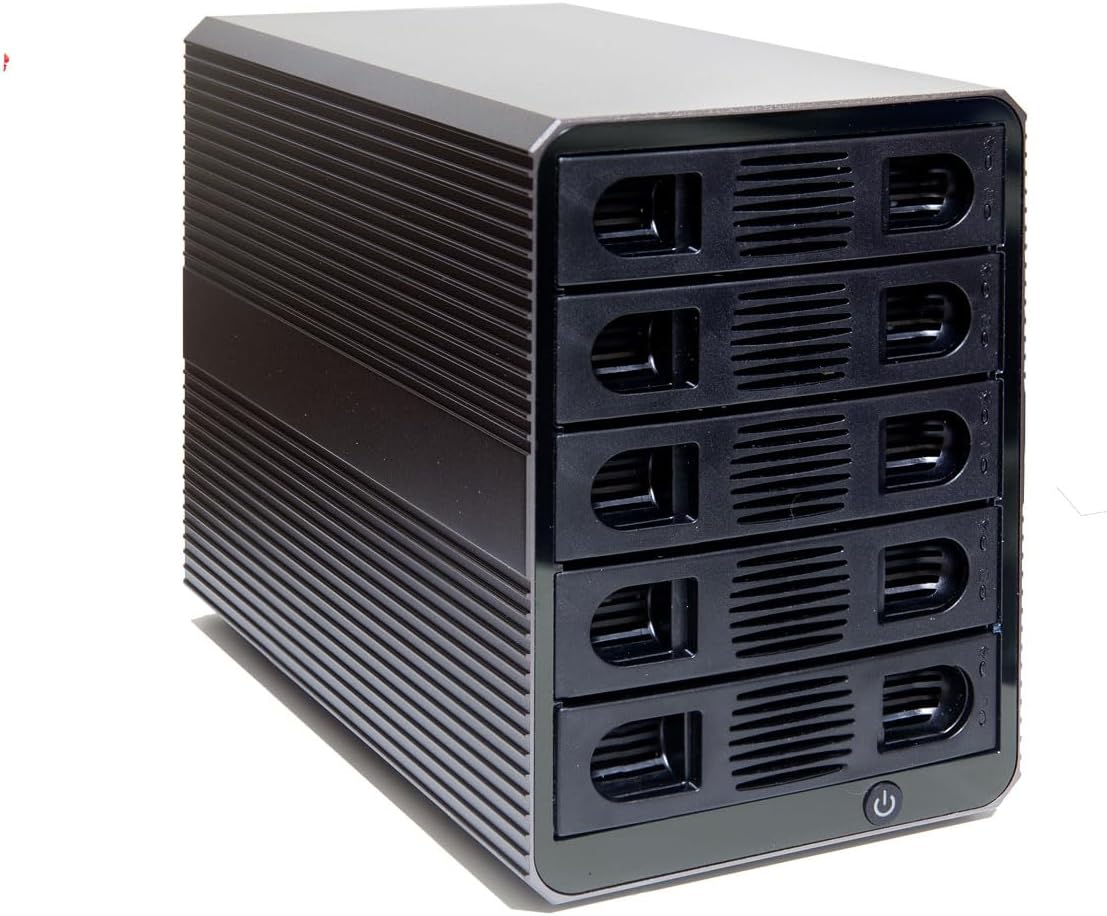
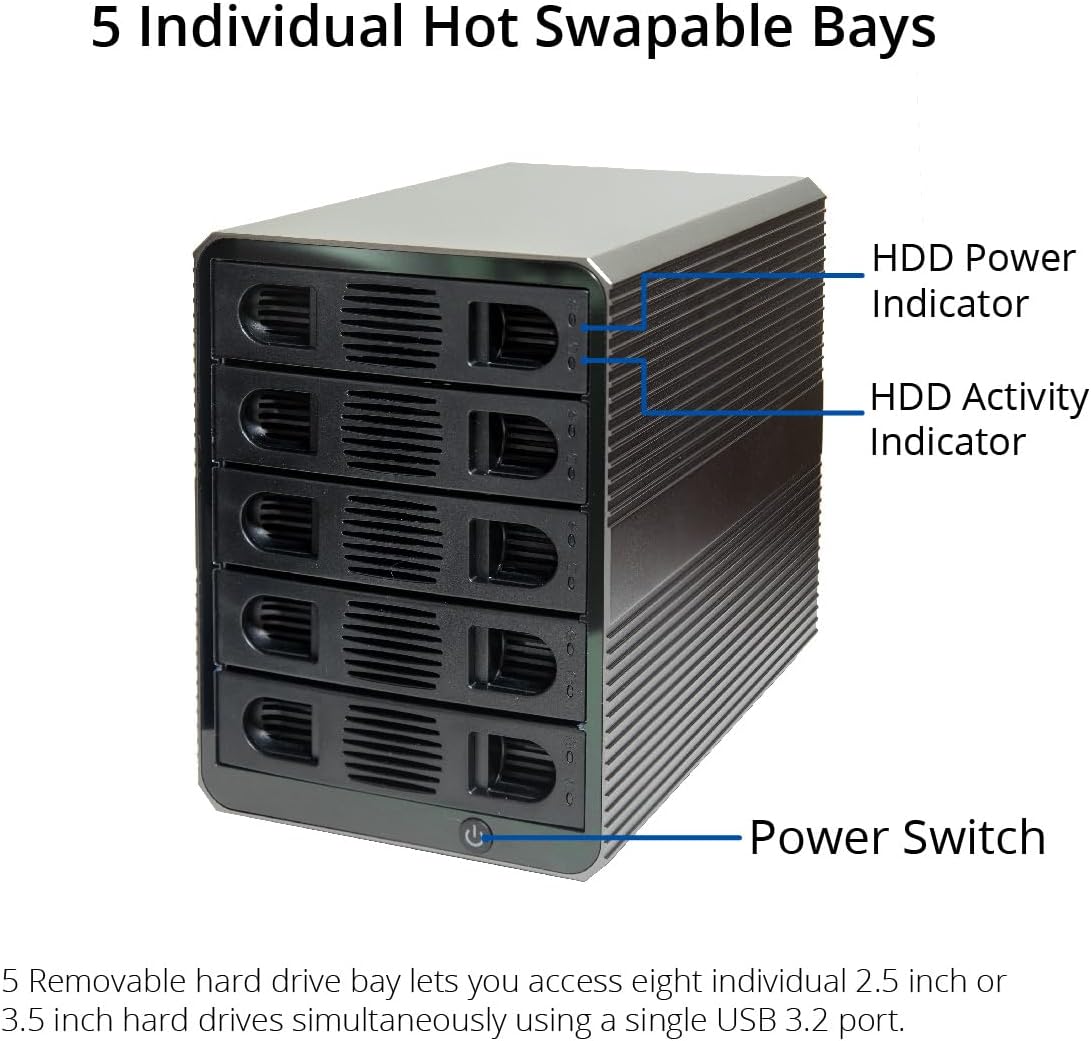
5 Bay USB 3.2 Type-C 10Gbps Daisy-Chain Hard Drive Enclosure DAS, Support 120TB (5X 24TB) 2.5" & 3.5" SATA HDD/SSD

4.00

지난 32시간 동안 판매됨 47

$ 187.99
$ 194.00
-3.20%

It's a lovely enclosure with its aluminium case. The drive trays are well built with even a little bit of reinforcing metal on the front of them instead of being all plastic. They accommodated ssds but you do have to remove one of the retaining clips in order to make that work. However, these sleds are really easy to put 3.5-in drives into. Another nice thing about this enclosure is the LED lights are easy to read and it has a nice power switch on the front.Good news is it uses ASMedia bridge chips and hub that can pass TRIM commands and supports Linux UAS (USB attached SCSI). However, if you plug it a hub rather directly to a USB on the server processor, you will need to configure the Linux kernel. But don't dispair, Google Gemini figured out the commands and saved me from tedious web searching.Performance wise against a pair of SSDs shows the enclosure chips has low latency but can be overwhelmed easily. Fio showed good numbers for USB 3.2 SSDs as a single drive, but fell apart on dual drive read/writes. I wouldn't recommend this enclosure if you're trying to get performance for raid SSD drives. On the other hand, if these are spinning discs, it's going to be able to keep up since ssds are already operating about 200 times faster then hdds. The cooling fan kept a full stack of HDDs to 50C during a grueling ZFS scrub operation.Honestly, if you're looking for raw performance, you wouldn't buy these, you would attach your drives to an enterprise SAS solution. But since you are looking at buying an enclosure, you probably don't have that option available to you.I just say move your drives into this enclosure and you won't notice the difference between this and directly attached SAS.This DAS gets five stars for me because it's pretty much what I expect at this price point. TRIM, excellent low latency and a very attractive enclosure make this a great DAS for a home server.

18 현재 누군가가 웹사이트를 탐색 중입니다.

Color
Black Gray Silver
Size
8-Bay USB-C 3.2 2+2-Bay USB-C 3.2 8-Bay USB-C 4.0 4-Bay USB 3.0 & eSATA 2-Bay USB 3.0 1-Bay USB-C 4.0 SSD 5-Bay RAID ALU 4-Bay USB-C 4.0 Docking 1-Bay USB-C 3.2 5-Bay USB 3.0 5-Bay USB-C 3.2 1-Bay USB-C 4.0 Docking
수량:
- +

예상 배송 시간: 12~26일(국제), 3~6일(미국)

구매일로부터 45일 이내에 반품이 가능합니다. 관세 및 세금은 환불되지 않습니다.

  • ASIN:

    B0FBZWDSL7

  • BEST_SELLERS_RANK:

    #85 in Enclosures

  • COMPATIBLE_DEVICES:

    Desktop, Laptop, Personal Computer

  • CUSTOMER_REVIEWS:

    4.0 4.0 out of 5 stars (523) 4.0 out of 5 stars

  • DATA_TRANSFER_RATE:

    10 Gigabits Per Second

  • DATE_FIRST_AVAILABLE:

    June 5, 2025

  • HARD_DISK_FORM_FACTOR:

    3.5 Inches

  • ITEM_DIMENSIONS_LXWXH:

    8.5 x 5 x 7 inches

  • ITEM_MODEL_NUMBER:

    SY-ENC50128

  • ITEM_WEIGHT:

    6.6 pounds

  • MANUFACTURER:

    IO CREST

  • MATERIAL:

    Aluminum

  • MAX_NUMBER_OF_SUPPORTED_DEVICES:

    5

  • MEMORY_STORAGE_CAPACITY:

    120 TB

  • PRODUCT_DIMENSIONS:

    8.5 x 5 x 7 inches

  • UPC:

    850039353437

안전한 결제를 보장하세요
제품 상세 정보
The SY-ENC50128 5-Bay 2.5" and 3.5" USB3.2 (10Gbps) Type-C SATA external enclosure is a powerful storage management device with flexible connectivity and easy HDD access. SY-ENC50128 offers many software RAID options including: RAID 0 (Striping), RAID 1 (Mirroring), RAID 10, RAID 5, JBOD (independent disks) and Combine (Span). The LED indicators provide verification of operating status and drive health/activity. The tool less tray design provides a simple way of HDD installation. Airflow is maximized due to the high quality, quiet fans that exhaust air away from the internal HDDs. The thermally efficient aluminum maintains optimal HDD operating temperature, prolonging the life of the HDDs.
고객 리뷰
4.00

(100 점수)

5
14
4
4
3
9
2
13
1
60
댓글 취소
댓글을 남겨주세요

16 논평

I bought one of the 8-bay USB4 enclosures used since it was significantly cheaper than new and could be easily returned if broken. My gamble paid off, this worked perfectly when plugged into a Windows 11 machine. (I've actually never gotten a used product that didn't work from Amazon Resale).However, it did not work on my Proxmox 9.1 (Debian) node, and surprisingly Google did not have an answer right away. After installing the bolt package and running "boltctl list" I could see the ASMedia 2464 controller but still could not see any of the installed disks. It turns out that status connected doesn't mean the controller is working, you have to run "boltctl enroll " to get the controller to be permanently authorized (or boltctl authorize for temporary authorization). In order to get the authorization to work I also had to install the pkexec package in order to get the correct policy kit installed. I'd add more but I have no idea what a policykit is.After enrolling the controller all the disks became visible! Hope this helps someone using this in the future. I'm using this as a DAS to a mini PC (GMKTec k8+), the mini PC acts as a NAS. It's a more compact, less power-hungry replacement for an old gaming system I had running as a NAS.

works with Android
2026-02-28    -C. Oliveira

Similar - and more expensive - products won't work with Android boxes, but this one will. Easy to install and works perfectly, all HDs are viewed individually by the OS. I would be nice to have individual power buttons per HD, but that's a tiny detail. Noise level could be better but it's far from noisy. That little box is awesome

works with Android
2026-02-15    -C. Oliveira

Similar - and more expensive - products won't work with Android boxes, but this one will. Easy to install and works perfectly, all HDs are viewed individually by the OS. I would be nice to have individual power buttons per HD, but that's a tiny detail. Noise level could be better but it's far from noisy. That little box is awesome

I bought one of the 8-bay USB4 enclosures used since it was significantly cheaper than new and could be easily returned if broken. My gamble paid off, this worked perfectly when plugged into a Windows 11 machine. (I've actually never gotten a used product that didn't work from Amazon Resale).However, it did not work on my Proxmox 9.1 (Debian) node, and surprisingly Google did not have an answer right away. After installing the bolt package and running "boltctl list" I could see the ASMedia 2464 controller but still could not see any of the installed disks. It turns out that status connected doesn't mean the controller is working, you have to run "boltctl enroll " to get the controller to be permanently authorized (or boltctl authorize for temporary authorization). In order to get the authorization to work I also had to install the pkexec package in order to get the correct policy kit installed. I'd add more but I have no idea what a policykit is.After enrolling the controller all the disks became visible! Hope this helps someone using this in the future. I'm using this as a DAS to a mini PC (GMKTec k8+), the mini PC acts as a NAS. It's a more compact, less power-hungry replacement for an old gaming system I had running as a NAS.

Excellent and inexpensive
2026-01-12    -Nihilism

I'm very pleased with the unit. It took me about 30 minutes to install and get configured 5x old 1TB drives I had lying around. The 2.5" drives screwed right into the trays without any need for an adapter (25 screws were included as well as the mini Phillips needed for the 2.5" drives). One of the trays didn't align perfectly on insert and needed to be wiggled a bit but no big deal. It comes with a mini-DVD with configuration software that is very simple to use, and you can download it from their site if you don't have a DVD drive anymore. Mine is configured for RAID 5 with the hardware controller and working very nicely. I would definitely buy again!

5.0 out of 5 stars Great DAS for a home server
2026-03-05    -Escapement Dog

It's a lovely enclosure with its aluminium case. The drive trays are well built with even a little bit of reinforcing metal on the front of them instead of being all plastic. They accommodated ssds but you do have to remove one of the retaining clips in order to make that work. However, these sleds are really easy to put 3.5-in drives into. Another nice thing about this enclosure is the LED lights are easy to read and it has a nice power switch on the front.Good news is it uses ASMedia bridge chips and hub that can pass TRIM commands and supports Linux UAS (USB attached SCSI). However, if you plug it a hub rather directly to a USB on the server processor, you will need to configure the Linux kernel. But don't dispair, Google Gemini figured out the commands and saved me from tedious web searching.Performance wise against a pair of SSDs shows the enclosure chips has low latency but can be overwhelmed easily. Fio showed good numbers for USB 3.2 SSDs as a single drive, but fell apart on dual drive read/writes. I wouldn't recommend this enclosure if you're trying to get performance for raid SSD drives. On the other hand, if these are spinning discs, it's going to be able to keep up since ssds are already operating about 200 times faster then hdds. The cooling fan kept a full stack of HDDs to 50C during a grueling ZFS scrub operation.Honestly, if you're looking for raw performance, you wouldn't buy these, you would attach your drives to an enterprise SAS solution. But since you are looking at buying an enclosure, you probably don't have that option available to you.I just say move your drives into this enclosure and you won't notice the difference between this and directly attached SAS.This DAS gets five stars for me because it's pretty much what I expect at this price point. TRIM, excellent low latency and a very attractive enclosure make this a great DAS for a home server.

Pros:It functions Transfer and Reads data seemingly without a hitchWD Red Pro 14 Tab copy speeds reached as high as 227.1 MB/s, always seemed to average around 200 MB/s thoughWD White Label Drives (Shucked EasyStores and Elements) never copied faster than 151 MB/sSeagate Barracudas and other 5400 RPM drives never seem to beat 140 MB/sIt works and functions well enough if you are not picky and are simply using as a long term home for your drivesEasy to setup if you don’t overthink itThe fan keeps the drives cool, the aforementioned WD Red never reached over 40°C not even once, even during sustained writes of 12 hours+. The other drives I mentioned never got hotter than 45°CEjecting the drives from Windows and on my Nvidia shield always worked flawlessly, both in function and reflected in the S.M.A.R.T. DataCons:I have never seen a multi bay enclosure made with cheaper materialsI never trusted this enclosure to house more than two drives at a time, call me over cautious but I don't see this enclosure being able to handle four drives simultaneously and live to tell about it. Even higher end JBOD and RAID enclosures that are over $300 struggle at handling 4 drives at onceThis enclosure isn't hot swappable, Meaning if you add or remove a drive while other drives are running every priorly installed drive will Abort all operations and essentially eject and have to spin-up again whenever you add or remove a drive from the enclosureThe BIGGEST issue with this enclosure is how cheaply made the trays are and how flawed of a system it is: it does not give you the option to mount your drives to the trays with screws and you are forced to use the extremely cheap and slightly undersized pegs attached to the plates that are supposed to fasten the tray to the drive which are made out of extremely cheap/flimsy plastic and you literally have to bend them and forcibly snap them off abruptly in-order to properly install each new drive to the enclosure and each time you do this the plates get looser and looser and pretty soon your drive will not be mounted properly at all. It does not help that there are no screw holes on the bottom of the trays for 3.5 inch drives, Otherwise this problem would honestly probably be O.K.all in all this enclosure is fine if you're just going to be installing and swapping drives sporadically and pretty much only using it to turn a few 3.5 inch drives into external drives. If you are thinking of buying this enclosure for the purpose of using it with several different drives - which would require a lot of swapping - my advice is: Absolutely do not buy this enclosure. Go with a terramaster d4-300 instead. It is worth the extra $53 dollars and It's trays are practically flawless.

I received the item today with different packing (not proper) Have some scratches on item as wellIt look like its used item

Syba SY-ENC50104 4 Bay 3.5”
2026-01-25    -gerardo j.

Si lo que buscar es un dispositivo para usar con tus discos de gran capacidad y que no entre en estado de hibernación automáticamente sin que puedas impedirlo, algo sumamente molesto, este es tu dispositivo.Tengo conectados 4 hdd de 16tb cada uno y funcionan perfectamente, silencioso y por sobre todas las especificaciones, los discos no se apagan o entran en hibernacion cada cinco minutos sin que puedas camiar esa opcion, algo que es de agradecerse al fabricante. El costo es bastante accesible y por su facilidad de uso y sin hibernacion es perfecto para cualquier tipo de trabajo en oficina, industria u hogar.

Doesn't work with Mac
2026-02-18    -clayton Harrop

It looks great, but doesn't work with MacBook. I downloaded the software as instructed and it just doesn't load or do anything. I found a window that than latter suggested contacting the manufacturer as the software isn't compatible.

댓글을 남겨주세요:

댓글 제목
댓글 내용
배송 및 반품
우리가 당신을 보호하겠습니다

대부분 지역에서는 배송비를 한 번만 지불하시면 됩니다 (주문 및 배송 페이지를 확인해 주세요).

구매 후 14일 이내 무료 반품 가능 (단, 수명이 다한 제품, 맞춤 제작 상품, 마스크, 향수 및 에어로졸과 같이 위험하거나 인화성 물질이 포함된 일부 제품은 제외).

수입 관세 정보

복잡한 절차는 저희가 처리해 드리겠습니다. 카나리아 제도를 제외한 모든 EU 국가, 영국, 미국, 캐나다, 호주, 뉴질랜드, 푸에르토리코, 스위스, 싱가포르, 한국, 쿠웨이트, 멕시코, 카타르, 인도, 노르웨이, 사우디아라비아, 대만, 태국, UAE, 일본, 브라질, 맨섬, 산마리노, 콜롬비아, 칠레, 아르헨티나, 이집트, 레바논, 홍콩 특별행정구, 바레인, 터키로 배송되는 상품 가격에는 모든 수입 관세가 포함되어 있습니다. 표시된 가격이 최종 결제 금액입니다.

예상 배송 시간

특급 배송: 7-10일

해당 창고에서 배송되었습니다.

더 자세한 정보가 필요하신가요?
반품 정책
반품 정책

저희는 제품 품질에 자신 있습니다. 만약 구매하신 제품에 완전히 만족하지 못하신다면, 수령일로부터 30일 이내에 간편하게 반품하실 수 있도록 정책을 마련해 두었습니다.

간편한 교환 또는 환불
  • 다른 사이즈, 색상 또는 스타일의 상품으로 교환하거나 전액 환불받을 수 있습니다.
  • 반품되는 모든 상품은 착용하지 않은 상태여야 하며, 원래 포장 상태 그대로 모든 태그가 손상되지 않은 상태여야 합니다.
간단한 절차
  • 온라인으로 반품을 신청하거나 고객 서비스 팀에 문의하여 도움을 받으실 수 있습니다.
  • 물품을 제대로 포장해 주시고, 원래의 포장 목록도 함께 넣어주세요.
  • 반품하실 상품을 보내주실 때에는 저희가 제공해 드린 선불 배송 라벨을 사용해 주시기 바랍니다.
  • 환불 요청 접수 즉시 처리해 드리겠습니다.

반품과 관련하여 궁금한 점이나 우려 사항이 있으시면 언제든지 저희 전문 고객 서비스 팀에 문의해 주세요. 고객 만족은 저희의 최우선 목표입니다.

범주
차이
제품
모든 제품 지우기