고객 서비스

판매자들은 가입하면 더 많은 혜택을 누릴 수 있습니다.

모든 주문 무료 배송.

하드디스크

Vantec Nexstar GX USB 3.0 Dual 2.5" SATA SSD/HDD RAID Enclosure, Black (NST-272S3-BK)

4.20

지난 32시간 동안 판매됨 40

$ 29.99
$ 30.00
-0.03%

Many of us we don’t really think about backups until its too late, then we wonder why we never got around to having a backup, or if we did have one, why we didn’t update it. Prior to my purchase of the Vantec NST-266S3-BK, I was using portable USB drives which unfortunately have a high failure rate due to their use of Shingled Magnetic Recording (SMR) technology. These manufactures never let the consumer know that they were buying an inferior product just so they could make larger profits, that is I'd have gladly paid the same amount of money for a portable USB drive that used Conventional Magnetic Recording (CMR) technology i.e. a 750GB CMR is much better than a 1TB SMR drive.My backup scheme is as follows:Copy 1: On a 2nd drive on the local PCCopy 2: On a 2.5-inch solid state drivesCopy 3: On a 3.5-inch hard drives used in earlier systemsIn addition each machine's boot drive is duplicated in a standalone USB Disk Duplicator (Syba SY-EN50071) and stored in a folder for each PC in the file cabinet. I bought my first Vantec NST-266S3-BK in February 2021 to replace a failed SMR based USB portable drive, and have since purchased 5 more to replace the rest of the SMR based USB portable drives as they begin to fail. The Vantec NST-266S3-BK design uses the ASMedia ASM 1153E controller and when it was first designed, the largest commercially available hard drives at the time were 4TB in size with 6TB just beginning to be sampled but not in volume production. The ASM 1153E controller uses LBA48 addressing mode which means in theory the largest drive that the device can support is about 144.1 PB (the same as 144,000 TB) so there should not be an issue supporting larger drives.This device is cool to the touch, has a design which minimizes fingerprints on its case, was easy to install (they even provide screws and a screwdriver). As for ventilation, the device has many holes on one of the sides. A 2.5 inch HDD may get a little hot, but SSD's should not get that hot and many SSD's have built in thermal sensors which will throttle the drive until the temperature drops to comfortable levels.The 2.5 inch drive fits nicely in the enclosure and can be attached via the supplied screws. I used two at the far end which is enough to hold the SSD in place. Once the tray is back in the outer enclosure, another 2 screws secure it. Vantec supplied 5 of the screws needed to secure the drive to the tray and 3 to secure the tray to the enclosure i.e. 1 extra of each.On Windows 7, I was only able to see 228/222 MB/s Read/Write speeds mainly due to Windows 7 not supporting the USB Attached SCSI Protocol (UASP), however on Linux I was able to get 441/432 MB/s Read/Write since UASP support was enabled. One should get similar performance for Windows 8/10 as UASP support exists in those Operating Systems. Even though the SSD is capable of 560 MB/s (read), the top speed is capped by USB 3.0 which has a theoretical max of 500 MB/s and after accounting for overhead the results are pretty good.The SSD was recognized as an SSD and I was able to use TRIM. For those who are having problems using TRIM, open up an elevated command prompt in Windows and type the following command:fsutil behavior query DisableDeleteNotify.If DisableDeleteNotify is set to 1, rerun the command with a 0 on the end:fsutil behavior set DisableDeleteNotify 0(thanks to programmers it's a double negative). In addition both HDD and SSD support SMART through the USB cable.We use the Vantec NST-266S3-BK on both Windows (7, 8.1, 10) and Linux (Linux Mint 20.1). Again, it's a little slow on Windows 7 due to a lack of UASP support but it's acceptable and it's very fast on all the other systems.With many manufactures resorting to the use of Shingled Magnetic Recording (SMR) technology in external USB drives, this devices lets you use Conventional Magnetic Recording (CMR) technology drives which are far superior.In the attached photo I have circled the asmedia controller chip on the circuit card.Some additional notes:If you are running Windows, Windows has a feature that is enabled by default that will turn off power to USB ports. You can verify this by going into Device Manager, expanding the Universal Serial Bus Controllers, and then selecting any (and all) USB Root Hub, then in the pop-up, look for Power Management and uncheck "Allow the computer to turn off this device to save power". If you don't do that, it's possible that windows shuts power off toyour device and you experience a "disconnect".Hope this helps other potential buyers or those who have purchased this product and may not have had a positive experience (i.e. they blamed the device instead of Windows).

16 현재 누군가가 웹사이트를 탐색 중입니다.

Style
NexStar GX - USB 3.0 Dual 2.5" (Type A) NexStar GX - USB 3.1 Gen 2(Type C) NexStar RX - USB 3.0 Rugged NexStar 3.1 - USB 3.1
수량:
- +

예상 배송 시간: 12~26일(국제), 3~6일(미국)

구매일로부터 45일 이내에 반품이 가능합니다. 관세 및 세금은 환불되지 않습니다.

  • ASIN:

    B074NM3ZXS

  • BEST_SELLERS_RANK:

    #192 in Enclosures

  • COMPATIBLE_DEVICES:

    Laptop

  • CONNECTIVITY_TECHNOLOGY:

    usb

  • CUSTOMER_REVIEWS:

    4.2 4.2 out of 5 stars (3,952) 4.2 out of 5 stars

  • DATA_TRANSFER_RATE:

    5000 Megabits Per Second

  • DATE_FIRST_AVAILABLE:

    August 8, 2017

  • GLOBAL_TRADE_IDENTIFICATION_NUMBER:

    00844767022710

  • HARD_DISK_FORM_FACTOR:

    2.5 Inches

  • HARD_DRIVE:

    2 TB Solid State Drive

  • HARD_DRIVE_INTERFACE:

    Serial ATA-600

  • IS_DISCONTINUED_BY_MANUFACTURER:

    No

  • ITEM_DIMENSIONS_LXWXH:

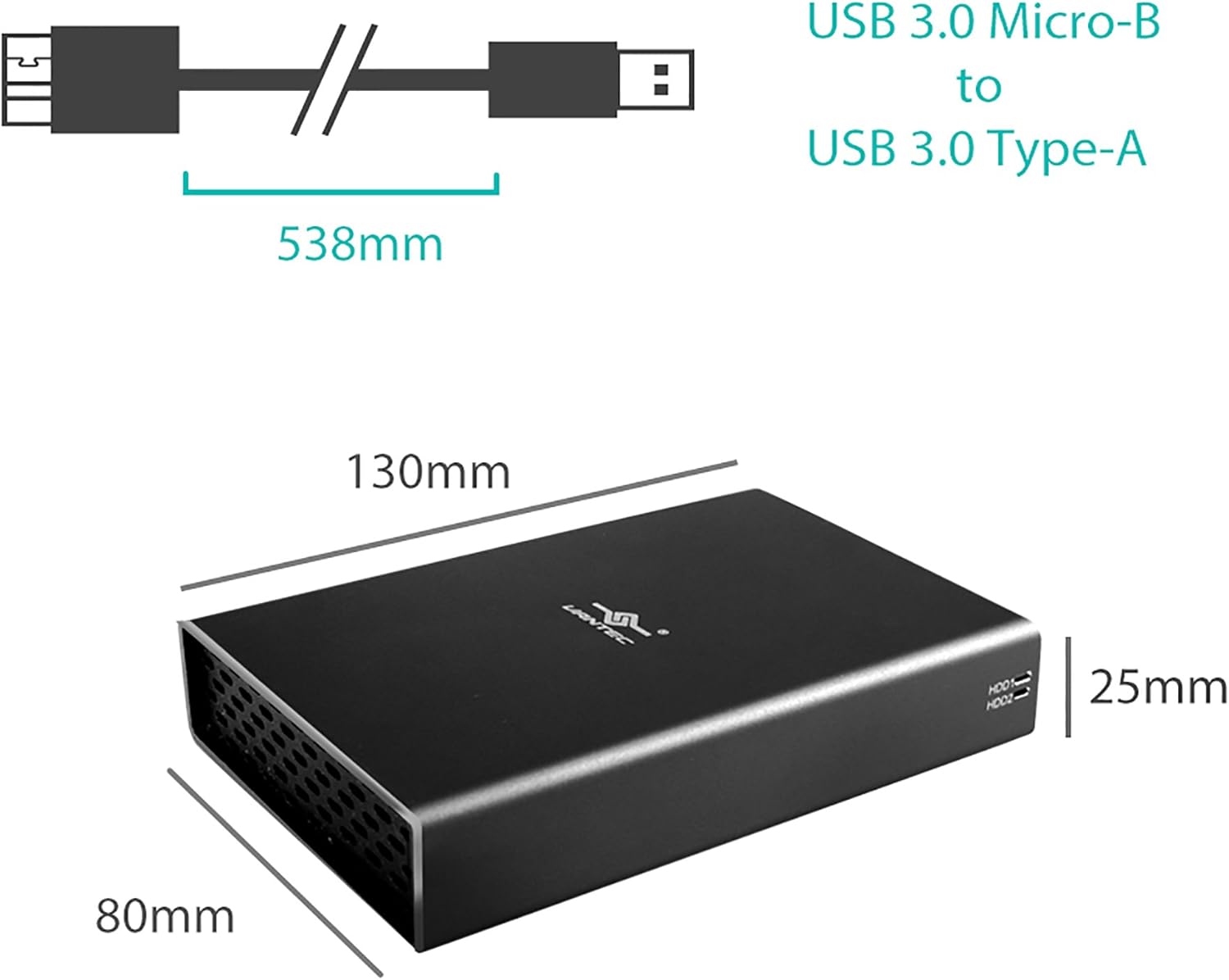
    5.11 x 3.15 x 0.98 inches

  • ITEM_MODEL_NUMBER:

    NST-272S3-BK

  • ITEM_WEIGHT:

    10.6 ounces

  • MANUFACTURER:

    Vantec USA

  • MATERIAL:

    Aluminum Casing with ABS tray

  • MAX_NUMBER_OF_SUPPORTED_DEVICES:

    2

  • MEMORY_STORAGE_CAPACITY:

    2 TB

  • OPERATING_SYSTEM:

    Windows, os x, linux

  • POWER_SOURCE:

    AC

  • PRODUCT_DIMENSIONS:

    5.11 x 3.15 x 0.98 inches

  • UPC:

    844767022710

  • VOLTAGE:

    5 Volts

안전한 결제를 보장하세요
제품 상세 정보
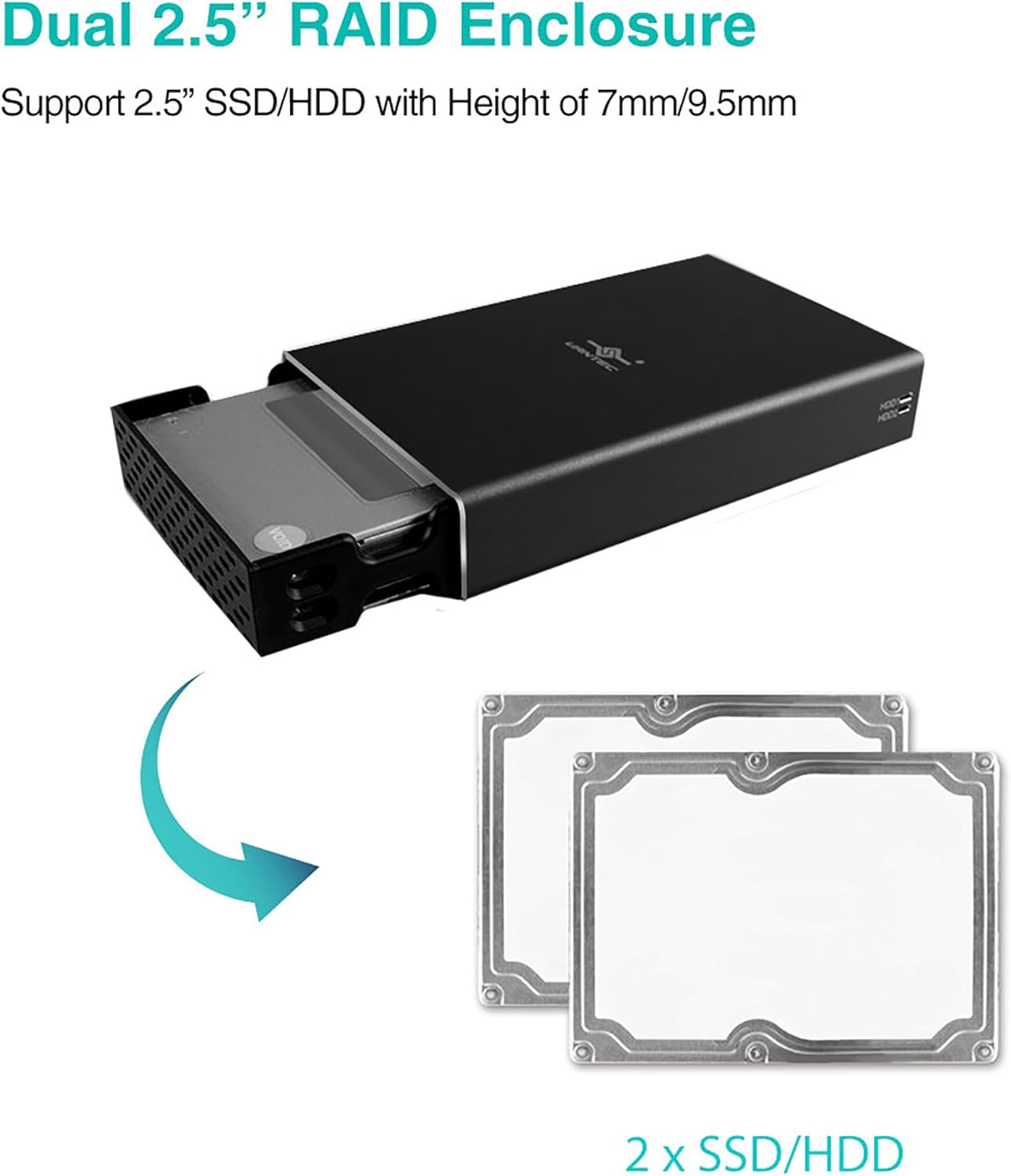
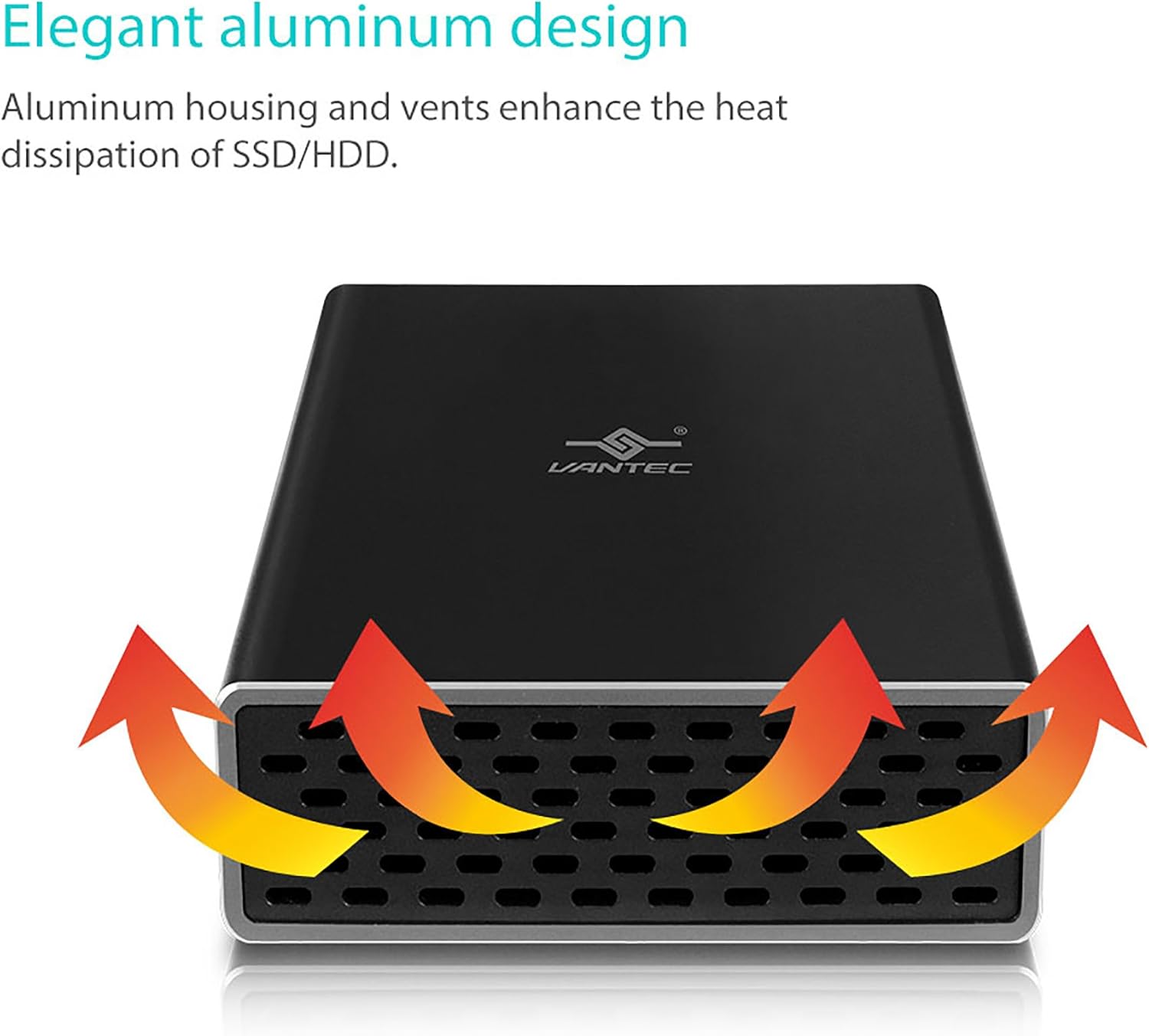
Nester GX USB 3. 0 Dual 2. 5" SATA SSD/HDD/SD HD RAID enclosure is a small, Fast and simple way to expand and protect your data. Designed ideally for Solid state drives, this compact form factor can house two solid state drives or hard drives for RAID capability. This RAID in a box simplifies the configuration using JBOD (individual)/RAID0/RAID1 mode, with these RAID mode you can decide for speed or/and redundancy for your storage like your precious family photos, music, video, and games. The sturdy drive cage protects your drives while the aluminum case and front vents effectively draws away the heat to keep your drives cool and improve performance. This Vantec Nester GX 2. 5" Will provide the performance in a RAID environment when couple with solid state drives.
고객 리뷰
4.20

(100 점수)

5
9
4
3
3
7
2
16
1
65
댓글 취소
댓글을 남겨주세요

16 논평

What a premium enclosure. This enclosure is rock solid. I had my drive installed in seconds and I was able to run the drive just by plugging it into my USB without having to use the separate power cable. The device has two LED lights that show disk activity. On the back side it has air holes to disburse heat. it also has a clip on stand which is certainly a nice add-on. Anyone looking for an enclosure for 2.5 SATA drives will be VERY happy if they order one of these.

price vs options
2025-12-24    -Edd Slabb

The set up was very quick and simple. This enclosure feels secure enough but it's not a tool I'd want to take on the road. It works well, was easy to set up and was very I expensive. For my home office this is an awesome way to reuse an old hard drive.

Many of us we don’t really think about backups until its too late, then we wonder why we never got around to having a backup, or if we did have one, why we didn’t update it. Prior to my purchase of the Vantec NST-266S3-BK, I was using portable USB drives which unfortunately have a high failure rate due to their use of Shingled Magnetic Recording (SMR) technology. These manufactures never let the consumer know that they were buying an inferior product just so they could make larger profits, that is I'd have gladly paid the same amount of money for a portable USB drive that used Conventional Magnetic Recording (CMR) technology i.e. a 750GB CMR is much better than a 1TB SMR drive.My backup scheme is as follows:Copy 1: On a 2nd drive on the local PCCopy 2: On a 2.5-inch solid state drivesCopy 3: On a 3.5-inch hard drives used in earlier systemsIn addition each machine's boot drive is duplicated in a standalone USB Disk Duplicator (Syba SY-EN50071) and stored in a folder for each PC in the file cabinet. I bought my first Vantec NST-266S3-BK in February 2021 to replace a failed SMR based USB portable drive, and have since purchased 5 more to replace the rest of the SMR based USB portable drives as they begin to fail. The Vantec NST-266S3-BK design uses the ASMedia ASM 1153E controller and when it was first designed, the largest commercially available hard drives at the time were 4TB in size with 6TB just beginning to be sampled but not in volume production. The ASM 1153E controller uses LBA48 addressing mode which means in theory the largest drive that the device can support is about 144.1 PB (the same as 144,000 TB) so there should not be an issue supporting larger drives.This device is cool to the touch, has a design which minimizes fingerprints on its case, was easy to install (they even provide screws and a screwdriver). As for ventilation, the device has many holes on one of the sides. A 2.5 inch HDD may get a little hot, but SSD's should not get that hot and many SSD's have built in thermal sensors which will throttle the drive until the temperature drops to comfortable levels.The 2.5 inch drive fits nicely in the enclosure and can be attached via the supplied screws. I used two at the far end which is enough to hold the SSD in place. Once the tray is back in the outer enclosure, another 2 screws secure it. Vantec supplied 5 of the screws needed to secure the drive to the tray and 3 to secure the tray to the enclosure i.e. 1 extra of each.On Windows 7, I was only able to see 228/222 MB/s Read/Write speeds mainly due to Windows 7 not supporting the USB Attached SCSI Protocol (UASP), however on Linux I was able to get 441/432 MB/s Read/Write since UASP support was enabled. One should get similar performance for Windows 8/10 as UASP support exists in those Operating Systems. Even though the SSD is capable of 560 MB/s (read), the top speed is capped by USB 3.0 which has a theoretical max of 500 MB/s and after accounting for overhead the results are pretty good.The SSD was recognized as an SSD and I was able to use TRIM. For those who are having problems using TRIM, open up an elevated command prompt in Windows and type the following command:fsutil behavior query DisableDeleteNotify.If DisableDeleteNotify is set to 1, rerun the command with a 0 on the end:fsutil behavior set DisableDeleteNotify 0(thanks to programmers it's a double negative). In addition both HDD and SSD support SMART through the USB cable.We use the Vantec NST-266S3-BK on both Windows (7, 8.1, 10) and Linux (Linux Mint 20.1). Again, it's a little slow on Windows 7 due to a lack of UASP support but it's acceptable and it's very fast on all the other systems.With many manufactures resorting to the use of Shingled Magnetic Recording (SMR) technology in external USB drives, this devices lets you use Conventional Magnetic Recording (CMR) technology drives which are far superior.In the attached photo I have circled the asmedia controller chip on the circuit card.Some additional notes:If you are running Windows, Windows has a feature that is enabled by default that will turn off power to USB ports. You can verify this by going into Device Manager, expanding the Universal Serial Bus Controllers, and then selecting any (and all) USB Root Hub, then in the pop-up, look for Power Management and uncheck "Allow the computer to turn off this device to save power". If you don't do that, it's possible that windows shuts power off toyour device and you experience a "disconnect".Hope this helps other potential buyers or those who have purchased this product and may not have had a positive experience (i.e. they blamed the device instead of Windows).

Excellent product!
2026-01-01    -John Chamberlain: Amazon Customer

Jobs or Raid 1 or Raid 0, they all work perfectly! Easy to install, I put 2 500gb drives and am currently using them as Raid0, very fast drive...

Looks great and works very well
2026-01-28    -Dave (Toronto)

The enclosure is very nice. I have 3 of them already but bought locally. They ran out so I purchased online.I found 2 issues with this enclosure.1) When inserting or removing the HD, the HD has to be on a 30 degree angle to the sata ports in the case. I don't think Vantec thought this through very well.2) Sometimes my computers (I tried a desktop and a laptop) stops copying files to or from the HD in the enclosure. Then my computers stop reading the drive. I suspect that there is not enough power going to the enclosure for the speeds that the enclosure is trying to transfer at. I used a micro USB cable instead (the same cables you use for your Android phone) which are USB 2.0. So, the transfer is slower but I haven't had an issue. I did try using Y cables but the same thing happened but not enough power is still my assumption.Having said this, I rarely swap out my drives and I'm in no rush to transfer files. So, they are not such a big deal to me. I would buy these again.

4.0 out of 5 stars Nice Enclosure.
2026-03-05    -Charles H

It serves its purpose. It's built of durable aluminum, but don't expect this to protect your hard disk from drops. If you drop it, you'll likely still damage the disk itself, but the enclosure will probably survive to be used again. ;)Over all, this suits my needs, so I don't have to buy a SATA cable. It's worth noting, though, that I wouldn't recommend keeping your hard disk inside this enclosure unless you're planning to travel with it inside the box. That's to be said with most portable external hard disks, though, because they don't take abuse very well.If you're not willing to spend much money, this enclosure is definitely the one for you. Just be very careful and don't drop or travel with it in a rough fashion. (You should always use the most respect and care when handling all hard disks anyway.)If you're up to spending more money, I'd suggest finding one that will provide protection for the hard disk when it's sealed inside the case, especially if you plan to travel a lot.Pros- It looks good- Hard disk fits snugly inside, preventing movement from vibration.- Aluminum construction is best for hard disks, as it doesn't require fans and dissipates heat.- Comes with a plastic guard for the board of the disk itself (Does anyone know where to find more of these things?)- Includes wires, and even a small carrying pouch to slip in and out of briefcase or laptop bag pockets easily.Cons- No drop or any real travel protection from enclosure- While construction is optimal, it doesn't appear that the ends of the enclosure would survive a drop.- Hard disk seems to just "hang" in place on the board/ports inside the enclosure, making traveling with a hard disk enclosed inside it a scary task.Over all, I say this is well worth the money I spent on it (less than $10.) I don't travel with my externals much, and I honestly would've bought something better if I were to do so with one inside an enclosure like this. If I were to travel with this model enclosure, it would definitely be securely inside of its box.

4.0 out of 5 stars Nice Enclosure.
2026-01-19    -Charles H

It serves its purpose. It's built of durable aluminum, but don't expect this to protect your hard disk from drops. If you drop it, you'll likely still damage the disk itself, but the enclosure will probably survive to be used again. ;)Over all, this suits my needs, so I don't have to buy a SATA cable. It's worth noting, though, that I wouldn't recommend keeping your hard disk inside this enclosure unless you're planning to travel with it inside the box. That's to be said with most portable external hard disks, though, because they don't take abuse very well.If you're not willing to spend much money, this enclosure is definitely the one for you. Just be very careful and don't drop or travel with it in a rough fashion. (You should always use the most respect and care when handling all hard disks anyway.)If you're up to spending more money, I'd suggest finding one that will provide protection for the hard disk when it's sealed inside the case, especially if you plan to travel a lot.Pros- It looks good- Hard disk fits snugly inside, preventing movement from vibration.- Aluminum construction is best for hard disks, as it doesn't require fans and dissipates heat.- Comes with a plastic guard for the board of the disk itself (Does anyone know where to find more of these things?)- Includes wires, and even a small carrying pouch to slip in and out of briefcase or laptop bag pockets easily.Cons- No drop or any real travel protection from enclosure- While construction is optimal, it doesn't appear that the ends of the enclosure would survive a drop.- Hard disk seems to just "hang" in place on the board/ports inside the enclosure, making traveling with a hard disk enclosed inside it a scary task.Over all, I say this is well worth the money I spent on it (less than $10.) I don't travel with my externals much, and I honestly would've bought something better if I were to do so with one inside an enclosure like this. If I were to travel with this model enclosure, it would definitely be securely inside of its box.

price vs options
2026-01-08    -Edd Slabb

The set up was very quick and simple. This enclosure feels secure enough but it's not a tool I'd want to take on the road. It works well, was easy to set up and was very I expensive. For my home office this is an awesome way to reuse an old hard drive.

Looks great and works very well
2026-02-15    -Dave (Toronto)

The enclosure is very nice. I have 3 of them already but bought locally. They ran out so I purchased online.I found 2 issues with this enclosure.1) When inserting or removing the HD, the HD has to be on a 30 degree angle to the sata ports in the case. I don't think Vantec thought this through very well.2) Sometimes my computers (I tried a desktop and a laptop) stops copying files to or from the HD in the enclosure. Then my computers stop reading the drive. I suspect that there is not enough power going to the enclosure for the speeds that the enclosure is trying to transfer at. I used a micro USB cable instead (the same cables you use for your Android phone) which are USB 2.0. So, the transfer is slower but I haven't had an issue. I did try using Y cables but the same thing happened but not enough power is still my assumption.Having said this, I rarely swap out my drives and I'm in no rush to transfer files. So, they are not such a big deal to me. I would buy these again.

Delivers on SPEED
2026-02-04    -Mark Fox

Housing a Crucial MX500 1TB 3D NAND SATA 6 Gbps 2.5" SSD with stated 560 MB/s read and 510 MB/s write; using the NexStar GX (NST-271C31-BK) enclosure the disk speed test (5 GB file) achieved 527 MB/s read and 475 MB/s write.The USB 3.0 enclosure that I was using prior to the NST-271C31-BK achieved around 400 MB/s max. for read and write.Very happy with it ;)

댓글을 남겨주세요:

댓글 제목
댓글 내용
배송 및 반품
우리가 당신을 보호하겠습니다

대부분 지역에서는 배송비를 한 번만 지불하시면 됩니다 (주문 및 배송 페이지를 확인해 주세요).

구매 후 14일 이내 무료 반품 가능 (단, 수명이 다한 제품, 맞춤 제작 상품, 마스크, 향수 및 에어로졸과 같이 위험하거나 인화성 물질이 포함된 일부 제품은 제외).

수입 관세 정보

복잡한 절차는 저희가 처리해 드리겠습니다. 카나리아 제도를 제외한 모든 EU 국가, 영국, 미국, 캐나다, 호주, 뉴질랜드, 푸에르토리코, 스위스, 싱가포르, 한국, 쿠웨이트, 멕시코, 카타르, 인도, 노르웨이, 사우디아라비아, 대만, 태국, UAE, 일본, 브라질, 맨섬, 산마리노, 콜롬비아, 칠레, 아르헨티나, 이집트, 레바논, 홍콩 특별행정구, 바레인, 터키로 배송되는 상품 가격에는 모든 수입 관세가 포함되어 있습니다. 표시된 가격이 최종 결제 금액입니다.

예상 배송 시간

특급 배송: 7-10일

해당 창고에서 배송되었습니다.

더 자세한 정보가 필요하신가요?
반품 정책
반품 정책

저희는 제품 품질에 자신 있습니다. 만약 구매하신 제품에 완전히 만족하지 못하신다면, 수령일로부터 30일 이내에 간편하게 반품하실 수 있도록 정책을 마련해 두었습니다.

간편한 교환 또는 환불
  • 다른 사이즈, 색상 또는 스타일의 상품으로 교환하거나 전액 환불받을 수 있습니다.
  • 반품되는 모든 상품은 착용하지 않은 상태여야 하며, 원래 포장 상태 그대로 모든 태그가 손상되지 않은 상태여야 합니다.
간단한 절차
  • 온라인으로 반품을 신청하거나 고객 서비스 팀에 문의하여 도움을 받으실 수 있습니다.
  • 물품을 제대로 포장해 주시고, 원래의 포장 목록도 함께 넣어주세요.
  • 반품하실 상품을 보내주실 때에는 저희가 제공해 드린 선불 배송 라벨을 사용해 주시기 바랍니다.
  • 환불 요청 접수 즉시 처리해 드리겠습니다.

반품과 관련하여 궁금한 점이나 우려 사항이 있으시면 언제든지 저희 전문 고객 서비스 팀에 문의해 주세요. 고객 만족은 저희의 최우선 목표입니다.
범주
차이
제품
모든 제품 지우기