고객 서비스

판매자들은 가입하면 더 많은 혜택을 누릴 수 있습니다.

모든 주문 무료 배송.

하드디스크

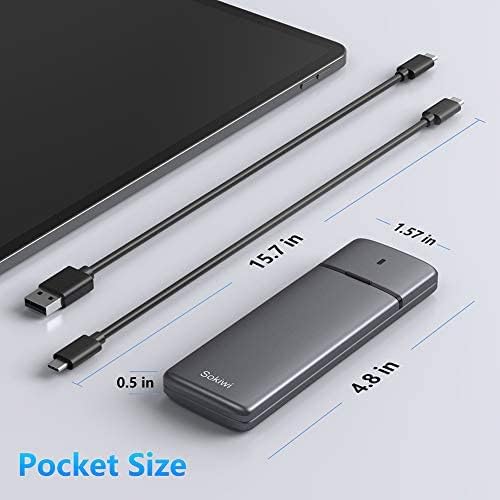
M.2 NVMe SATA SSD Enclosure Adapter Tool-Free,Sokiwi USB 3.2 Gen2 10Gbps External to USB PCI-E 6Gbps SATA M-Key / B+M Key, NVMe Reader Support UASP Trim for SSDs 2230/2242/2260/2280

4.40

지난 32시간 동안 판매됨 20

$ 28.49
$ 29.00
-1.79%

Worked as advertised. Lots of tech initials to make it confusing, but shapes were rights and the SSD I bought fit in after some fussing. The cloning with Acronis went fast and smooth. And the laptop fired right up and installation. I wish all upgrades were so easy!

26 현재 누군가가 웹사이트를 탐색 중입니다.

Model
SKUD1001 SKUD0501-US UD0501
수량:
- +

예상 배송 시간: 12~26일(국제), 3~6일(미국)

구매일로부터 45일 이내에 반품이 가능합니다. 관세 및 세금은 환불되지 않습니다.

  • ASIN:

    B08PV3X6HR

  • BEST_SELLERS_RANK:

    #37 in Enclosures

  • COMPATIBLE_DEVICES:

    M.2 NVMe SSD with M-Key & B+M Key, M.2 SATA SSD with M-Key & B+M Key

  • CONNECTIVITY_TECHNOLOGY:

    USB

  • CUSTOMER_REVIEWS:

    4.4 4.4 out of 5 stars (2,367) 4.4 out of 5 stars

  • DATA_TRANSFER_RATE:

    10 Gigabits Per Second

  • DATE_FIRST_AVAILABLE:

    December 7, 2020

  • HARD_DISK_FORM_FACTOR:

    80 Millimeters

  • ITEM_MODEL_NUMBER:

    SKUD0501-US

  • ITEM_WEIGHT:

    3.84 ounces

  • MANUFACTURER:

    Sokiwi

  • MAX_NUMBER_OF_SUPPORTED_DEVICES:

    1

  • MEMORY_STORAGE_CAPACITY:

    8 TB

  • PRODUCT_DIMENSIONS:

    3.7 x 1.5 x 0.4 inches

  • UPC:

    779605124427

안전한 결제를 보장하세요
제품 상세 정보
Speed: USB C 3.2 Gen 2 10Gbps to M.2 NVME PCIe; USB C 3.1 Gen 2 6Gbps to M.2 SATA PCIe Read and write speeds of over 900 MBps/600MBps, when connected to a Thunderbolt 3 or USB 3.2 Gen 2 port. Read and write speeds of under 500 Mb/s, when connected to usb 3.0 port or install SATA protocol SSD. Overheating Protection : If your SSD overheating when transfer large of data, enclosure will run the overheating protection auto and goes into read-only mode or stop the transfer or down the speed of transfer data. Avoiding your SSD damage due to overheating and improving the life of your SSD. Computer have different show about overheating protection. Once your SSD cool down then can use again. Your file won't lose. Includes both USB Type-C and USB 3.1 (Type-A) cables Warm Note - If you computer can't recognize the SSD enclosure. Please Following Steps Tips: How to start disk management? Right click "Computer" - "Manage" - "Disk Management". Find your unallocated disk, right click "Unallocated", and choose "New Simple Volume Wizard". Click Start -> Run -> type compmgmt.msc -> click OK. Alternatively, right-click on the My Computer icon and select 'Manage'. In the console tree, click Disk Management. Applicable to sizes 2230/2242 / 2260 / 2280 solid state drivers. For Samsung:Samsung 980 PRO/970 EVO Plus/970 EVO/970 Pro/960 EVO/950 PRO/860 EVO/850 EVO(NOT SUPPORT SAMSUNG 980 PRO SSD with Heatsink) For Crucial: P1/P2/P5 For Western Digital: WD Blue SN550/ WD_Black SN750/ WD_Black SN850/WD Blue 3D NAND SATA SSD M.2 2280/ WD Red SA500 NAS SATA SSD M.2/480GB WD Green SATA SSD M.2 2280 For Intel: 600P/660P/665P/760P/545S/Optane 800P/Optane H10 For Kingston: A2000/KC2000/KC2500/SA400M8 For ADATA: SX8200Pro/XPG SX6000 Lite/S11 Lite/S11 Pro/SP580M For Seagate:BarraCuda 510/FireCuda 510/FireCuda 520 For Toshiba: RC500/RD500/RC100/RC10 For Pioneer: APS-SE20/SE20QN/APS-SE20P/APS-SE10N If your ssd not included in the list,please let us know, we are very gladly to help you check if the enclosure can work with your ssd.
고객 리뷰
4.40

(100 점수)

5
7
4
2
3
5
2
12
1
74
댓글 취소
댓글을 남겨주세요

26 논평

Pro: Read speed of 800MB/s on USB-C connector. Write speed about 500MB/s on USB-C connector. Connect to motherboard via USB-A connector, drops to about 400MB/s Read and 300MB/s Write which is appropriate.Con: As stated in title, LED is burnt or doesn't work... I'll still keep it.

petit bijou
2026-02-23    -Sylvain

J'ai utilisé cet accessoire pour en faire un disque dur Nvme 2 et franchement je suis entièrement satisfait de ce boitier, pour sa facilité à monter le disque, pour la polyvalence de sa connexion.

This sleek little M.2 NVMe/NGFF enclosure is well-made and functioned as advertised.I used this plug-and-play enclosure to clone between a small, old SATA SSD and a new, larger Samsung NVMe SSD for my laptop's operating system (which is complemented by a separate 1TB data drive, but wasn't transferable!), and the process took less than 20 minutes.My laptop didn't immediately recognize the enclosure device once it was plugged in, but all I had to do was download and run the new SSD's migration software and both SSDs were then recognized without issue. There was no overheating during the cloning process.I now have my old SSD housed in the enclosure, and can keep it as a bootable back-up should the need ever arise.My laptop's opsys is running happily once again, after being hobbled by a lack of space. Happy computer, happy customer!

1.0 out of 5 stars Good for maybe one copy.
2026-02-26    -J. David Green

Wish it worked more than once. I bought this just before Christmas so I could upgrade my mom's computer SSD from 256 to 1tb because she started to save a ton of pictures. It worked that one time cloning and all was well. Windows allowed me to stretch the drive and she can keep being picture happy. Now here I am trying to clone a 256 to 1tb (same drives) and no joy. I power it on again using the included wall wart. Turn it on - two blue lights. I press and hold the button and I hear the beep and it seems OK but there is zero progress. Looking further into it the fan no longer works. It seems this is a one and done appliance.

5.0 out of 5 stars Easy to setup!
2026-01-06    -Marcos Girardo

Super versatile and easy to carry.

M.2 NVME SSD Enclosure
2026-02-04    -Amazon Customer

It works exactly as advertised, easy to use and completely tool free. I used it to clone a larger M2.NVME drive for my laptop, and am using the enclosure for the old drive that I replaced for extra storage. It is sleek, looks good, and works well enough for my needs.

5.0 out of 5 stars Easy to setup!
2026-02-10    -Marcos Girardo

Super versatile and easy to carry.

Used this to upgrade my PC build from a 250GB drive to a 2TB. I first cloned my original 250GB OS drive to a 2TB Samsung 980 Pro with heatsink using this enclosure, and it worked flawlessly. Couldn’t use the included cooling fans due to the size of the heatsink, but it didn’t cause any issues. Fast, reliable, and made the whole upgrade process smooth. Great tool and solid value.

As others have wrote, this unit works exactly as needed. I'm another one of the 40 year IT guys here and can vouch this clone device works exactly as described and does it FAST. Cloned a 256GB NVMe to new 1TB NVME, took less than 5 minutes. I was amazed.Afterwards use one of the many free 'partition wizard' programs to rearrange (or delete) partitions so you can make the newly found disk space contiguous with existing space. Ie: The existing C drive partition must be adjacent to the new unallocated free space in order to Extend the drive's useable space. I deleted the two Dell/Windows recovery partitions using EaseUS Partition Assistant Free Edition. The two recovery partitions allow for a system restore from the manufacturer's Windows files. For me, if the drive is fouled so badly that I need to reinstall or repair Windows I'll simply reinstall Windows 10/11 from a USB image created using free Windows 10/11 Installation Media utility. If you're an amateur the above steps may be overwhelming or frustrating, seek out YouTube for assistance.Only caveat of the clone device might be the cheap feel and durability. It feels like cheapy $15 USB speaker thing. This is one of the few devices in my toolkit that I'm willing to overlook the build quality for functionality and time savings achieved.

My Go to External
2026-01-18    -Dan

I needed something to pull data off an NVME drive. I now use this as a daily driver.It was very easy to install the NVME into the enclosure. High speed USB Cable is also included in the package.I love this item because it is very sleek and portable. I am able to swap out NVME drives easily and have more versatility in accessing my files.Definitely buy this! You could save money by using your own NVMEs as an External Hard drive instead of purchasing one separately.

댓글을 남겨주세요:

댓글 제목
댓글 내용
배송 및 반품
우리가 당신을 보호하겠습니다

대부분 지역에서는 배송비를 한 번만 지불하시면 됩니다 (주문 및 배송 페이지를 확인해 주세요).

구매 후 14일 이내 무료 반품 가능 (단, 수명이 다한 제품, 맞춤 제작 상품, 마스크, 향수 및 에어로졸과 같이 위험하거나 인화성 물질이 포함된 일부 제품은 제외).

수입 관세 정보

복잡한 절차는 저희가 처리해 드리겠습니다. 카나리아 제도를 제외한 모든 EU 국가, 영국, 미국, 캐나다, 호주, 뉴질랜드, 푸에르토리코, 스위스, 싱가포르, 한국, 쿠웨이트, 멕시코, 카타르, 인도, 노르웨이, 사우디아라비아, 대만, 태국, UAE, 일본, 브라질, 맨섬, 산마리노, 콜롬비아, 칠레, 아르헨티나, 이집트, 레바논, 홍콩 특별행정구, 바레인, 터키로 배송되는 상품 가격에는 모든 수입 관세가 포함되어 있습니다. 표시된 가격이 최종 결제 금액입니다.

예상 배송 시간

특급 배송: 7-10일

해당 창고에서 배송되었습니다.

더 자세한 정보가 필요하신가요?
반품 정책
반품 정책

저희는 제품 품질에 자신 있습니다. 만약 구매하신 제품에 완전히 만족하지 못하신다면, 수령일로부터 30일 이내에 간편하게 반품하실 수 있도록 정책을 마련해 두었습니다.

간편한 교환 또는 환불
  • 다른 사이즈, 색상 또는 스타일의 상품으로 교환하거나 전액 환불받을 수 있습니다.
  • 반품되는 모든 상품은 착용하지 않은 상태여야 하며, 원래 포장 상태 그대로 모든 태그가 손상되지 않은 상태여야 합니다.
간단한 절차
  • 온라인으로 반품을 신청하거나 고객 서비스 팀에 문의하여 도움을 받으실 수 있습니다.
  • 물품을 제대로 포장해 주시고, 원래의 포장 목록도 함께 넣어주세요.
  • 반품하실 상품을 보내주실 때에는 저희가 제공해 드린 선불 배송 라벨을 사용해 주시기 바랍니다.
  • 환불 요청 접수 즉시 처리해 드리겠습니다.

반품과 관련하여 궁금한 점이나 우려 사항이 있으시면 언제든지 저희 전문 고객 서비스 팀에 문의해 주세요. 고객 만족은 저희의 최우선 목표입니다.

범주
차이
제품
모든 제품 지우기