고객 서비스

판매자들은 가입하면 더 많은 혜택을 누릴 수 있습니다.

모든 주문 무료 배송.

안전 장비

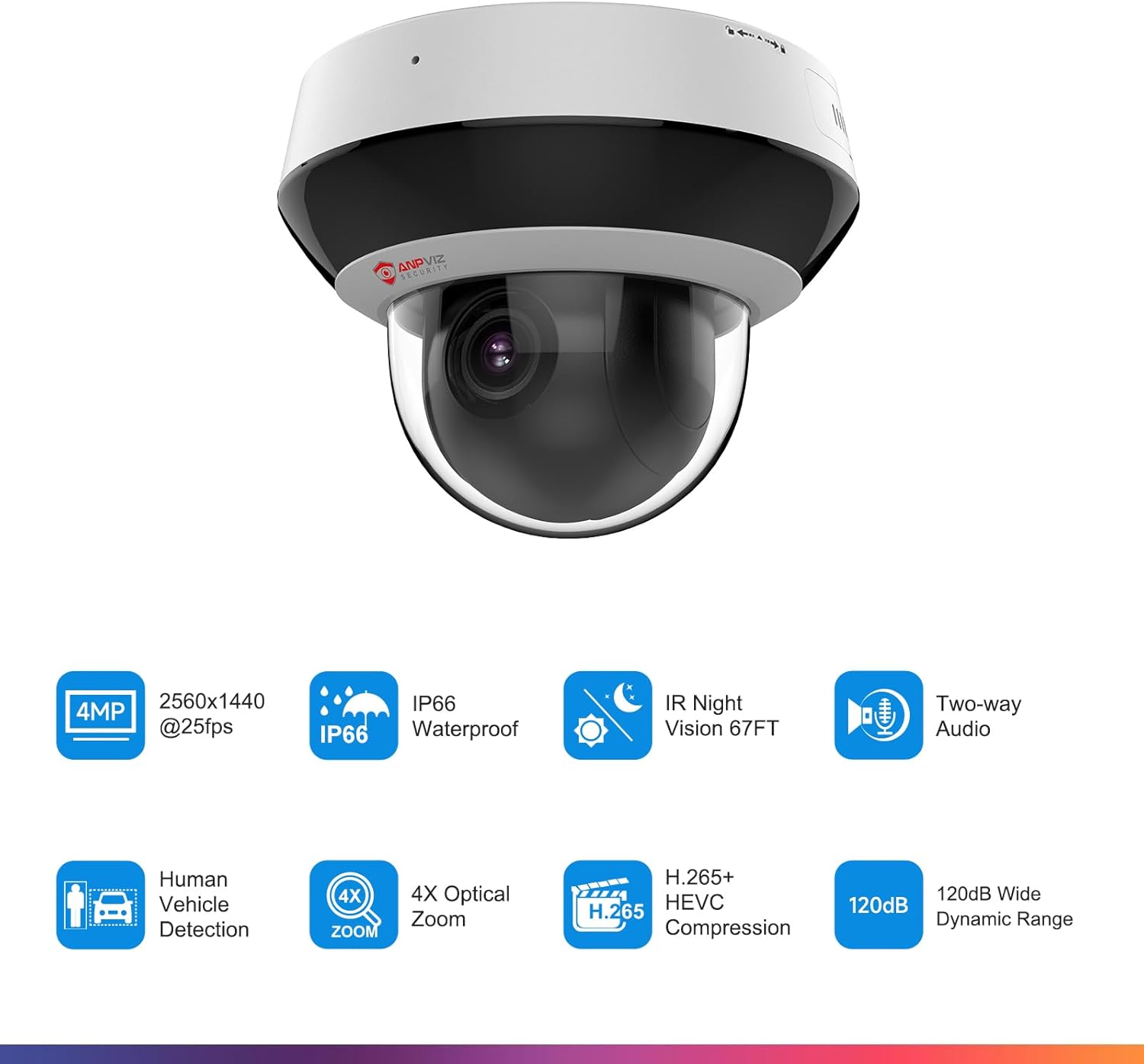
Anpviz 4MP PoE PTZ IP Camera, 4X Optical Zoom, Perimeter Protection, Human Vehicle Detection, 4MP@30fps, Dome Wired Security Camera with Audio, 330° Pan 90° Tilt, Card Slot, WDR, PTZIP204WX4IR-SU

4.20

지난 32시간 동안 판매됨 35

$ 139.99
$ 143.00
-2.15%

The tl;dr version: camera is better than average, support and product warranty is excellentThis review will be in two parts - camera and support.The camera is a pretty good value-for-money proposition; it's easy to configure, the PTZ function is pretty quick, it's at least mostly Hikvision compatible so there's a lot of supporting software. Resolution is quite acceptable (ours is set up to monitor our bird feeders), focus is sharp and doesn't wander, and in general the camera is pretty decent. This would probably get four stars instead of five - very acceptable performance, decent price, easy install.Support and warranty are markedly better than average and that's what gets the extra star.In late January, the camera stopped responding. After testing it more thoroughly with no results, I contacted Anpviz support to see if it was still under warranty - it was - and was quite pleased when in less than a week I got a box with a brand new camera in it. With all the horror stories here about lack of support, this was a very welcome approach from Anpviz - no argument, just send a replacement item.As I went through the configuration to install the camera I ran into a snag. The new camera had an IP address and a password different than the default, indicating it had been at least partially configured by someone else. Anpviz was later able to tell me that the camera had been purchased via Amazon and then returned as NIB without the prior customer mentioning they'd configured the camera or resetting the camera to the default. I can't see any way that either Anpviz or Amazon could have known that - the first point at which a previous configuration is visible is well into the configuration process. So boooo to the prior customer.I contacted Anpviz again; they suggested pulling the camera cover and using the physical reset button on the circuit board. As it turns out, this doesn't reset passwords but it does reset the password attempt counter. Back to Anpviz, this time generating a password reset file with the SADP configuration utility. I sent that file to Anpviz and got a file in return that allowed me to use SADP to reset the password and get control of the camera.That's the bare bones of it but I want to call Anpviz support out in particular - their responses to my questions and requests were always fast, never more than 6 hours and often less than 30 minutes. I never had to argue with them about what I needed to do and, had we not been able to get the password reset, I have no doubt they'd have sent me another camera. That's what moves me to 5 stars - in an industry where getting *any* support seems hit or miss, to get not only a new camera without question and then a lot of support to resolve a problem Anpviz did not create is exceptional.Let me toss in a couple of additional notes here in case someone else find them useful...1) most of any communication delay was due to my going through Amazon messaging and email. Dylan at Anpviz offered several times to go to a direct session with WhatsApp which would have sped up the process. I chose not to do that because I don't have WhatsApp and didn't want to set it up for something I was working on only as time permitted.2) the password reset process is a little complex and requires coordination with Anpviz (there's YouTubes for it as well). I think the process needs to be cleared by support before tech support will do it.a) use the SADP configuration utility 'forgot password' to generate a password recovery XML file. Once this file is generated, you cannot power the camera down until the password reset is complete. You have 24 hours to complete the process from this point or the recovery file will age out.b) rename the XML file to xml.txt so it will pass through Amazon's filters and most email systems and send it to Anpviz tech supportc) Tech support will respond with an xml file that you load into the SADP utility, give it the new password, and it will overwrite the old one. Again, this has to be done within 24 hours of the generation of the original XML file so make sure your ducks are all lined up before you start.d) once the reset process completes, you can shut the camera down or whatever just as you would normally doFor pulling the cover off, you need to locate some snap-in notches around the dark ring. You can most easily see these if you look down on the camera dome - there are 4 notches, equally spaced. They're pretty much invisible from the edge, so looking down at the camera is the only way to locate them. Once the ring is off, there are 4 screws to remove; these are #2 phillips but look much smaller. When re-assembling, the dome section has two small rods that fit into two holes in the camera body - the dome ring must be aligned with those in order to get the dome ring seated to the camera body correctly.This really did turn out way better and way easier than I thought it would. There are so many stories about no support and manufacturers not standing behind the products that having Anpviz do both was really outstanding - Thanks Dylan and thanks Frank! Damn fine job from both of you...

21 현재 누군가가 웹사이트를 탐색 중입니다.

수량:
- +

예상 배송 시간: 12~26일(국제), 3~6일(미국)

구매일로부터 45일 이내에 반품이 가능합니다. 관세 및 세금은 환불되지 않습니다.

  • ALERT_TYPE:

    Motion Only

  • ASIN:

    B07T62VCY3

  • AUDIO_VISUAL_RECORDING_CAPABILITIES:

    Video

  • BATTERIES_REQUIRED:

    No

  • BEST_SELLERS_RANK:

    #1,266 in Dome Surveillance Cameras

  • COMPATIBLE_DEVICES:

    Desktop, Laptop, Network Video Recorder, Smartphone, Television

  • CONNECTIVITY_PROTOCOL:

    Anpviz, On-vif, RTSP

  • CONTROL_METHOD:

    App

  • CONTROLLER_TYPE:

    APP

  • CUSTOMER_REVIEWS:

    4.2 4.2 out of 5 stars (170) 4.2 out of 5 stars

  • DATE_FIRST_AVAILABLE:

    June 24, 2019

  • EFFECTIVE_STILL_RESOLUTION:

    4 MP

  • EFFECTIVE_VIDEO_RESOLUTION:

    4 MP

  • FIELD_OF_VIEW:

    135 Degrees

  • FLASH_MEMORY_SUPPORTED_SIZE_MAXIMUM:

    512 GB

  • FOCUS_TYPE:

    Auto Focus

  • FORM_FACTOR:

    Dome

  • FRAME_RATE:

    30 frames per second

  • INCLUDED_COMPONENTS:

    1* 4MP PTZ PoE IP Camera, 1* After sales card, 1* Manual, 1* Screw kit, 1* Waterproof lid

  • INDOOR_OUTDOOR_USAGE:

    Indoor

  • INSTALLATION_TYPE:

    Screw In

  • INTERNATIONAL_PROTECTION_RATING:

    IP66

  • ITEM_DIMENSIONS_L_X_W_X_H:

    5 x 4 x 4 inches

  • ITEM_MODEL_NUMBER:

    PTZIP204WX4IR-SU

  • ITEM_WEIGHT:

    1.83 pounds

  • LIGHT_SOURCE_TYPE:

    Infrared

  • LOW_LIGHT_TECHNOLOGY:

    67FT Infrared Night Vision

  • MANUFACTURER:

    Anpviz

  • MAXIMUM_WEBCAM_IMAGE_RESOLUTION:

    4 MP

  • MOUNTING_TYPE:

    Ceiling Mount

  • NIGHT_VISION_RANGE:

    67 Feet

  • NUMBER_OF_CHANNELS:

    1

  • NUMBER_OF_ITEMS:

    1

  • OPTICAL_ZOOM:

    4 x

  • PHOTO_SENSOR_TECHNOLOGY:

    CMOS

  • POWER_SOURCE:

    Corded Electric

  • PRODUCT_DIMENSIONS:

    5 x 4 x 4 inches

  • ROOM_TYPE:

    Living Room, Office

  • SHAPE:

    Dome

  • SPECIFIC_USES_FOR_PRODUCT:

    Surveillance

  • UNIT_COUNT:

    1.0 Count

  • UPC:

    745695840295

  • VIDEO_CAPTURE_FORMAT:

    MP4

  • VIDEO_CAPTURE_RESOLUTION:

    4MP

  • VIEWING_ANGLE:

    360 Degrees

  • VOLTAGE:

    12 Volts

  • WATER_RESISTANCE_LEVEL:

    Waterproof

  • WATTAGE:

    5 watts

  • WIRELESS_COMMUNICATION_TECHNOLOGY:

    Wired

  • ZOOM_RATIO:

    4

  • ZOOM_TYPE:

    Optical Zoom

안전한 결제를 보장하세요

제품 상세 정보
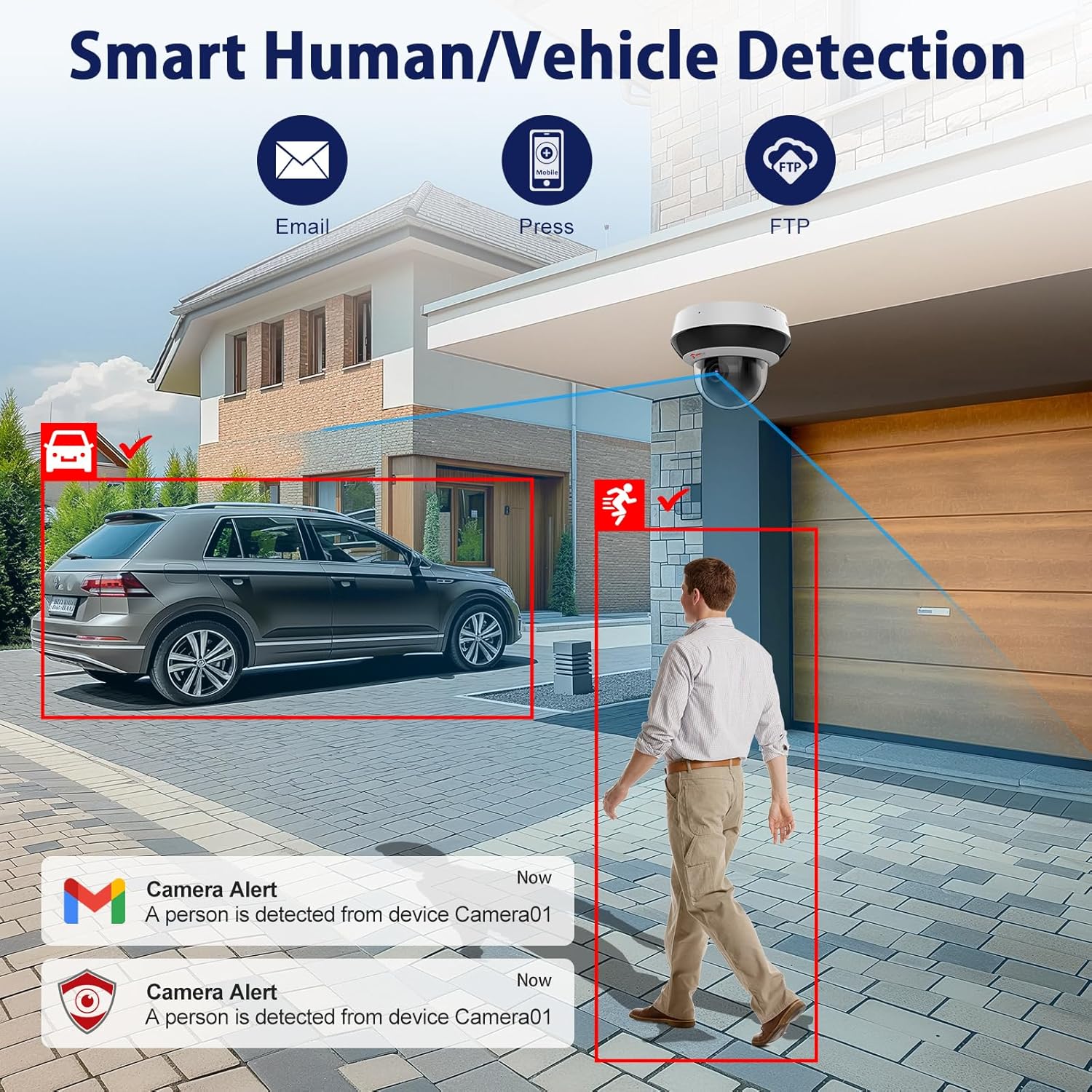
The perimeter protection function of this ptz poe camera includes Intrusion Detection, Line Crossing Detection, Region Existing Detection, and Region Entrance Detection. You can use this method to add the camera to Anpviz Viewer APP when your camera is powered via DC 12V or PoE Switch and connected to Router. You can use this method to activate the camera when your camera is powered via DC 12V or PoE Switch and connected to Router. This model includes 1* PTZ IP camera, 1* After-sales card, 1* Screw Kits, 1* Waterproof Lid, 1* User Manual, 1* Quick Guide. 4MP PoE PTZ Camera 12MP 32CH POE NVR 12MP 8CH PoE NVR 5MP PoE Camera 5MP PoE Red & Blue Light 5MP PoE Camera Smart Dual-Light POE Camera With MD 2.0 Anpviz was established in 2014, a professional security camera company. We aim to provide all kinds of camera solutions, our business scope is covered with Asia, North America, South America, Africa, and there are regions such as Southeast Asia and the Middle East. Anpviz will continue to keep the customer-centric, continue to maintain the spirit of innovation, and provide convenience and security for customers' lives.
고객 리뷰
4.20

(100 점수)

5
7
4
7
3
5
2
14
1
67
댓글 취소
댓글을 남겨주세요

6 논평

The tl;dr version: camera is better than average, support and product warranty is excellentThis review will be in two parts - camera and support.The camera is a pretty good value-for-money proposition; it's easy to configure, the PTZ function is pretty quick, it's at least mostly Hikvision compatible so there's a lot of supporting software. Resolution is quite acceptable (ours is set up to monitor our bird feeders), focus is sharp and doesn't wander, and in general the camera is pretty decent. This would probably get four stars instead of five - very acceptable performance, decent price, easy install.Support and warranty are markedly better than average and that's what gets the extra star.In late January, the camera stopped responding. After testing it more thoroughly with no results, I contacted Anpviz support to see if it was still under warranty - it was - and was quite pleased when in less than a week I got a box with a brand new camera in it. With all the horror stories here about lack of support, this was a very welcome approach from Anpviz - no argument, just send a replacement item.As I went through the configuration to install the camera I ran into a snag. The new camera had an IP address and a password different than the default, indicating it had been at least partially configured by someone else. Anpviz was later able to tell me that the camera had been purchased via Amazon and then returned as NIB without the prior customer mentioning they'd configured the camera or resetting the camera to the default. I can't see any way that either Anpviz or Amazon could have known that - the first point at which a previous configuration is visible is well into the configuration process. So boooo to the prior customer.I contacted Anpviz again; they suggested pulling the camera cover and using the physical reset button on the circuit board. As it turns out, this doesn't reset passwords but it does reset the password attempt counter. Back to Anpviz, this time generating a password reset file with the SADP configuration utility. I sent that file to Anpviz and got a file in return that allowed me to use SADP to reset the password and get control of the camera.That's the bare bones of it but I want to call Anpviz support out in particular - their responses to my questions and requests were always fast, never more than 6 hours and often less than 30 minutes. I never had to argue with them about what I needed to do and, had we not been able to get the password reset, I have no doubt they'd have sent me another camera. That's what moves me to 5 stars - in an industry where getting *any* support seems hit or miss, to get not only a new camera without question and then a lot of support to resolve a problem Anpviz did not create is exceptional.Let me toss in a couple of additional notes here in case someone else find them useful...1) most of any communication delay was due to my going through Amazon messaging and email. Dylan at Anpviz offered several times to go to a direct session with WhatsApp which would have sped up the process. I chose not to do that because I don't have WhatsApp and didn't want to set it up for something I was working on only as time permitted.2) the password reset process is a little complex and requires coordination with Anpviz (there's YouTubes for it as well). I think the process needs to be cleared by support before tech support will do it.a) use the SADP configuration utility 'forgot password' to generate a password recovery XML file. Once this file is generated, you cannot power the camera down until the password reset is complete. You have 24 hours to complete the process from this point or the recovery file will age out.b) rename the XML file to xml.txt so it will pass through Amazon's filters and most email systems and send it to Anpviz tech supportc) Tech support will respond with an xml file that you load into the SADP utility, give it the new password, and it will overwrite the old one. Again, this has to be done within 24 hours of the generation of the original XML file so make sure your ducks are all lined up before you start.d) once the reset process completes, you can shut the camera down or whatever just as you would normally doFor pulling the cover off, you need to locate some snap-in notches around the dark ring. You can most easily see these if you look down on the camera dome - there are 4 notches, equally spaced. They're pretty much invisible from the edge, so looking down at the camera is the only way to locate them. Once the ring is off, there are 4 screws to remove; these are #2 phillips but look much smaller. When re-assembling, the dome section has two small rods that fit into two holes in the camera body - the dome ring must be aligned with those in order to get the dome ring seated to the camera body correctly.This really did turn out way better and way easier than I thought it would. There are so many stories about no support and manufacturers not standing behind the products that having Anpviz do both was really outstanding - Thanks Dylan and thanks Frank! Damn fine job from both of you...

The tl;dr version: camera is better than average, support and product warranty is excellentThis review will be in two parts - camera and support.The camera is a pretty good value-for-money proposition; it's easy to configure, the PTZ function is pretty quick, it's at least mostly Hikvision compatible so there's a lot of supporting software. Resolution is quite acceptable (ours is set up to monitor our bird feeders), focus is sharp and doesn't wander, and in general the camera is pretty decent. This would probably get four stars instead of five - very acceptable performance, decent price, easy install.Support and warranty are markedly better than average and that's what gets the extra star.In late January, the camera stopped responding. After testing it more thoroughly with no results, I contacted Anpviz support to see if it was still under warranty - it was - and was quite pleased when in less than a week I got a box with a brand new camera in it. With all the horror stories here about lack of support, this was a very welcome approach from Anpviz - no argument, just send a replacement item.As I went through the configuration to install the camera I ran into a snag. The new camera had an IP address and a password different than the default, indicating it had been at least partially configured by someone else. Anpviz was later able to tell me that the camera had been purchased via Amazon and then returned as NIB without the prior customer mentioning they'd configured the camera or resetting the camera to the default. I can't see any way that either Anpviz or Amazon could have known that - the first point at which a previous configuration is visible is well into the configuration process. So boooo to the prior customer.I contacted Anpviz again; they suggested pulling the camera cover and using the physical reset button on the circuit board. As it turns out, this doesn't reset passwords but it does reset the password attempt counter. Back to Anpviz, this time generating a password reset file with the SADP configuration utility. I sent that file to Anpviz and got a file in return that allowed me to use SADP to reset the password and get control of the camera.That's the bare bones of it but I want to call Anpviz support out in particular - their responses to my questions and requests were always fast, never more than 6 hours and often less than 30 minutes. I never had to argue with them about what I needed to do and, had we not been able to get the password reset, I have no doubt they'd have sent me another camera. That's what moves me to 5 stars - in an industry where getting *any* support seems hit or miss, to get not only a new camera without question and then a lot of support to resolve a problem Anpviz did not create is exceptional.Let me toss in a couple of additional notes here in case someone else find them useful...1) most of any communication delay was due to my going through Amazon messaging and email. Dylan at Anpviz offered several times to go to a direct session with WhatsApp which would have sped up the process. I chose not to do that because I don't have WhatsApp and didn't want to set it up for something I was working on only as time permitted.2) the password reset process is a little complex and requires coordination with Anpviz (there's YouTubes for it as well). I think the process needs to be cleared by support before tech support will do it.a) use the SADP configuration utility 'forgot password' to generate a password recovery XML file. Once this file is generated, you cannot power the camera down until the password reset is complete. You have 24 hours to complete the process from this point or the recovery file will age out.b) rename the XML file to xml.txt so it will pass through Amazon's filters and most email systems and send it to Anpviz tech supportc) Tech support will respond with an xml file that you load into the SADP utility, give it the new password, and it will overwrite the old one. Again, this has to be done within 24 hours of the generation of the original XML file so make sure your ducks are all lined up before you start.d) once the reset process completes, you can shut the camera down or whatever just as you would normally doFor pulling the cover off, you need to locate some snap-in notches around the dark ring. You can most easily see these if you look down on the camera dome - there are 4 notches, equally spaced. They're pretty much invisible from the edge, so looking down at the camera is the only way to locate them. Once the ring is off, there are 4 screws to remove; these are #2 phillips but look much smaller. When re-assembling, the dome section has two small rods that fit into two holes in the camera body - the dome ring must be aligned with those in order to get the dome ring seated to the camera body correctly.This really did turn out way better and way easier than I thought it would. There are so many stories about no support and manufacturers not standing behind the products that having Anpviz do both was really outstanding - Thanks Dylan and thanks Frank! Damn fine job from both of you...

Anpviz PTZIP204WX4IRhttps://smile.amazon.com/gp/product/B07T62VCY3/ref=ppx_yo_dt_b_search_asin_title?ie=UTF8&psc=1I purchased one of these to try out on my LaView recorder. After finding that the camera has many features that are not supported by my recorder. I purchased an NAS from Synology and purchased Surveillance station to run my cameras.The picture quality is amazing, but that might be because I was using 2MP bullet cameras.These cameras are pretty easy to set up and use compared to the LaView setup I replaced. They have a 4X optical zoom and claims a 16X digital zoom. Of course the digital zoom is just zooming into the display as you would when zooming into a photo, it doesn’t increase the actual zoom level.Pan and tilt both work smoothly and quietly. They will pan down 90 degrees but only a few degrees above horizontal. This is not a problem as I don’t need to look at the sky. They pan 355 degrees and with the view angle you do get full 360 degree coverage. These cameras do have audio and can be triggered by a change in the audio level.I was initially unhappy with the IR lighting until I discovered one sketchy network cable, the one camera would also disconnect and reconnect randomly. Besides the one bad network cable, I believe the LaView NVR I was using did not have the power to to operate all the cameras at once. As I said previously, I purchased a Network Attached Storage drive and am using Surveillance Station and a POE network switch to run these cameras. With these upgrades the IR lighting is very good, I would bet they make the 100’ claimed lighting distance.They are IP67 waterproof rating, my only reservation is a small gap left by the mounting ring where the wires are supposed to be run. I used some caulking rope just to cover this small area.I have been so happy with these cameras I bought 5 more to replace all my old 2MP camera. My one major complaint was the domes were dirty on 4 of the 6 cameras I bought. I tried cleaning them both inside and out but there were some scratches and areas that would not come clean, mostly up close to the base of the dome.I tried to contact the manufacturer, the first time I did not get an answer for 8 days. Then their troubleshooting involved questioning whether there was other lighting sources that could be casting some glare on the dome. Suffice it to say they did nothing to correct the issue!Overall these are nice cameras for the price.

Anpviz PTZIP204WX4IRhttps://smile.amazon.com/gp/product/B07T62VCY3/ref=ppx_yo_dt_b_search_asin_title?ie=UTF8&psc=1I purchased one of these to try out on my LaView recorder. After finding that the camera has many features that are not supported by my recorder. I purchased an NAS from Synology and purchased Surveillance station to run my cameras.The picture quality is amazing, but that might be because I was using 2MP bullet cameras.These cameras are pretty easy to set up and use compared to the LaView setup I replaced. They have a 4X optical zoom and claims a 16X digital zoom. Of course the digital zoom is just zooming into the display as you would when zooming into a photo, it doesn’t increase the actual zoom level.Pan and tilt both work smoothly and quietly. They will pan down 90 degrees but only a few degrees above horizontal. This is not a problem as I don’t need to look at the sky. They pan 355 degrees and with the view angle you do get full 360 degree coverage. These cameras do have audio and can be triggered by a change in the audio level.I was initially unhappy with the IR lighting until I discovered one sketchy network cable, the one camera would also disconnect and reconnect randomly. Besides the one bad network cable, I believe the LaView NVR I was using did not have the power to to operate all the cameras at once. As I said previously, I purchased a Network Attached Storage drive and am using Surveillance Station and a POE network switch to run these cameras. With these upgrades the IR lighting is very good, I would bet they make the 100’ claimed lighting distance.They are IP67 waterproof rating, my only reservation is a small gap left by the mounting ring where the wires are supposed to be run. I used some caulking rope just to cover this small area.I have been so happy with these cameras I bought 5 more to replace all my old 2MP camera. My one major complaint was the domes were dirty on 4 of the 6 cameras I bought. I tried cleaning them both inside and out but there were some scratches and areas that would not come clean, mostly up close to the base of the dome.I tried to contact the manufacturer, the first time I did not get an answer for 8 days. Then their troubleshooting involved questioning whether there was other lighting sources that could be casting some glare on the dome. Suffice it to say they did nothing to correct the issue!Overall these are nice cameras for the price.

I purchased this camera and installed recently (August 7th, '20) - as one of my other cameras completely died and needed replacing. Also reviewed and purchased here on Amazon, read my other review. This camera I purchased because of PTZ, PoE, ONVIF, IR and brand (this is an OEM Hikvision camera with a different name). The image quality is stellar at any resolution setting - see the attached screengrabs.My first impressions are excellent. The image quality from this unit as compared to my other 4 cameras is much better. The PTZ works better, the ONVIF compatibility is better (I use a Synology DVR) and the device responds much better. Also, night vision works as advertised. For $140 this camera is a gem.One downside I might mention is that the mounting bracket is kind of lame. it is a piece of cheap plastic which slots into the back of the camera, and if it is not mounted to a totally flat surface it is difficult to get it straight. I solved the problem with some wood shims - which I always recommend anyway - but beware of this bracket.The reason this camera gets 4 instead of 5 stars is 2 things:- The mounting bracket- The included software is kind of garbage - typical of CN made cameras of this pricepoint.- This camera tried to phone home. I have an enterprise grade firewall at home so I caught it, but there is NO reason this device should be going out to the network in the capacity I caught. SO - block it if you can, or let it have access to only your DVR on your network and not directly to the internet.

I purchased this camera and installed recently (August 7th, '20) - as one of my other cameras completely died and needed replacing. Also reviewed and purchased here on Amazon, read my other review. This camera I purchased because of PTZ, PoE, ONVIF, IR and brand (this is an OEM Hikvision camera with a different name). The image quality is stellar at any resolution setting - see the attached screengrabs.My first impressions are excellent. The image quality from this unit as compared to my other 4 cameras is much better. The PTZ works better, the ONVIF compatibility is better (I use a Synology DVR) and the device responds much better. Also, night vision works as advertised. For $140 this camera is a gem.One downside I might mention is that the mounting bracket is kind of lame. it is a piece of cheap plastic which slots into the back of the camera, and if it is not mounted to a totally flat surface it is difficult to get it straight. I solved the problem with some wood shims - which I always recommend anyway - but beware of this bracket.The reason this camera gets 4 instead of 5 stars is 2 things:- The mounting bracket- The included software is kind of garbage - typical of CN made cameras of this pricepoint.- This camera tried to phone home. I have an enterprise grade firewall at home so I caught it, but there is NO reason this device should be going out to the network in the capacity I caught. SO - block it if you can, or let it have access to only your DVR on your network and not directly to the internet.

댓글을 남겨주세요:

댓글 제목
댓글 내용
배송 및 반품
우리가 당신을 보호하겠습니다

대부분 지역에서는 배송비를 한 번만 지불하시면 됩니다 (주문 및 배송 페이지를 확인해 주세요).

구매 후 14일 이내 무료 반품 가능 (단, 수명이 다한 제품, 맞춤 제작 상품, 마스크, 향수 및 에어로졸과 같이 위험하거나 인화성 물질이 포함된 일부 제품은 제외).

수입 관세 정보

복잡한 절차는 저희가 처리해 드리겠습니다. 카나리아 제도를 제외한 모든 EU 국가, 영국, 미국, 캐나다, 호주, 뉴질랜드, 푸에르토리코, 스위스, 싱가포르, 한국, 쿠웨이트, 멕시코, 카타르, 인도, 노르웨이, 사우디아라비아, 대만, 태국, UAE, 일본, 브라질, 맨섬, 산마리노, 콜롬비아, 칠레, 아르헨티나, 이집트, 레바논, 홍콩 특별행정구, 바레인, 터키로 배송되는 상품 가격에는 모든 수입 관세가 포함되어 있습니다. 표시된 가격이 최종 결제 금액입니다.

예상 배송 시간

특급 배송: 7-10일

해당 창고에서 배송되었습니다.

더 자세한 정보가 필요하신가요?
반품 정책
반품 정책

저희는 제품 품질에 자신 있습니다. 만약 구매하신 제품에 완전히 만족하지 못하신다면, 수령일로부터 30일 이내에 간편하게 반품하실 수 있도록 정책을 마련해 두었습니다.

간편한 교환 또는 환불
  • 다른 사이즈, 색상 또는 스타일의 상품으로 교환하거나 전액 환불받을 수 있습니다.
  • 반품되는 모든 상품은 착용하지 않은 상태여야 하며, 원래 포장 상태 그대로 모든 태그가 손상되지 않은 상태여야 합니다.
간단한 절차
  • 온라인으로 반품을 신청하거나 고객 서비스 팀에 문의하여 도움을 받으실 수 있습니다.
  • 물품을 제대로 포장해 주시고, 원래의 포장 목록도 함께 넣어주세요.
  • 반품하실 상품을 보내주실 때에는 저희가 제공해 드린 선불 배송 라벨을 사용해 주시기 바랍니다.
  • 환불 요청 접수 즉시 처리해 드리겠습니다.

반품과 관련하여 궁금한 점이나 우려 사항이 있으시면 언제든지 저희 전문 고객 서비스 팀에 문의해 주세요. 고객 만족은 저희의 최우선 목표입니다.

범주
차이
제품
모든 제품 지우기