고객 서비스

판매자들은 가입하면 더 많은 혜택을 누릴 수 있습니다.

모든 주문 무료 배송.

안전 장비

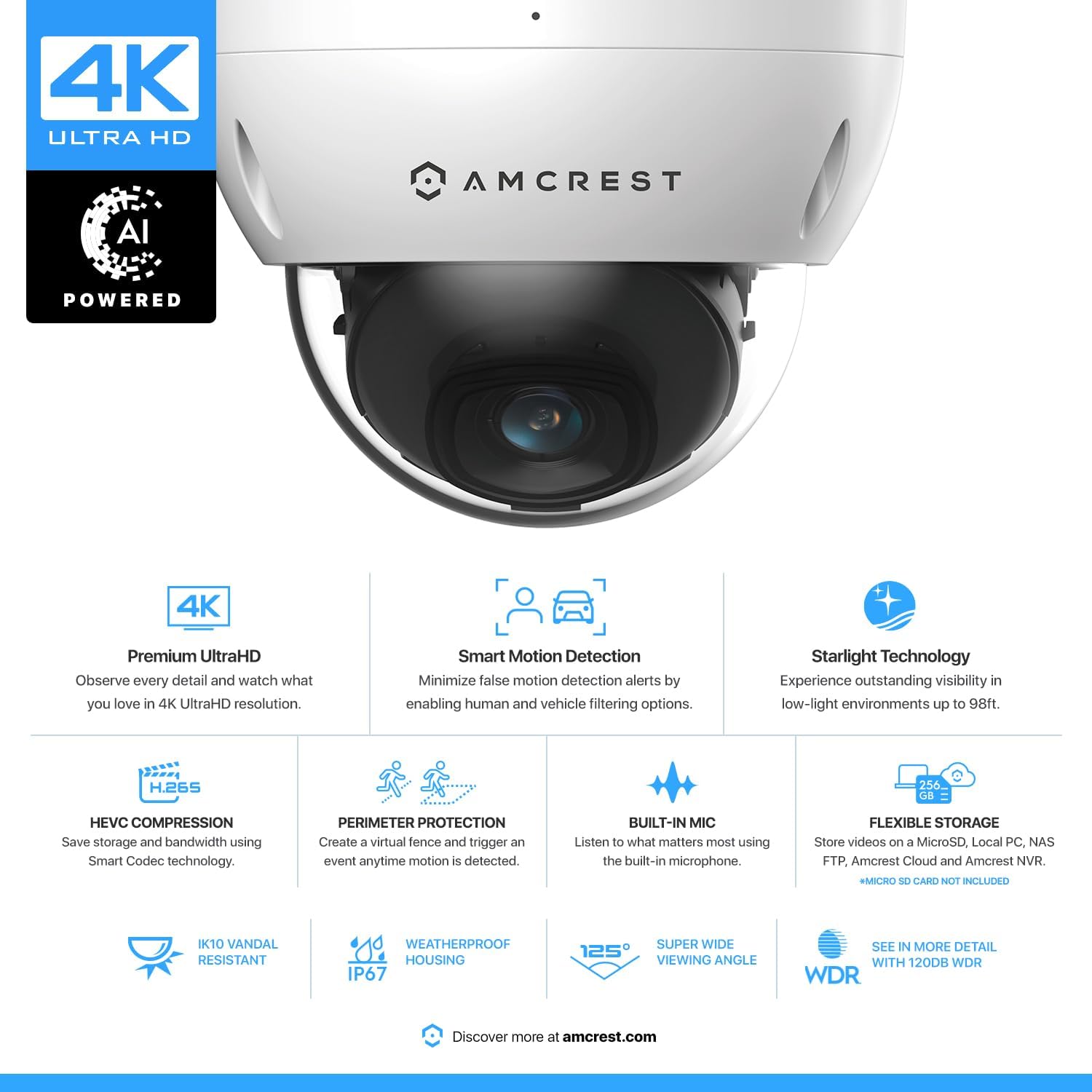
Amcrest UltraHD 4K (8MP) Outdoor Security PoE IP Camera, 3840x2160, 98ft NightVision, 2.8mm Lens, IP67 Weatherproof, IK10 Vandal Resistant Dome, MicroSD Recording, White (IP8M-2493EW-AI-V3)

4.20

지난 32시간 동안 판매됨 31

$ 89.99
$ 93.00
-3.34%

Picture quality is great, especially snapshots. Can be used standalone/no internet. CGI API works well.You can configure both video and still images be saved on the SD card, I have it configured to save motion events as videos, and stills once a minute to the SD card 24/7. The stills are NOT frame captures of the video stream but jpg's from the raw data that do not suffer from the video compression.I do not intend to use this with any of Amcrest's online services or phone apps. I have the camera connected on an isolated DMZ with NO internet access. All attempts to connect to the internet are blocked and I connect to the cameras locally from my laptop and home server.Yes, you can provision it via the embedded web server just fine from a PC locally. Most config can be done without needing to install their browser plugin, but you do need to use their plugin to do some items such as motion ranges, privacy masks, etc...By default on power up the camera attempts to create these connections, but the camera is just fine if they are blocked. I find it ironic that their cloud service connection attempt is over HTTPS, however their "security" connection attempt is over HTTP.TCP: config.amcrestcloud.com:443TCP: amcrestview.com:12367TCP: dh.amcrestsecurity.com:80UDP: p2p.amcrestview.com:8800UDP: google-public-dns-a.google.com:53UDP: google-public-dns-b.google.com:53Amcrest vs Dahua:Yes, it's quite clear that Amcrest just OEM's camera hardware and firmware from Dahua. The Amcrest IP8M-2493EW appears to be a Dahua HDBW4831E (not 100% sure on that exact model number).I have nothing wrong with this business model, however I don't see much value in Amcrest investing in re-skinning all the UIs and firmware. Not intending to use any of their cloud services the only plus I see is Amcrest looks to be more consumer focused than Dahua (both in sales and support).Some faults:Whenever you login via the web interface, the camera automatically syncs the time from your PC to the camera, even if you have NTP configured, it takes whatever time you have on your PC and uses it. This cannot be disabled. If the time on your PC is slightly off the camera will step the clock and also be incorrect until the next NTP update.SMTP with the 'other' server option seems completely broken, there are some threads on amcrest forums about this. Mail test fails immediately and it doesn't even attempt to do a DNS lookup let alone a TCP SYN to the SMTP server.Amcrest's "user docs" are horrible. It seems they hired some contractor to simply take Dahua's docs and "translate" them from english to english and replacing all the company logos, providing no useful material. You can download the Dahua's user manual to get a better experience.The back of the camera has the pigtail coming out almost near the side, nowhere near the center. Mounting this camera isn't ideal. I bought one of the mounts (PFA136) which will give you space to store all those cables.Some pros:syslog works, it'll log to my home server just fine. ntp works, etc...The CGI APIs work well. Do a web search for the AMCREST_CGI_SDK_API.pdf and read through it. This is identical (or almost identical) to the Dahua CGI API doc.Some useful items from the SDK. You can obtain real-time still images from /cgi-bin/snapshot.cgi which is quite useful and better quality than stills captured from the video stream.It took me a few hours to write a shell script with wget to list contents of the SD card, and then retreive all the videos and stills on there to my home server.Relativly low power consumption, my switch reports 4W when IR off and 6W when IR is on (on about 40ft cat6).Pigtail:Oh it's almost a dealbreaker. What a horrible pigtail. People who are buying a PoE camera expect just one connection, an RJ45. This things has 5 connections, and "waterproofing" is only provided for the ethernet connection.On the inside of the camera the other end of the pigtail is broken out into 2 connectiors, a 6-wire connector with the Audio and Alarm relays, and a 9-wire connector with Ethernet, PoE, 12vDC, and the alarm ground wire. See my pictures.If you are only connecting the RJ45, you can safely unplug the alarm/audio header and even clip the 12vDC wires on the inside of the housing then chop off the unused pigtails leaving just the RJ45 external with no risk of shorts outside the camera.

27 현재 누군가가 웹사이트를 탐색 중입니다.

Color
White Black
수량:
- +

예상 배송 시간: 12~26일(국제), 3~6일(미국)

구매일로부터 45일 이내에 반품이 가능합니다. 관세 및 세금은 환불되지 않습니다.

  • ALERT_TYPE:

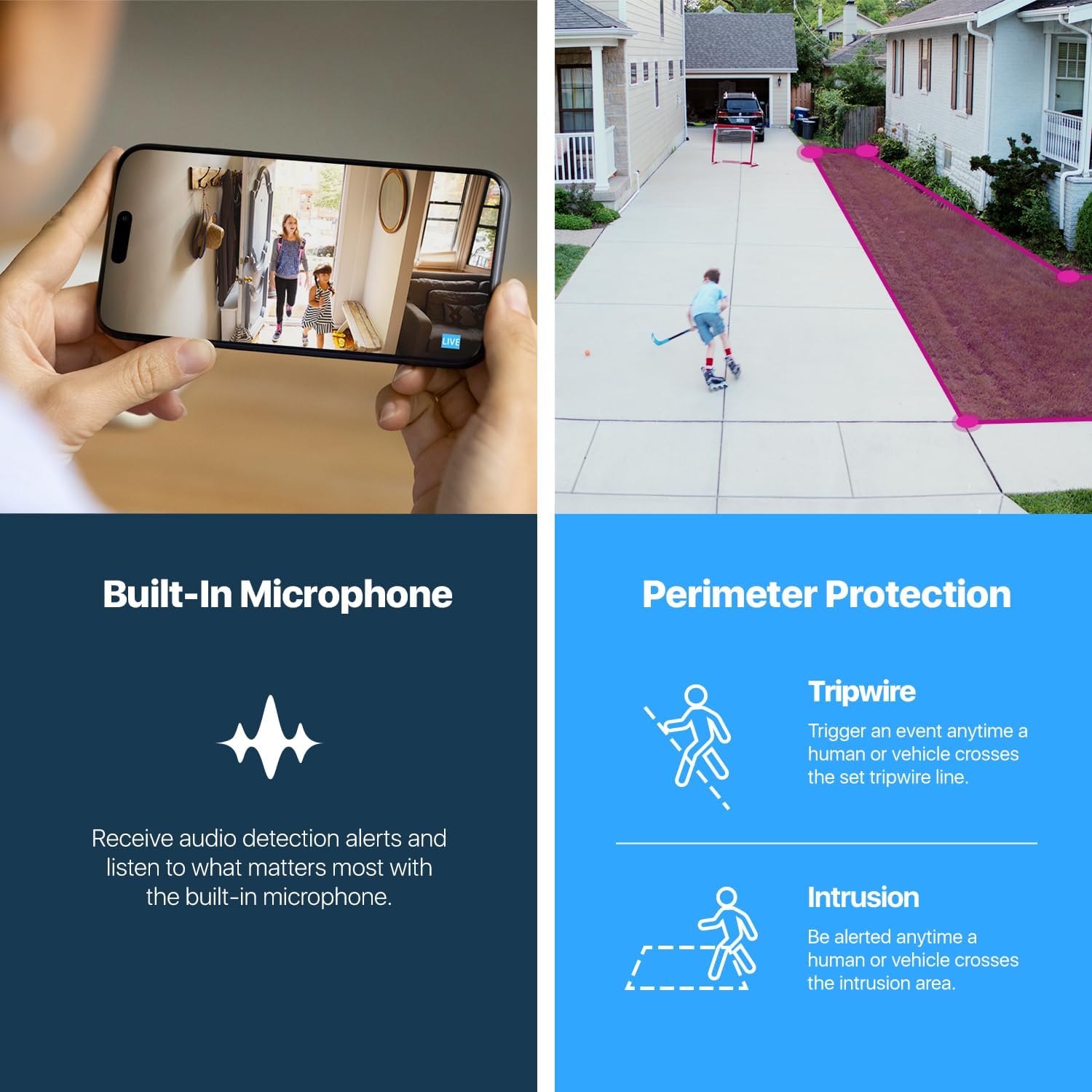
    Tripwire, Intrusion

  • ASIN:

    B077Y52782

  • BATTERIES_REQUIRED:

    No

  • BEST_SELLERS_RANK:

    #181 in Dome Surveillance Cameras

  • COLOR:

    White

  • COMPATIBLE_DEVICES:

    Smartphone

  • CONNECTIVITY_PROTOCOL:

    Ethernet

  • CONTROL_METHOD:

    Voice

  • CONTROLLER_TYPE:

    Amazon Alexa

  • CUSTOMER_REVIEWS:

    4.2 4.2 out of 5 stars (787) 4.2 out of 5 stars

  • DATE_FIRST_AVAILABLE:

    December 5, 2017

  • EFFECTIVE_STILL_RESOLUTION:

    8 MP

  • EFFECTIVE_VIDEO_RESOLUTION:

    8 MP

  • FIELD_OF_VIEW:

    112 Degrees

  • FORM_FACTOR:

    Dome

  • FRAME_RATE:

    20 frames per second

  • INCLUDED_COMPONENTS:

    Quick Start Guide

  • INDOOR_OUTDOOR_USAGE:

    Outdoor

  • INTERNATIONAL_PROTECTION_RATING:

    IP67

  • IS_DISCONTINUED_BY_MANUFACTURER:

    No

  • ITEM_DIMENSIONS_L_X_W_X_H:

    6.1 x 6.1 x 5.4 inches

  • ITEM_MODEL_NUMBER:

    IP8M - 2493EW

  • ITEM_WEIGHT:

    1.28 pounds

  • LOW_LIGHT_TECHNOLOGY:

    Night Color

  • MANUFACTURER:

    Amcrest

  • MATERIAL:

    Metal

  • MAXIMUM_WEBCAM_IMAGE_RESOLUTION:

    8 MP

  • MOUNTING_TYPE:

    Surface Mount

  • NIGHT_VISION_RANGE:

    98 Feet

  • NUMBER_OF_CHANNELS:

    1

  • NUMBER_OF_IR_LEDS:

    1

  • NUMBER_OF_ITEMS:

    1

  • PHOTO_SENSOR_TECHNOLOGY:

    CMOS

  • POWER_SOURCE:

    Power Over Ethernet

  • PRODUCT_DIMENSIONS:

    6.1 x 6.1 x 5.4 inches

  • ROOM_TYPE:

    Outdoor

  • SPECIFIC_USES_FOR_PRODUCT:

    Surveillance

  • UNIT_COUNT:

    1.0 Count

  • UPC:

    858999007032

  • VIDEO_CAPTURE_FORMAT:

    HEVC

  • VIDEO_CAPTURE_RESOLUTION:

    4k

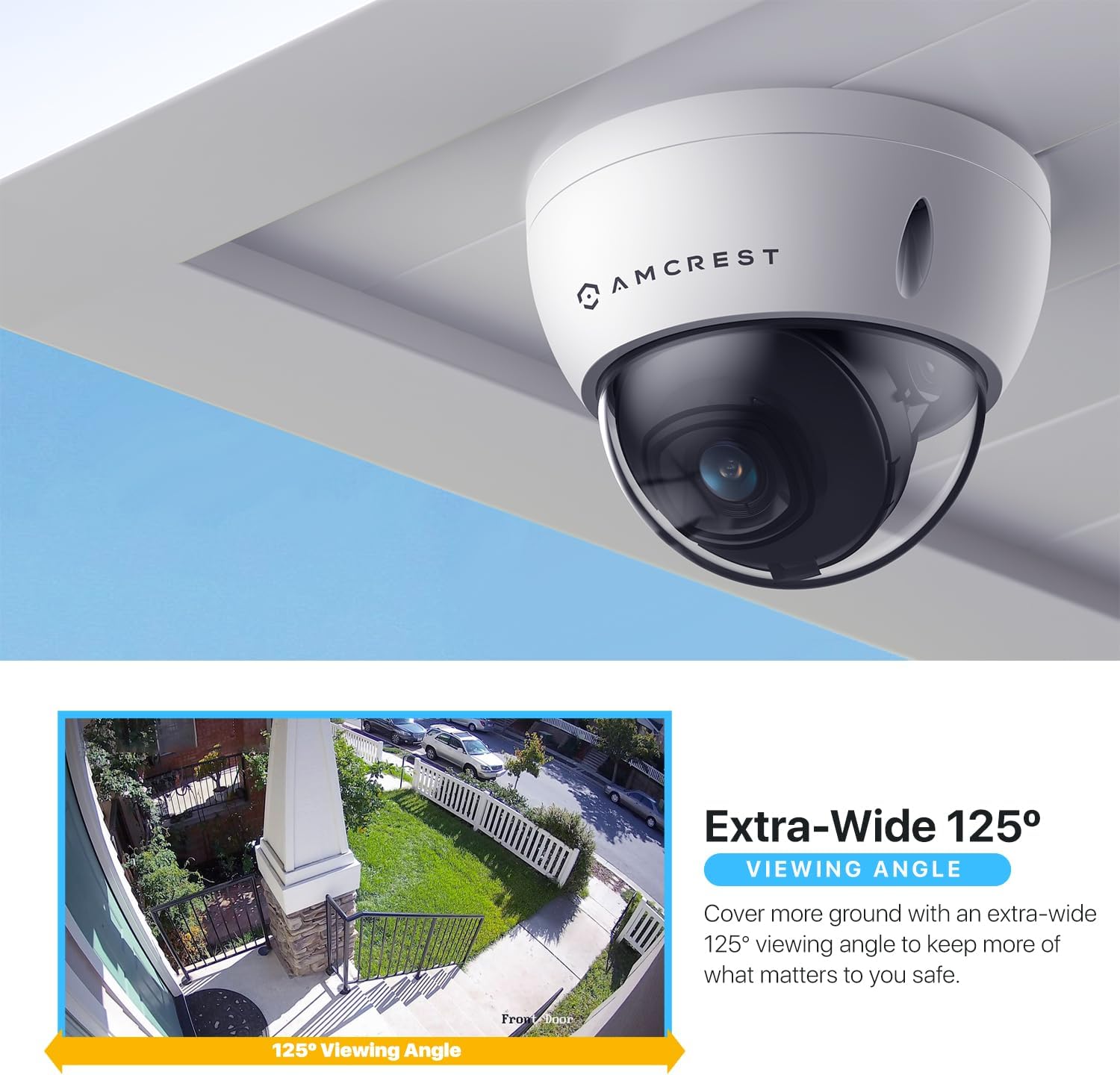
  • VIEWING_ANGLE:

    125 Degrees

  • VOLTAGE:

    12 Volts

  • WATTAGE:

    6 watts

  • WIRELESS_COMMUNICATION_TECHNOLOGY:

    Wired / POE

  • ZOOM_TYPE:

    Digital Zoom

안전한 결제를 보장하세요

제품 상세 정보
Receive intelligent motion alerts that send notifications directly to your computer or smartphone, via the Amcrest View Pro app anytime motion is detected. Create up to 4 motion detection zones and customize each zone's sensitivity to receive only the alerts that you need. Be notified anytime your camera goes offline. View, record, and playback UltraHD footage directly from your smartphone with the Amcrest View Pro o r Amcrest Cloud app. View up to 16 cameras at one time with Multi-View feature. Record UltraHD footage directly to a 256GB MicroSD card (sold separately). Never worry about losing your footage with Amcrest Cloud optional Cloud storage plans. Record and store what you want, where you want with flexible storage options including 256GB MicroSD, Amcrest Cloud, Amcrest Surveillance Pro for PC and Mac, Amcrest NVRs, Synology & QNAP NAS, FTP, Blue Iris and more, giving you the flexibility and security you need. This product may contain components which are not NDAA compliant. Cover every angle with the built- in super-wide 125° viewing angle, allowing you to keep an eye on what matters most. Equipped with night vision up to 98 ft, the Amcrest 4K UltraHD Vandal Dome PoE Outdoor Security IP Camera is the perfect home security solution for you and your loved ones.
고객 리뷰
4.20

(100 점수)

5
10
4
3
3
8
2
13
1
66
댓글 취소
댓글을 남겨주세요

16 논평

Picture quality is great, especially snapshots. Can be used standalone/no internet. CGI API works well.You can configure both video and still images be saved on the SD card, I have it configured to save motion events as videos, and stills once a minute to the SD card 24/7. The stills are NOT frame captures of the video stream but jpg's from the raw data that do not suffer from the video compression.I do not intend to use this with any of Amcrest's online services or phone apps. I have the camera connected on an isolated DMZ with NO internet access. All attempts to connect to the internet are blocked and I connect to the cameras locally from my laptop and home server.Yes, you can provision it via the embedded web server just fine from a PC locally. Most config can be done without needing to install their browser plugin, but you do need to use their plugin to do some items such as motion ranges, privacy masks, etc...By default on power up the camera attempts to create these connections, but the camera is just fine if they are blocked. I find it ironic that their cloud service connection attempt is over HTTPS, however their "security" connection attempt is over HTTP.TCP: config.amcrestcloud.com:443TCP: amcrestview.com:12367TCP: dh.amcrestsecurity.com:80UDP: p2p.amcrestview.com:8800UDP: google-public-dns-a.google.com:53UDP: google-public-dns-b.google.com:53Amcrest vs Dahua:Yes, it's quite clear that Amcrest just OEM's camera hardware and firmware from Dahua. The Amcrest IP8M-2493EW appears to be a Dahua HDBW4831E (not 100% sure on that exact model number).I have nothing wrong with this business model, however I don't see much value in Amcrest investing in re-skinning all the UIs and firmware. Not intending to use any of their cloud services the only plus I see is Amcrest looks to be more consumer focused than Dahua (both in sales and support).Some faults:Whenever you login via the web interface, the camera automatically syncs the time from your PC to the camera, even if you have NTP configured, it takes whatever time you have on your PC and uses it. This cannot be disabled. If the time on your PC is slightly off the camera will step the clock and also be incorrect until the next NTP update.SMTP with the 'other' server option seems completely broken, there are some threads on amcrest forums about this. Mail test fails immediately and it doesn't even attempt to do a DNS lookup let alone a TCP SYN to the SMTP server.Amcrest's "user docs" are horrible. It seems they hired some contractor to simply take Dahua's docs and "translate" them from english to english and replacing all the company logos, providing no useful material. You can download the Dahua's user manual to get a better experience.The back of the camera has the pigtail coming out almost near the side, nowhere near the center. Mounting this camera isn't ideal. I bought one of the mounts (PFA136) which will give you space to store all those cables.Some pros:syslog works, it'll log to my home server just fine. ntp works, etc...The CGI APIs work well. Do a web search for the AMCREST_CGI_SDK_API.pdf and read through it. This is identical (or almost identical) to the Dahua CGI API doc.Some useful items from the SDK. You can obtain real-time still images from /cgi-bin/snapshot.cgi which is quite useful and better quality than stills captured from the video stream.It took me a few hours to write a shell script with wget to list contents of the SD card, and then retreive all the videos and stills on there to my home server.Relativly low power consumption, my switch reports 4W when IR off and 6W when IR is on (on about 40ft cat6).Pigtail:Oh it's almost a dealbreaker. What a horrible pigtail. People who are buying a PoE camera expect just one connection, an RJ45. This things has 5 connections, and "waterproofing" is only provided for the ethernet connection.On the inside of the camera the other end of the pigtail is broken out into 2 connectiors, a 6-wire connector with the Audio and Alarm relays, and a 9-wire connector with Ethernet, PoE, 12vDC, and the alarm ground wire. See my pictures.If you are only connecting the RJ45, you can safely unplug the alarm/audio header and even clip the 12vDC wires on the inside of the housing then chop off the unused pigtails leaving just the RJ45 external with no risk of shorts outside the camera.

No incluye cable Fe fuente de poder
2025-12-27    -Luiz EnriQz

No trae cable de fuente de poder, me pueden decir si viene incluido , no lo incluye o simplemente no me llego en el paquete

Easy install and setup, very wide field of view, and absolutely incredible resolution and image quality. I have mine paired up with an Amcrest NV4116E , and it was instantly recognized and displayed. I have this vandal-resistant dome camera on my front porch, watching over my front door. My previous "wide angle" security camera placed in the same location could see the front stoop and 3 steps leading up to it. This camera however, sees the entire stoop, all six steps, a 30 foot walkway, and half of the front yard; all in exceptional detail. If I (hopefully don't) need to use footage to identify someone, it would be absolutely no problem with this camera. Without exaggeration, I can count the leaves on a boxwood plant that is ~25 feet from the camera; the image is *that* sharp.I absolutely love this camera, and will certainly be buying many more from Amcrest in the future. That being said, this product is not really for the average joe. In order to have this working well, and installed properly, you'll need to have moderate DIY skills. Being super nerdy helps too (PhD in engineering here) Knowing how to setup secure networks, DDNS, and terminate cat5e all really help here. Not difficult by any means at all, perhaps a little outside of the knowledge of the average DIY'er. Also, as with other Amcrest products that I've purchased in the past, these are all "prosumer" devices. Very little in the way of documentation or instructions at all. It isn't too difficult to figure out, but if you haven't played with a PoE camera before, it might have a bit of a learning curve.One other happy surprise that isn't shown in the pictures or written in the description; the wiring pigtail obviously has a PoE port, but it also includes RCA ports for audio in and audio out, as well as a 3-wire pigtail to alert an alarm system. Nice, unexpected bonus.

Buena calidad !
2026-02-15    -DOUGLAS SERRA

Excelente calidad ! Lo único malo qué hay que pagar para Guardar videos en la nube

Great view.
2026-02-15    -Eagle

To see back yard.

Buena calidad !
2026-01-19    -DOUGLAS SERRA

Excelente calidad ! Lo único malo qué hay que pagar para Guardar videos en la nube

Picture quality is great, especially snapshots. Can be used standalone/no internet. CGI API works well.You can configure both video and still images be saved on the SD card, I have it configured to save motion events as videos, and stills once a minute to the SD card 24/7. The stills are NOT frame captures of the video stream but jpg's from the raw data that do not suffer from the video compression.I do not intend to use this with any of Amcrest's online services or phone apps. I have the camera connected on an isolated DMZ with NO internet access. All attempts to connect to the internet are blocked and I connect to the cameras locally from my laptop and home server.Yes, you can provision it via the embedded web server just fine from a PC locally. Most config can be done without needing to install their browser plugin, but you do need to use their plugin to do some items such as motion ranges, privacy masks, etc...By default on power up the camera attempts to create these connections, but the camera is just fine if they are blocked. I find it ironic that their cloud service connection attempt is over HTTPS, however their "security" connection attempt is over HTTP.TCP: config.amcrestcloud.com:443TCP: amcrestview.com:12367TCP: dh.amcrestsecurity.com:80UDP: p2p.amcrestview.com:8800UDP: google-public-dns-a.google.com:53UDP: google-public-dns-b.google.com:53Amcrest vs Dahua:Yes, it's quite clear that Amcrest just OEM's camera hardware and firmware from Dahua. The Amcrest IP8M-2493EW appears to be a Dahua HDBW4831E (not 100% sure on that exact model number).I have nothing wrong with this business model, however I don't see much value in Amcrest investing in re-skinning all the UIs and firmware. Not intending to use any of their cloud services the only plus I see is Amcrest looks to be more consumer focused than Dahua (both in sales and support).Some faults:Whenever you login via the web interface, the camera automatically syncs the time from your PC to the camera, even if you have NTP configured, it takes whatever time you have on your PC and uses it. This cannot be disabled. If the time on your PC is slightly off the camera will step the clock and also be incorrect until the next NTP update.SMTP with the 'other' server option seems completely broken, there are some threads on amcrest forums about this. Mail test fails immediately and it doesn't even attempt to do a DNS lookup let alone a TCP SYN to the SMTP server.Amcrest's "user docs" are horrible. It seems they hired some contractor to simply take Dahua's docs and "translate" them from english to english and replacing all the company logos, providing no useful material. You can download the Dahua's user manual to get a better experience.The back of the camera has the pigtail coming out almost near the side, nowhere near the center. Mounting this camera isn't ideal. I bought one of the mounts (PFA136) which will give you space to store all those cables.Some pros:syslog works, it'll log to my home server just fine. ntp works, etc...The CGI APIs work well. Do a web search for the AMCREST_CGI_SDK_API.pdf and read through it. This is identical (or almost identical) to the Dahua CGI API doc.Some useful items from the SDK. You can obtain real-time still images from /cgi-bin/snapshot.cgi which is quite useful and better quality than stills captured from the video stream.It took me a few hours to write a shell script with wget to list contents of the SD card, and then retreive all the videos and stills on there to my home server.Relativly low power consumption, my switch reports 4W when IR off and 6W when IR is on (on about 40ft cat6).Pigtail:Oh it's almost a dealbreaker. What a horrible pigtail. People who are buying a PoE camera expect just one connection, an RJ45. This things has 5 connections, and "waterproofing" is only provided for the ethernet connection.On the inside of the camera the other end of the pigtail is broken out into 2 connectiors, a 6-wire connector with the Audio and Alarm relays, and a 9-wire connector with Ethernet, PoE, 12vDC, and the alarm ground wire. See my pictures.If you are only connecting the RJ45, you can safely unplug the alarm/audio header and even clip the 12vDC wires on the inside of the housing then chop off the unused pigtails leaving just the RJ45 external with no risk of shorts outside the camera.

Bueno/Malo
2026-01-01    -Erich Dohm

Software solo en inglés.

Easy install and setup, very wide field of view, and absolutely incredible resolution and image quality. I have mine paired up with an Amcrest NV4116E , and it was instantly recognized and displayed. I have this vandal-resistant dome camera on my front porch, watching over my front door. My previous "wide angle" security camera placed in the same location could see the front stoop and 3 steps leading up to it. This camera however, sees the entire stoop, all six steps, a 30 foot walkway, and half of the front yard; all in exceptional detail. If I (hopefully don't) need to use footage to identify someone, it would be absolutely no problem with this camera. Without exaggeration, I can count the leaves on a boxwood plant that is ~25 feet from the camera; the image is *that* sharp.I absolutely love this camera, and will certainly be buying many more from Amcrest in the future. That being said, this product is not really for the average joe. In order to have this working well, and installed properly, you'll need to have moderate DIY skills. Being super nerdy helps too (PhD in engineering here) Knowing how to setup secure networks, DDNS, and terminate cat5e all really help here. Not difficult by any means at all, perhaps a little outside of the knowledge of the average DIY'er. Also, as with other Amcrest products that I've purchased in the past, these are all "prosumer" devices. Very little in the way of documentation or instructions at all. It isn't too difficult to figure out, but if you haven't played with a PoE camera before, it might have a bit of a learning curve.One other happy surprise that isn't shown in the pictures or written in the description; the wiring pigtail obviously has a PoE port, but it also includes RCA ports for audio in and audio out, as well as a 3-wire pigtail to alert an alarm system. Nice, unexpected bonus.

No incluye cable Fe fuente de poder
2026-02-06    -Luiz EnriQz

No trae cable de fuente de poder, me pueden decir si viene incluido , no lo incluye o simplemente no me llego en el paquete

댓글을 남겨주세요:

댓글 제목
댓글 내용
배송 및 반품
우리가 당신을 보호하겠습니다

대부분 지역에서는 배송비를 한 번만 지불하시면 됩니다 (주문 및 배송 페이지를 확인해 주세요).

구매 후 14일 이내 무료 반품 가능 (단, 수명이 다한 제품, 맞춤 제작 상품, 마스크, 향수 및 에어로졸과 같이 위험하거나 인화성 물질이 포함된 일부 제품은 제외).

수입 관세 정보

복잡한 절차는 저희가 처리해 드리겠습니다. 카나리아 제도를 제외한 모든 EU 국가, 영국, 미국, 캐나다, 호주, 뉴질랜드, 푸에르토리코, 스위스, 싱가포르, 한국, 쿠웨이트, 멕시코, 카타르, 인도, 노르웨이, 사우디아라비아, 대만, 태국, UAE, 일본, 브라질, 맨섬, 산마리노, 콜롬비아, 칠레, 아르헨티나, 이집트, 레바논, 홍콩 특별행정구, 바레인, 터키로 배송되는 상품 가격에는 모든 수입 관세가 포함되어 있습니다. 표시된 가격이 최종 결제 금액입니다.

예상 배송 시간

특급 배송: 7-10일

해당 창고에서 배송되었습니다.

더 자세한 정보가 필요하신가요?
반품 정책
반품 정책

저희는 제품 품질에 자신 있습니다. 만약 구매하신 제품에 완전히 만족하지 못하신다면, 수령일로부터 30일 이내에 간편하게 반품하실 수 있도록 정책을 마련해 두었습니다.

간편한 교환 또는 환불
  • 다른 사이즈, 색상 또는 스타일의 상품으로 교환하거나 전액 환불받을 수 있습니다.
  • 반품되는 모든 상품은 착용하지 않은 상태여야 하며, 원래 포장 상태 그대로 모든 태그가 손상되지 않은 상태여야 합니다.
간단한 절차
  • 온라인으로 반품을 신청하거나 고객 서비스 팀에 문의하여 도움을 받으실 수 있습니다.
  • 물품을 제대로 포장해 주시고, 원래의 포장 목록도 함께 넣어주세요.
  • 반품하실 상품을 보내주실 때에는 저희가 제공해 드린 선불 배송 라벨을 사용해 주시기 바랍니다.
  • 환불 요청 접수 즉시 처리해 드리겠습니다.

반품과 관련하여 궁금한 점이나 우려 사항이 있으시면 언제든지 저희 전문 고객 서비스 팀에 문의해 주세요. 고객 만족은 저희의 최우선 목표입니다.

범주
차이
제품
모든 제품 지우기