고객 서비스

판매자들은 가입하면 더 많은 혜택을 누릴 수 있습니다.

모든 주문 무료 배송.

안전 장비

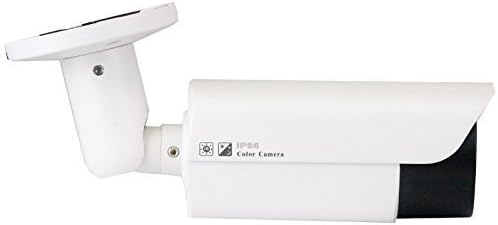
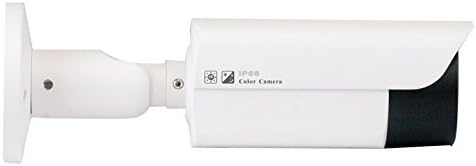
GW Security 5 Megapixel 2592 x 1920 Pixel Super HD 1920P Outdoor PoE 120FT Night Vision Weatherproof Security IP Camera with 2.8-12mm Varifocal Zoom Len

3.80

지난 32시간 동안 판매됨 31

$ 89.00
$ 90.00
-1.12%

Note: I'm writing this review after testing out this camera for a specific purpose but it didn't have enough zoom for my needs so I have returned it.This manual zoom/manual focus camera appears to be well built with an aluminum housing and base. I tested this with a Unifi NVR using its "Discover 3rd-Party Cameras" feature. I did use the camera's web interface to set up things like camera name and streaming resolution. The camera listing and labeling say this is a 2592 x 1920 camera but the settings in the camera actually had 3072x2048 as an option and this setting did work. I did not check frame rate so I don't know if it slowed down the frame rate at the max resolution. Once focused the image was crisp. The zoom and focus adjustments are available on the underside of the front of the camera which can be adjusted with the hex tool provided with the camera. The adjustment points appear to have a friction connection to the actual zoom and focus internally as the zoom and focus doesn't always change with a slight turn. There is also a slight increase in resistance when reaching the end of the range. This is good as it doesn't appear to be any way to damage the unit by over turning the adjustments.I can't speak to the longevity of this camera but if I had the zoom level I needed I would have definitely kept the camera. It is definitely worth checking it out if it fits the capabilities you are looking for.

25 현재 누군가가 웹사이트를 탐색 중입니다.

수량:
- +

예상 배송 시간: 12~26일(국제), 3~6일(미국)

구매일로부터 45일 이내에 반품이 가능합니다. 관세 및 세금은 환불되지 않습니다.

  • ALERT_TYPE:

    Motion Only

  • ASIN:

    B06XKZ3YM8

  • BATTERIES_REQUIRED:

    No

  • BEST_SELLERS_RANK:

    #1,140 in Bullet Surveillance Cameras

  • COMPATIBLE_DEVICES:

    Desktop, Smartphone

  • CONNECTIVITY_PROTOCOL:

    Ethernet

  • CONTROL_METHOD:

    App

  • CONTROLLER_TYPE:

    Iris

  • CUSTOMER_REVIEWS:

    3.8 3.8 out of 5 stars (122) 3.8 out of 5 stars

  • DATE_FIRST_AVAILABLE:

    March 23, 2016

  • EFFECTIVE_STILL_RESOLUTION:

    5 MP

  • FOCUS_TYPE:

    Manual Focus

  • FORM_FACTOR:

    Bullet

  • FRAME_RATE:

    30 fps

  • INCLUDED_COMPONENTS:

    camera

  • INDOOR_OUTDOOR_USAGE:

    Indoor, Outdoor

  • INTERNATIONAL_PROTECTION_RATING:

    IP67

  • IS_DISCONTINUED_BY_MANUFACTURER:

    No

  • ITEM_DIMENSIONS_L_X_W_X_H:

    5 x 5 x 5 inches

  • ITEM_MODEL_NUMBER:

    VD5050IPC

  • ITEM_WEIGHT:

    2.51 pounds

  • LIGHT_SOURCE_TYPE:

    LED

  • LOW_LIGHT_TECHNOLOGY:

    Night Color

  • MANUFACTURER:

    GW Security

  • MAXIMUM_WEBCAM_IMAGE_RESOLUTION:

    5 MP

  • MOUNTING_TYPE:

    Ceiling Mount and Wall Mount

  • NIGHT_VISION_RANGE:

    120 Feet

  • NUMBER_OF_CHANNELS:

    1

  • NUMBER_OF_IR_LEDS:

    42

  • NUMBER_OF_ITEMS:

    1

  • PHOTO_SENSOR_TECHNOLOGY:

    CMOS

  • POWER_SOURCE:

    Ac/dc

  • PRODUCT_DIMENSIONS:

    5 x 5 x 5 inches

  • ROOM_TYPE:

    Bedroom, Kitchen, Living Room, Nursery, Office

  • SPECIFIC_USES_FOR_PRODUCT:

    Surveillance

  • UNIT_COUNT:

    1.0 Count

  • VIDEO_CAPTURE_FORMAT:

    H.265 Video Format

  • VIDEO_CAPTURE_RESOLUTION:

    1080p

  • WATER_RESISTANCE_LEVEL:

    Waterproof

  • WATTAGE:

    8 watts

  • WIRELESS_COMMUNICATION_TECHNOLOGY:

    Wi-Fi

  • ZOOM_TYPE:

    Digital Zoom

안전한 결제를 보장하세요

제품 상세 정보
Camera Overview This GW Security IP camera employs advanced high resolution 1920P in combination to the latest 5.0 Megapixel 1/3" Megapixel CMOS image sensor which provides the best quality image day and night, resolution up to 2592 x 1920. This camera can record real-time 1536p and 1080p resolution at 30 frames per second, so that recorded video plays back smoothly and clearly. Alternately, even higher definition 5MP provides more viewing pixels recorded at near-real-time of 15 frames per second, for amazing detail and superior recognition of faces or license plates. Built in 2.8 12mm Manual Zoom Varifocal Lens which allow you to adjust the angle of View to meet you need. 42Pcs Infrared LED illumination for recording video at night up to 120Ft. This POE camera is completely Power over Ethernet so setup is clean and simple with just a single cable. Designed for easy installation, the bullet camera has a waterproof and vandal proof housing, fits in most indoor and outdoor installations. It is ideal for home or business use. Camera Feature Adopt the High performance 5.0MP 1/3" Megapixel CMOS Sensor Real time 2.0 Megapixel 30 frames, 3.0 Megapixel 30 frames, 5.0 Megapixel 15 frames, Support 1-30 Frames/second adjustable 42Pcs Infrared LED illumination for recording video at night up to 120Ft Support OSD, color, brightness, saturation, and digital zoom settings Support real-time video, transmission, video motion detection and privacy masking Support remote monitoring. ONVIF 2..
고객 리뷰
3.80

(100 점수)

5
10
4
18
3
2
2
18
1
52
댓글 취소
댓글을 남겨주세요

12 논평

I bought this camera so I could use it at the 12mm focal point. I have a lot of security cameras and most of them are much wider angled and not so good for looking up my street a ways. Since this was cheaper than some of the others, I decided to give it a try.After I received it I connected it to my network, loaded the default IP address as specified in the quick start guide (192.168.0.123) and got the login prompt. Typed in the default login and had to look at what the default password was, came back to type it in a minute or so later and the login page was unresponsive. I couldn't ping the IP address. Rebooted the camera and was able to ping the camera so tried to log in again. Unresponsive and couldn't ping it. I did this a few times and it dawned on me that it might be getting a DHCP IP address from my router, so I took a look at the connected devices. I have a lot of devices connected that are only identified by MAC address. I looked on the camera, no MAC address. Looked on the box. No MAC address. No where could I find a MAC address for this camera, so I couldn't find it that way. I could have started up Wire Shark and looked for a device asking for an IP address but I didn't feel like going through that trouble so I downloaded the application to find the camera. I hate loading Chinese applications on any of my computers, so I put it on one that I can revert to a backup. It did find the camera and yes, it had obtained a DHCP IP address and it did have the MAC address for it showing. The quick start guides says it has a default IP address but doesn't tell you that it will revert to a DHCP IP address a minute or so after start up. I changed it to a static IP.Now that I was in the camera and could view the image, it looked as good as my cheap Amcrest cameras. The settings look fairly common and mostly intuitive if you have set up a bunch of these cameras. It was easy to install on Blue Iris as well. So far, once I was able to get into it, it's looking ok. So I let it burn in for a couple of days just sitting on a desk.So after letting it just sit for a couple of days I took a look at it and it still seemed to be doing good, so I started working on the zoom and focus. I cranked it all the way out to 12mm and then tried to get it into focus. Someone else commented about it being a pain to focus and they aren't kidding. I got it to the point where I saw it go past the sweet spot and I'd come back and slowly go forward. You would think if you pass the sweet spot slowly that you could turn the allen wrench back just a little very slowly and it would back into focus. Nope, you would be wrong. You have to turn about a quarter turn before the focus once again goes past the sweet spot. Then forward about a quarter turn to find it again. After doing this a half dozen times I finally got the feel for when it was about to go past the sweet spot and I'd stop then tweak it forward a tiny bit. Even then it is a very small sweet spot and once I went past it I had to do the quarter turn to get to the spot just before it was in focus. I finally did, although I wish I could nudge it just a very very tiny bit back and forth to make sure I was in exact focus. This is while holding the camera upside down while turning the allen wrench and looking at my computer monitor while trying to keep the camera pointed at a bucket label out on my patio. The writing on the label was the best to telling when it was in focus as I could read the bigger type.So I finally get it in focus and I take the camera and set it up so it can look out my garage window down the street. I learned a long time ago to not put a camera up on the roof or where it's hard to get to until I know for sure it's ready. I then came back and started watching it on one of my systems that runs Blue Iris. I have two other systems with various cameras, HKVision, Dhula, and Amcrest and I can watch cameras on those systems that are looking in about the same direction. I start playing with the zoom feature in Blue Iris with the digital zoom of the camera and it's looking pretty good compared to my other cameras that do not have digital zoom, just the software zoom of Blue Iris. So I'm thinking that maybe for a cheap camera, it will work ok for what I need it to do. So I kick back and just watch the monitors for a bit. And then I see a problem. I see cars go by on my other cameras but I'm not seeing it on the GW camera. I check to make sure it's not frozen and it's not. Then I see a car go by on it. Then I see some people walk by on my other cameras and nothing on the GW camera. As I'm looking at it about 50 seconds after they went by real time on my other cameras, the people are seen on the GW camera. I watch for awhile and I see I'm getting a 50 second lag time on the GW camera. So I eliminate Blue Iris and go to a direct login of the camera. It's better but there is still a 3 or so lag time of the camera. And it's jerky when they do go by. And sometimes a car would drive by and jerk half away across and disappear. Sometimes it wouldn't show at all but I know one went by. This camera is on a gig network with gig switches on a leg of my network that only has about 5 other cameras on it, none of which are showing any lagging or jerking. I am not getting network slow down over this leg. My computer is plugged into the same gig switch that this leg is plugged into as well. In the image is a couple of tall trees across the street. The wind is blowing and the leaves are flowing back and forth in my other cameras. It's like stop action on the GW camera. And sometimes they don't move at all even though the leaves and limbs are still moving. I start changing settings in the camera to see if I can improve it. With all of the changes I could make it worse but I couldn't make it better. Nothing I tried would give me a closer real time view experience like my other cameras were giving me. A bit of lag and some jerkyness I could probably live with, but having it not record at all during activity, that I can not have as I could miss important activity at times when I need a recording. We have a lot of car prowlers, mailbox and porch pirates and homeless that wonder through our neighborhood both night and day and though having security cameras will not stop them or even slow them down, at least I can get a record of it. If I can't record it, then the camera is useless to me and doubly so if I can't even use it for live viewing. So I boxed it back up and did a return to Amazon. Too bad as I did have some hope that it would do the job. Bu a couple of my $55 Amcrest cameras, even with out the zoom work a whole lot better than the GW cameras does.

Did not work
2026-02-09    -Amazon Customer

Was not able to connect to this camera.Worse thing that GW security cameras require different discovery utility to run, I have 5 installed!!:"GW IPCManagerV4.02", "Search Tool", "AjDevTools", "SADPTool" and "Device Config Tool" - this one for NVR, all either downloaded from GW web site or came on disk with GW camera. This is a nightmare, none of tools are able to discover all my GW cameras. I have 4 different types, all GW brand. All tools (except 'GW IPCManagerV4.02') are low quality utilities, probable made by developers for developers and not supposed to be used by consumers, tools are ugly with outdated UI and barely works. All tools feel and look different, probably made by absolutely different teams, no unified UI whatsoever, no version, screen not re-sizable etc.. Only "GW IPCManagerV4.02" seem to be made more professional, except it recognizes only 2 of my 5 cameras... pretty useless.Overall, I must say I am regretting getting into GW NVR and camera lineup, not reliable when it comes to compatibility their cameras with their own GW NVR, even their technicians could not solve issues with connectivity, have 2 cameras not working even if connected directly to NVR.In addition to that, their browser pluging for NVR works only with old internet explorer which is retiring in a months or so, none of existing browser can work with NVR...

Note: I'm writing this review after testing out this camera for a specific purpose but it didn't have enough zoom for my needs so I have returned it.This manual zoom/manual focus camera appears to be well built with an aluminum housing and base. I tested this with a Unifi NVR using its "Discover 3rd-Party Cameras" feature. I did use the camera's web interface to set up things like camera name and streaming resolution. The camera listing and labeling say this is a 2592 x 1920 camera but the settings in the camera actually had 3072x2048 as an option and this setting did work. I did not check frame rate so I don't know if it slowed down the frame rate at the max resolution. Once focused the image was crisp. The zoom and focus adjustments are available on the underside of the front of the camera which can be adjusted with the hex tool provided with the camera. The adjustment points appear to have a friction connection to the actual zoom and focus internally as the zoom and focus doesn't always change with a slight turn. There is also a slight increase in resistance when reaching the end of the range. This is good as it doesn't appear to be any way to damage the unit by over turning the adjustments.I can't speak to the longevity of this camera but if I had the zoom level I needed I would have definitely kept the camera. It is definitely worth checking it out if it fits the capabilities you are looking for.

I bought this camera so I could use it at the 12mm focal point. I have a lot of security cameras and most of them are much wider angled and not so good for looking up my street a ways. Since this was cheaper than some of the others, I decided to give it a try.After I received it I connected it to my network, loaded the default IP address as specified in the quick start guide (192.168.0.123) and got the login prompt. Typed in the default login and had to look at what the default password was, came back to type it in a minute or so later and the login page was unresponsive. I couldn't ping the IP address. Rebooted the camera and was able to ping the camera so tried to log in again. Unresponsive and couldn't ping it. I did this a few times and it dawned on me that it might be getting a DHCP IP address from my router, so I took a look at the connected devices. I have a lot of devices connected that are only identified by MAC address. I looked on the camera, no MAC address. Looked on the box. No MAC address. No where could I find a MAC address for this camera, so I couldn't find it that way. I could have started up Wire Shark and looked for a device asking for an IP address but I didn't feel like going through that trouble so I downloaded the application to find the camera. I hate loading Chinese applications on any of my computers, so I put it on one that I can revert to a backup. It did find the camera and yes, it had obtained a DHCP IP address and it did have the MAC address for it showing. The quick start guides says it has a default IP address but doesn't tell you that it will revert to a DHCP IP address a minute or so after start up. I changed it to a static IP.Now that I was in the camera and could view the image, it looked as good as my cheap Amcrest cameras. The settings look fairly common and mostly intuitive if you have set up a bunch of these cameras. It was easy to install on Blue Iris as well. So far, once I was able to get into it, it's looking ok. So I let it burn in for a couple of days just sitting on a desk.So after letting it just sit for a couple of days I took a look at it and it still seemed to be doing good, so I started working on the zoom and focus. I cranked it all the way out to 12mm and then tried to get it into focus. Someone else commented about it being a pain to focus and they aren't kidding. I got it to the point where I saw it go past the sweet spot and I'd come back and slowly go forward. You would think if you pass the sweet spot slowly that you could turn the allen wrench back just a little very slowly and it would back into focus. Nope, you would be wrong. You have to turn about a quarter turn before the focus once again goes past the sweet spot. Then forward about a quarter turn to find it again. After doing this a half dozen times I finally got the feel for when it was about to go past the sweet spot and I'd stop then tweak it forward a tiny bit. Even then it is a very small sweet spot and once I went past it I had to do the quarter turn to get to the spot just before it was in focus. I finally did, although I wish I could nudge it just a very very tiny bit back and forth to make sure I was in exact focus. This is while holding the camera upside down while turning the allen wrench and looking at my computer monitor while trying to keep the camera pointed at a bucket label out on my patio. The writing on the label was the best to telling when it was in focus as I could read the bigger type.So I finally get it in focus and I take the camera and set it up so it can look out my garage window down the street. I learned a long time ago to not put a camera up on the roof or where it's hard to get to until I know for sure it's ready. I then came back and started watching it on one of my systems that runs Blue Iris. I have two other systems with various cameras, HKVision, Dhula, and Amcrest and I can watch cameras on those systems that are looking in about the same direction. I start playing with the zoom feature in Blue Iris with the digital zoom of the camera and it's looking pretty good compared to my other cameras that do not have digital zoom, just the software zoom of Blue Iris. So I'm thinking that maybe for a cheap camera, it will work ok for what I need it to do. So I kick back and just watch the monitors for a bit. And then I see a problem. I see cars go by on my other cameras but I'm not seeing it on the GW camera. I check to make sure it's not frozen and it's not. Then I see a car go by on it. Then I see some people walk by on my other cameras and nothing on the GW camera. As I'm looking at it about 50 seconds after they went by real time on my other cameras, the people are seen on the GW camera. I watch for awhile and I see I'm getting a 50 second lag time on the GW camera. So I eliminate Blue Iris and go to a direct login of the camera. It's better but there is still a 3 or so lag time of the camera. And it's jerky when they do go by. And sometimes a car would drive by and jerk half away across and disappear. Sometimes it wouldn't show at all but I know one went by. This camera is on a gig network with gig switches on a leg of my network that only has about 5 other cameras on it, none of which are showing any lagging or jerking. I am not getting network slow down over this leg. My computer is plugged into the same gig switch that this leg is plugged into as well. In the image is a couple of tall trees across the street. The wind is blowing and the leaves are flowing back and forth in my other cameras. It's like stop action on the GW camera. And sometimes they don't move at all even though the leaves and limbs are still moving. I start changing settings in the camera to see if I can improve it. With all of the changes I could make it worse but I couldn't make it better. Nothing I tried would give me a closer real time view experience like my other cameras were giving me. A bit of lag and some jerkyness I could probably live with, but having it not record at all during activity, that I can not have as I could miss important activity at times when I need a recording. We have a lot of car prowlers, mailbox and porch pirates and homeless that wonder through our neighborhood both night and day and though having security cameras will not stop them or even slow them down, at least I can get a record of it. If I can't record it, then the camera is useless to me and doubly so if I can't even use it for live viewing. So I boxed it back up and did a return to Amazon. Too bad as I did have some hope that it would do the job. Bu a couple of my $55 Amcrest cameras, even with out the zoom work a whole lot better than the GW cameras does.

Do not buy this camera!
2026-01-28    -Devin

I hardly ever write Amazon reviews but I won't be able to sleep at night knowing that other people might actually buy cameras from this company and experience the same horrors that I have. However, I must make the time in this case in hopes that my review will save some poor souls from the nasty experiences (and complete waste of money) that I have. I can't believe that there's a single remotely positive review for this camera on Amazon, let alone a few 5 star ones! My guess is that they are employees of GW.I have several other security cameras and each and every single one was a real pleasure to work with and they all work out of the box, as advertised. They were truly worth the money (and then some). For example, for monitoring the front door I use a Skybell HD trim and for around the property I use Wyze. My neighbors use Ring, Nest, and Arlo cameras and not one of us has anything bad to say except for me and this GW camera. I was hoping to find a rugged, outdoor camera that I could use to to zoom into passing cars to capture license plates. This one seemed to fit the bill based on the specifications and the amazing reviews... I couldn't have been more wrong!Pros:-Cons:- The web browser software ONLY works with Internet Explorer. You know, the web browser that even Microsoft wants you to avoid!- The web browser software does not even work well in Internet Explorer and it's frustrating when it does work.- Motion capture doesn't capture anything. I setup a NAS using openmediavault on a Linux server and have tested NFS and FTP on Windows and Linux clients and everything works just fine. This camera doesn't record a single thing to either.- The user manual is garbage. Under the tiny Video Description section it actually says the following:"You can also setup an email address or FTP storage server to receive the motion snapshot. (Trigger recording will work only if memory card or NFS NAS connected. )"So which is it? FTP or NFS? Is this a bad Chinese to English translation?Unfortunately I can't return it and that's my fault. It has been several months since I bought this garbage and due to a recent move I haven't been able to set it up and test it until now. I don't even know if it's worthy of going to an electronic recycling center!So please, PLEASE do not buy this camera unless you want to:- throw $160+ out the window- spend countless hours fighting with junk software with a false hope that something might workAmazon should seriously consider removing this camera from their website (and any other GW products if they are as bad as this one).

Do not buy this camera!
2026-02-20    -Devin

I hardly ever write Amazon reviews but I won't be able to sleep at night knowing that other people might actually buy cameras from this company and experience the same horrors that I have. However, I must make the time in this case in hopes that my review will save some poor souls from the nasty experiences (and complete waste of money) that I have. I can't believe that there's a single remotely positive review for this camera on Amazon, let alone a few 5 star ones! My guess is that they are employees of GW.I have several other security cameras and each and every single one was a real pleasure to work with and they all work out of the box, as advertised. They were truly worth the money (and then some). For example, for monitoring the front door I use a Skybell HD trim and for around the property I use Wyze. My neighbors use Ring, Nest, and Arlo cameras and not one of us has anything bad to say except for me and this GW camera. I was hoping to find a rugged, outdoor camera that I could use to to zoom into passing cars to capture license plates. This one seemed to fit the bill based on the specifications and the amazing reviews... I couldn't have been more wrong!Pros:-Cons:- The web browser software ONLY works with Internet Explorer. You know, the web browser that even Microsoft wants you to avoid!- The web browser software does not even work well in Internet Explorer and it's frustrating when it does work.- Motion capture doesn't capture anything. I setup a NAS using openmediavault on a Linux server and have tested NFS and FTP on Windows and Linux clients and everything works just fine. This camera doesn't record a single thing to either.- The user manual is garbage. Under the tiny Video Description section it actually says the following:"You can also setup an email address or FTP storage server to receive the motion snapshot. (Trigger recording will work only if memory card or NFS NAS connected. )"So which is it? FTP or NFS? Is this a bad Chinese to English translation?Unfortunately I can't return it and that's my fault. It has been several months since I bought this garbage and due to a recent move I haven't been able to set it up and test it until now. I don't even know if it's worthy of going to an electronic recycling center!So please, PLEASE do not buy this camera unless you want to:- throw $160+ out the window- spend countless hours fighting with junk software with a false hope that something might workAmazon should seriously consider removing this camera from their website (and any other GW products if they are as bad as this one).

I tried other cameras on amazon, some cheaper, some higher priced but this is really the best camera out there.Very good resolution. Very good night vision. POE simplicity. Varifocal is really nice to have to get any detail you need.Cons:Sometimes the color is a little off but this is a surveillance camera - I'm not filming the next academy award winner.Not the greatest web interface but perfectly usable and how often do you actually need to use it after it is set up?They really need to tell you in the manual how to use the varifocal and it's associated focus ring rather than having to figure it out yourself.I have had one for about a year and another for about 6 weeks. No problems, 24x7 motion sensing recording via NFS to a linux server uses lots of gigs a day but that's what you pay for the resolution.Attached are a couple of pictures - the street is very dark but the camera lights it up quite well.UPDATE:I have a bunch of these cameras, some for several years, all outdoors in the variable weather conditions of NY and they are rock solid. They are plugged into POE routers which rarely get rebooted. Records directly to an NFS mounted RAID drive which is a huge plus. I recently purchased a 2.8mm fixed lens Amcrest at half the price that seems good but it creates a wacky number of directories and subdirectories on my NFS filesystem with strangely named entries with brackets and @ signs like '11.33.45-11.41.00[M][0@0][0].mp4'

Note: I'm writing this review after testing out this camera for a specific purpose but it didn't have enough zoom for my needs so I have returned it.This manual zoom/manual focus camera appears to be well built with an aluminum housing and base. I tested this with a Unifi NVR using its "Discover 3rd-Party Cameras" feature. I did use the camera's web interface to set up things like camera name and streaming resolution. The camera listing and labeling say this is a 2592 x 1920 camera but the settings in the camera actually had 3072x2048 as an option and this setting did work. I did not check frame rate so I don't know if it slowed down the frame rate at the max resolution. Once focused the image was crisp. The zoom and focus adjustments are available on the underside of the front of the camera which can be adjusted with the hex tool provided with the camera. The adjustment points appear to have a friction connection to the actual zoom and focus internally as the zoom and focus doesn't always change with a slight turn. There is also a slight increase in resistance when reaching the end of the range. This is good as it doesn't appear to be any way to damage the unit by over turning the adjustments.I can't speak to the longevity of this camera but if I had the zoom level I needed I would have definitely kept the camera. It is definitely worth checking it out if it fits the capabilities you are looking for.

I tried other cameras on amazon, some cheaper, some higher priced but this is really the best camera out there.Very good resolution. Very good night vision. POE simplicity. Varifocal is really nice to have to get any detail you need.Cons:Sometimes the color is a little off but this is a surveillance camera - I'm not filming the next academy award winner.Not the greatest web interface but perfectly usable and how often do you actually need to use it after it is set up?They really need to tell you in the manual how to use the varifocal and it's associated focus ring rather than having to figure it out yourself.I have had one for about a year and another for about 6 weeks. No problems, 24x7 motion sensing recording via NFS to a linux server uses lots of gigs a day but that's what you pay for the resolution.Attached are a couple of pictures - the street is very dark but the camera lights it up quite well.UPDATE:I have a bunch of these cameras, some for several years, all outdoors in the variable weather conditions of NY and they are rock solid. They are plugged into POE routers which rarely get rebooted. Records directly to an NFS mounted RAID drive which is a huge plus. I recently purchased a 2.8mm fixed lens Amcrest at half the price that seems good but it creates a wacky number of directories and subdirectories on my NFS filesystem with strangely named entries with brackets and @ signs like '11.33.45-11.41.00[M][0@0][0].mp4'

Did not work
2026-01-20    -Amazon Customer

Was not able to connect to this camera.Worse thing that GW security cameras require different discovery utility to run, I have 5 installed!!:"GW IPCManagerV4.02", "Search Tool", "AjDevTools", "SADPTool" and "Device Config Tool" - this one for NVR, all either downloaded from GW web site or came on disk with GW camera. This is a nightmare, none of tools are able to discover all my GW cameras. I have 4 different types, all GW brand. All tools (except 'GW IPCManagerV4.02') are low quality utilities, probable made by developers for developers and not supposed to be used by consumers, tools are ugly with outdated UI and barely works. All tools feel and look different, probably made by absolutely different teams, no unified UI whatsoever, no version, screen not re-sizable etc.. Only "GW IPCManagerV4.02" seem to be made more professional, except it recognizes only 2 of my 5 cameras... pretty useless.Overall, I must say I am regretting getting into GW NVR and camera lineup, not reliable when it comes to compatibility their cameras with their own GW NVR, even their technicians could not solve issues with connectivity, have 2 cameras not working even if connected directly to NVR.In addition to that, their browser pluging for NVR works only with old internet explorer which is retiring in a months or so, none of existing browser can work with NVR...

댓글을 남겨주세요:

댓글 제목
댓글 내용
배송 및 반품
우리가 당신을 보호하겠습니다

대부분 지역에서는 배송비를 한 번만 지불하시면 됩니다 (주문 및 배송 페이지를 확인해 주세요).

구매 후 14일 이내 무료 반품 가능 (단, 수명이 다한 제품, 맞춤 제작 상품, 마스크, 향수 및 에어로졸과 같이 위험하거나 인화성 물질이 포함된 일부 제품은 제외).

수입 관세 정보

복잡한 절차는 저희가 처리해 드리겠습니다. 카나리아 제도를 제외한 모든 EU 국가, 영국, 미국, 캐나다, 호주, 뉴질랜드, 푸에르토리코, 스위스, 싱가포르, 한국, 쿠웨이트, 멕시코, 카타르, 인도, 노르웨이, 사우디아라비아, 대만, 태국, UAE, 일본, 브라질, 맨섬, 산마리노, 콜롬비아, 칠레, 아르헨티나, 이집트, 레바논, 홍콩 특별행정구, 바레인, 터키로 배송되는 상품 가격에는 모든 수입 관세가 포함되어 있습니다. 표시된 가격이 최종 결제 금액입니다.

예상 배송 시간

특급 배송: 7-10일

해당 창고에서 배송되었습니다.

더 자세한 정보가 필요하신가요?
반품 정책
반품 정책

저희는 제품 품질에 자신 있습니다. 만약 구매하신 제품에 완전히 만족하지 못하신다면, 수령일로부터 30일 이내에 간편하게 반품하실 수 있도록 정책을 마련해 두었습니다.

간편한 교환 또는 환불
  • 다른 사이즈, 색상 또는 스타일의 상품으로 교환하거나 전액 환불받을 수 있습니다.
  • 반품되는 모든 상품은 착용하지 않은 상태여야 하며, 원래 포장 상태 그대로 모든 태그가 손상되지 않은 상태여야 합니다.
간단한 절차
  • 온라인으로 반품을 신청하거나 고객 서비스 팀에 문의하여 도움을 받으실 수 있습니다.
  • 물품을 제대로 포장해 주시고, 원래의 포장 목록도 함께 넣어주세요.
  • 반품하실 상품을 보내주실 때에는 저희가 제공해 드린 선불 배송 라벨을 사용해 주시기 바랍니다.
  • 환불 요청 접수 즉시 처리해 드리겠습니다.

반품과 관련하여 궁금한 점이나 우려 사항이 있으시면 언제든지 저희 전문 고객 서비스 팀에 문의해 주세요. 고객 만족은 저희의 최우선 목표입니다.

범주
차이
제품
모든 제품 지우기