고객 서비스

판매자들은 가입하면 더 많은 혜택을 누릴 수 있습니다.

모든 주문 무료 배송.

스마트 도어락

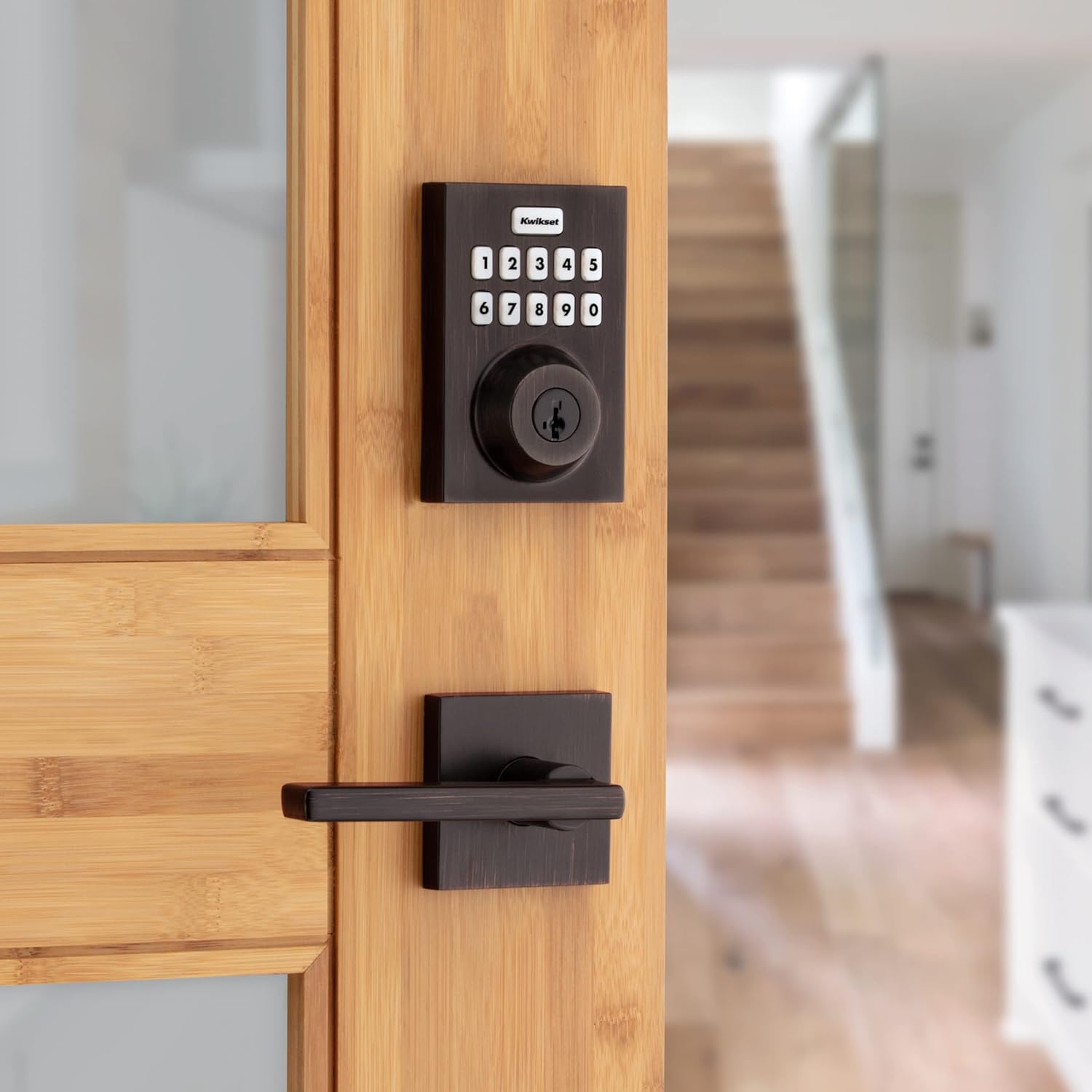
Kwikset Home Connect 620 Smart Lock Deadbolt with Z-Wave Technology, Works with Ring Alarm, Samsung Smartthings and More, Z-Wave Hub Required, Contemporary Design in Venetian Bronze

4.30

지난 32시간 동안 판매됨 47

$ 132.40
$ 134.00
-1.21%

Installation was a breeze, the instructions provided were pretty clear, it took me a couple once overs for some of the steps, but overall I had no struggles. I finished the installation within an hour. I pre-drilled some of the holes for the screws instead of relying the the screws themselves to tap the holes; I highly recommend this, especially for the longer screws.Adding it to my SmartThings hub was also a piece of cake, I just initiated adding a device with the SmartThings app on my phone, pressed the "A" button on the lock as shown in the manual, and then it asked me to scan the QR code on the lock itself. That was pretty much it. I can now tell SmartThings to automatically lock the door when it detects that my wife and I have both left the house.The only thing that was a little confusing during installation/setup was the "auto-handing" process that takes place the first time you put in the batteries. The lock will automatically determine if turning the knob clockwise or or counterclockwise is to lock and vice versa. It does this by automatically trying to turn it each way and figure out the results based on, I think, if it comes across resistance while turning. I don't think it succeeded when I initially installed the batteries, but when I tried using the app to lock the door for the first time, it sounded like it automatically attempted it again, and this time, it figured out that turning counterclockwise was to lock my door. In the end it worked out, I just couldn't really understand at what point in the installation/setup process this was meant to happen.Setting codes via the keypad was pretty easy as well, though later I found that you could also do it through the Smartthings app. I haven't had a reason to add more than one code yet, so I haven't actually added a code via the app but it seems possible. It also looks like you can delete codes from the app as well; but I don't think you can delete a code via the keypad without resetting the lock. That said, the process through the app is not very intuitive; in the SmartThings app, you don't add/delete codes through the device settings of the lock itself. There is another section in the "Life" tab of the SmartThings app that handles "Smart Lock Guest Access". This section seems to be automatically added when you add at least one smart lock to SmartThings, it did not exist before I added this lock. There you can add/delete codes for any number of locks you have, not just this specific Kwikset 620 lock. Not the most straight forward UI but the functionality appears to be there.And finally, the physical keyhole can be retooled by the customer to accept any other key that is compatible with Kwikset. You need a special tool from Kiwkset to retool the lock, which was included with the 620. I was lucky that my current front door key was compatible so now I can use my existing physical house key to lock and unlock; I don't use the keys that came with the 620.Overall, I'm very pleased with this lock, it's simple but does its job just fine. I'm curious to find out how long the batteries last. So far it's only been a week, and the battery meter still says 100%, if that means anything :DEDIT: 06-02-2025: It's been about 1 year and 7 months now, and I've had to change the battery once so far. I don't remember exactly when I changed them out, but it was around the 1 year mark. The lock currently says the 2nd set of batteries is at 62%.

25 현재 누군가가 웹사이트를 탐색 중입니다.

Color
Venetian Bronze Matte Black Satin Nickel Polished Brass Polished Chrome
Pattern Name
Z-Wave Z-Wave Long Range
Size
Contemporary Traditional
수량:
- +

예상 배송 시간: 12~26일(국제), 3~6일(미국)

구매일로부터 45일 이내에 반품이 가능합니다. 관세 및 세금은 환불되지 않습니다.

  • ASIN:

    B09HR7FHQ9

  • BATTERIES:

    2 AA batteries required. (included)

  • BATTERIES_INCLUDED:

    Yes

  • BATTERIES_REQUIRED:

    Yes

  • BATTERY_CELL_TYPE:

    Alkaline

  • BEST_SELLERS_RANK:

    #11,891 in Tools & Home Improvement (See Top 100 in Tools & Home Improvement) #233 in Deadbolts

  • BRAND:

    Kwikset

  • COLOR:

    Venetian Bronze

  • CONNECTIVITY_PROTOCOL:

    Z-Wave

  • CONTROL_METHOD:

    Touch

  • CONTROLLER_TYPE:

    Google Assistant, Amazon Alexa, SmartThings

  • CUSTOMER_REVIEWS:

    4.3 4.3 out of 5 stars (1,408) 4.3 out of 5 stars

  • DATE_FIRST_AVAILABLE:

    October 4, 2021

  • FINISH:

    Bronze

  • FINISH_TYPE:

    Bronze

  • INCLUDED_COMPONENTS:

    HC-620 Smart Lock; battery pack, latch, strike, mounting plate, 2 keys, (4) AA Alkaline batteries, SmartKey tool, screws

  • ITEM_DIMENSIONS_L_X_W_X_H:

    2.8 x 1.25 x 4.3 inches

  • ITEM_MODEL_NUMBER:

    98690-005

  • ITEM_PACKAGE_QUANTITY:

    1

  • ITEM_WEIGHT:

    1 pounds

  • LOCK_TYPE:

    Keypad

  • MANUFACTURER:

    Kwikset

  • MATERIAL:

    Metal

  • MODEL_NAME:

    98690-005

  • NUMBER_OF_PIECES:

    2

  • PART_NUMBER:

    98690-005

  • PATTERN:

    Z-Wave

  • PRODUCT_DIMENSIONS:

    2.8 x 1.25 x 4.3 inches

  • RECOMMENDED_USES_FOR_PRODUCT:

    Security, Front Door Lock

  • SHAPE:

    Rectangular

  • SIZE:

    Contemporary

  • SPECIAL_FEATURE:

    Auto-Lock, Keyless

  • SPECIAL_FEATURES:

    Auto-Lock, Keyless

  • STYLE:

    Contemporary

  • UPC:

    883351793513

  • WARRANTY_DESCRIPTION:

    Lifetime mechanical and finish warranty, 1 year electronics warranty

안전한 결제를 보장하세요

제품 상세 정보
This single cylinder deadbolt can be locked or unlocked by using the keypad or key from the outside as well as the turn button from the inside. The Venetian Bronze finish is hand-rubbed to reveal unique bronze highlights and provides a rich and warm complement to the product's style.
고객 리뷰
4.30

(100 점수)

5
9
4
3
3
5
2
11
1
72
댓글 취소
댓글을 남겨주세요

16 논평

I’m very happy with the Kwikset HomeConnect 620 smart lock. Installation was fast and simple—took me about 5 to 10 minutes using just basic tools. One of the best features is how easy it was to rekey; it only took me a few seconds to match the key to the rest of the locks in my house using the SmartKey system.Once installed, it paired quickly with my Ring Alarm system and has worked flawlessly ever since. I can manage user codes directly through the Ring app, which makes it incredibly convenient. Integration with Alexa is also smooth, allowing me to check the status and control the lock with voice commands.The keypad is responsive, and the Venetian Bronze finish looks sharp and modern on the door. If you already use Ring or Alexa, this is a great addition that adds both security and convenience. Just keep in mind that a compatible Z-Wave hub is required.

Installation was a breeze, the instructions provided were pretty clear, it took me a couple once overs for some of the steps, but overall I had no struggles. I finished the installation within an hour. I pre-drilled some of the holes for the screws instead of relying the the screws themselves to tap the holes; I highly recommend this, especially for the longer screws.Adding it to my SmartThings hub was also a piece of cake, I just initiated adding a device with the SmartThings app on my phone, pressed the "A" button on the lock as shown in the manual, and then it asked me to scan the QR code on the lock itself. That was pretty much it. I can now tell SmartThings to automatically lock the door when it detects that my wife and I have both left the house.The only thing that was a little confusing during installation/setup was the "auto-handing" process that takes place the first time you put in the batteries. The lock will automatically determine if turning the knob clockwise or or counterclockwise is to lock and vice versa. It does this by automatically trying to turn it each way and figure out the results based on, I think, if it comes across resistance while turning. I don't think it succeeded when I initially installed the batteries, but when I tried using the app to lock the door for the first time, it sounded like it automatically attempted it again, and this time, it figured out that turning counterclockwise was to lock my door. In the end it worked out, I just couldn't really understand at what point in the installation/setup process this was meant to happen.Setting codes via the keypad was pretty easy as well, though later I found that you could also do it through the Smartthings app. I haven't had a reason to add more than one code yet, so I haven't actually added a code via the app but it seems possible. It also looks like you can delete codes from the app as well; but I don't think you can delete a code via the keypad without resetting the lock. That said, the process through the app is not very intuitive; in the SmartThings app, you don't add/delete codes through the device settings of the lock itself. There is another section in the "Life" tab of the SmartThings app that handles "Smart Lock Guest Access". This section seems to be automatically added when you add at least one smart lock to SmartThings, it did not exist before I added this lock. There you can add/delete codes for any number of locks you have, not just this specific Kwikset 620 lock. Not the most straight forward UI but the functionality appears to be there.And finally, the physical keyhole can be retooled by the customer to accept any other key that is compatible with Kwikset. You need a special tool from Kiwkset to retool the lock, which was included with the 620. I was lucky that my current front door key was compatible so now I can use my existing physical house key to lock and unlock; I don't use the keys that came with the 620.Overall, I'm very pleased with this lock, it's simple but does its job just fine. I'm curious to find out how long the batteries last. So far it's only been a week, and the battery meter still says 100%, if that means anything :DEDIT: 06-02-2025: It's been about 1 year and 7 months now, and I've had to change the battery once so far. I don't remember exactly when I changed them out, but it was around the 1 year mark. The lock currently says the 2nd set of batteries is at 62%.

Works well with Ring
2026-01-04    -A.T.

Bought this for parents who also have a Ring alarm. Works very well for them, even disarms the alarm. No issues with it at all.

Installation was a breeze, the instructions provided were pretty clear, it took me a couple once overs for some of the steps, but overall I had no struggles. I finished the installation within an hour. I pre-drilled some of the holes for the screws instead of relying the the screws themselves to tap the holes; I highly recommend this, especially for the longer screws.Adding it to my SmartThings hub was also a piece of cake, I just initiated adding a device with the SmartThings app on my phone, pressed the "A" button on the lock as shown in the manual, and then it asked me to scan the QR code on the lock itself. That was pretty much it. I can now tell SmartThings to automatically lock the door when it detects that my wife and I have both left the house.The only thing that was a little confusing during installation/setup was the "auto-handing" process that takes place the first time you put in the batteries. The lock will automatically determine if turning the knob clockwise or or counterclockwise is to lock and vice versa. It does this by automatically trying to turn it each way and figure out the results based on, I think, if it comes across resistance while turning. I don't think it succeeded when I initially installed the batteries, but when I tried using the app to lock the door for the first time, it sounded like it automatically attempted it again, and this time, it figured out that turning counterclockwise was to lock my door. In the end it worked out, I just couldn't really understand at what point in the installation/setup process this was meant to happen.Setting codes via the keypad was pretty easy as well, though later I found that you could also do it through the Smartthings app. I haven't had a reason to add more than one code yet, so I haven't actually added a code via the app but it seems possible. It also looks like you can delete codes from the app as well; but I don't think you can delete a code via the keypad without resetting the lock. That said, the process through the app is not very intuitive; in the SmartThings app, you don't add/delete codes through the device settings of the lock itself. There is another section in the "Life" tab of the SmartThings app that handles "Smart Lock Guest Access". This section seems to be automatically added when you add at least one smart lock to SmartThings, it did not exist before I added this lock. There you can add/delete codes for any number of locks you have, not just this specific Kwikset 620 lock. Not the most straight forward UI but the functionality appears to be there.And finally, the physical keyhole can be retooled by the customer to accept any other key that is compatible with Kwikset. You need a special tool from Kiwkset to retool the lock, which was included with the 620. I was lucky that my current front door key was compatible so now I can use my existing physical house key to lock and unlock; I don't use the keys that came with the 620.Overall, I'm very pleased with this lock, it's simple but does its job just fine. I'm curious to find out how long the batteries last. So far it's only been a week, and the battery meter still says 100%, if that means anything :DEDIT: 06-02-2025: It's been about 1 year and 7 months now, and I've had to change the battery once so far. I don't remember exactly when I changed them out, but it was around the 1 year mark. The lock currently says the 2nd set of batteries is at 62%.

Works well with Ring
2026-01-25    -A.T.

Bought this for parents who also have a Ring alarm. Works very well for them, even disarms the alarm. No issues with it at all.

Should not be sold in Australia
2026-02-20    -T R Cunningham

I purchased this item through Amazon without realising that it was not only unsuitable for the Australian market but absolutely illegal to use here. It's set up to the US Z Wave frequency, rather than the Australian one. Completely unsatisfactory, and I only discovered this AFTER fitting the lock. For my trouble, Amazon gave me a $30 voucher to repair the hole in my door. Again, completely unsatisfactory.It's a real shame, the lock itself seems well made and the instructions are excellent. It's very easy to fit in comparison with a lot of other similar locks.

Good buy
2026-01-03    -HGR

Works with alarm system. Happy with it

Works great with Smartthings
2026-01-06    -D.D.

Newer and easier to use than the Schlage Camelot.

Good Z wave lock
2026-01-18    -Dinos

works with Smartthings and Alexa, only has basic functions when connected to a Ring Alarm system

Works great with Smartthings
2026-01-05    -D.D.

Newer and easier to use than the Schlage Camelot.

댓글을 남겨주세요:

댓글 제목
댓글 내용
배송 및 반품
우리가 당신을 보호하겠습니다

대부분 지역에서는 배송비를 한 번만 지불하시면 됩니다 (주문 및 배송 페이지를 확인해 주세요).

구매 후 14일 이내 무료 반품 가능 (단, 수명이 다한 제품, 맞춤 제작 상품, 마스크, 향수 및 에어로졸과 같이 위험하거나 인화성 물질이 포함된 일부 제품은 제외).

수입 관세 정보

복잡한 절차는 저희가 처리해 드리겠습니다. 카나리아 제도를 제외한 모든 EU 국가, 영국, 미국, 캐나다, 호주, 뉴질랜드, 푸에르토리코, 스위스, 싱가포르, 한국, 쿠웨이트, 멕시코, 카타르, 인도, 노르웨이, 사우디아라비아, 대만, 태국, UAE, 일본, 브라질, 맨섬, 산마리노, 콜롬비아, 칠레, 아르헨티나, 이집트, 레바논, 홍콩 특별행정구, 바레인, 터키로 배송되는 상품 가격에는 모든 수입 관세가 포함되어 있습니다. 표시된 가격이 최종 결제 금액입니다.

예상 배송 시간

특급 배송: 7-10일

해당 창고에서 배송되었습니다.

더 자세한 정보가 필요하신가요?
반품 정책
반품 정책

저희는 제품 품질에 자신 있습니다. 만약 구매하신 제품에 완전히 만족하지 못하신다면, 수령일로부터 30일 이내에 간편하게 반품하실 수 있도록 정책을 마련해 두었습니다.

간편한 교환 또는 환불
  • 다른 사이즈, 색상 또는 스타일의 상품으로 교환하거나 전액 환불받을 수 있습니다.
  • 반품되는 모든 상품은 착용하지 않은 상태여야 하며, 원래 포장 상태 그대로 모든 태그가 손상되지 않은 상태여야 합니다.
간단한 절차
  • 온라인으로 반품을 신청하거나 고객 서비스 팀에 문의하여 도움을 받으실 수 있습니다.
  • 물품을 제대로 포장해 주시고, 원래의 포장 목록도 함께 넣어주세요.
  • 반품하실 상품을 보내주실 때에는 저희가 제공해 드린 선불 배송 라벨을 사용해 주시기 바랍니다.
  • 환불 요청 접수 즉시 처리해 드리겠습니다.

반품과 관련하여 궁금한 점이나 우려 사항이 있으시면 언제든지 저희 전문 고객 서비스 팀에 문의해 주세요. 고객 만족은 저희의 최우선 목표입니다.

범주
차이
제품
모든 제품 지우기