고객 서비스

판매자들은 가입하면 더 많은 혜택을 누릴 수 있습니다.

모든 주문 무료 배송.

자동차 전자 장치

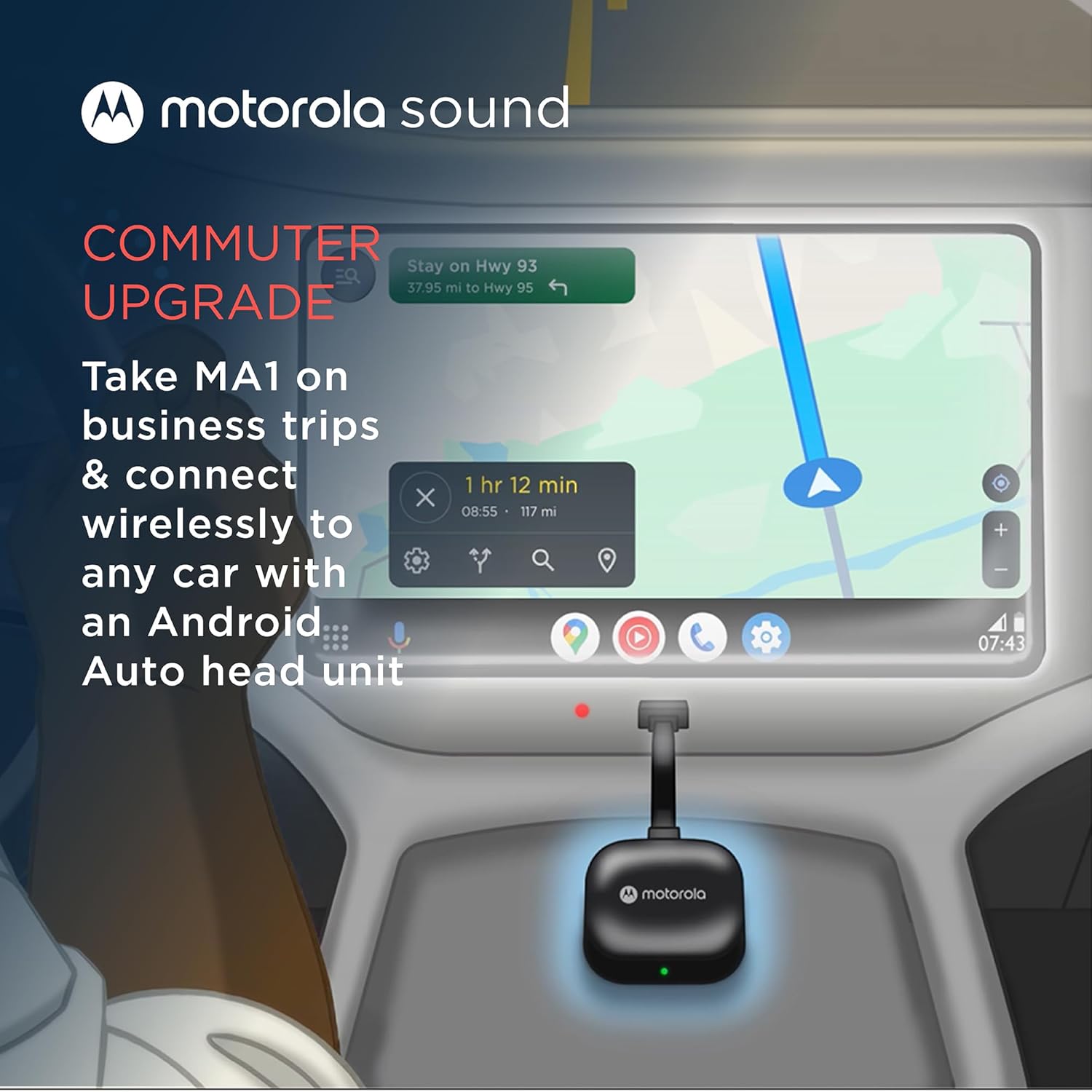
Motorola Sound MA1, The Only Google Authorized Wireless Android Auto Car Adapter, Smartphone to Screen Wireless Bridge Car Accessories, USB Type-A

3.50

지난 32시간 동안 판매됨 43

$ 44.99
$ 48.00
-6.69%

I previously purchased the first adapter to come to market to allow a wireless connection for Android Auto. This was the AAWireless product and it served me well. I have owned it for a few years now.It generally receives the most favorable reviews of all the available adaptors, and this is due in part to its overall quality and the ability to do detailed configuration via the companion app. This is important in that some cars are more finicky with Android Auto than others and for those vehicles the app allows for adjustments to be made.However, for me, my phone often would not connect and I would have to toggle Wi-Fi and Bluetooth on a off to get it to connect. This can be common when you leave your residence and the phone has to switch from you home Wi-Fi to the car Wi-Fi. However, for me, this happened a lot when I was away from home and not switching from one Wi-Fi signal to another. After a few years, I got tired of trying to make configuration adjustments in the app and got tired of toggling Wi-Fi and Bluetooth on a off to get it to connect.On a whim, I decided to try the Motorola adapter. I noted that it is sold as the only USB adapter accessory using "Google-licensed bridge technology" to enable a wireless Android Auto connection. I thought maybe it would be more stable and connect consistently. I also noted that it does not have a companion app and as such, if it did not work, I would be back to my AAWireless product.Turns buying the Motorola was a good decision. It connects every time without fail. No more toggling Wi-Fi and Bluetooth on a off. I connects quickly. If there is a lag, it is when my phone needs to drop the connection to the home Wi-Fi and then connect to this adapter. That happens within about 30 seconds or less and most of the time, it is less. When I am away from home, it connects shortly after starting my vehicle within about 15 seconds.I think which manufacturer makes the best adapter is debatable. The AAWireless product worked well and I am not making this review to suggest it is not an excellent product. However, for me, this one is just simpler (no configuration needed for my vehicle) and it consistently connects and does so quickly. Simple, no drama, and it just works!That makes it the right choice for me and my 2018 Ford F150.

11 현재 누군가가 웹사이트를 탐색 중입니다.

수량:
- +

예상 배송 시간: 12~26일(국제), 3~6일(미국)

구매일로부터 45일 이내에 반품이 가능합니다. 관세 및 세금은 환불되지 않습니다.

  • ASIN:

    B09PQ95GY4

  • BEST_SELLERS_RANK:

    #20 in Car Audio & Video Input Adapters

  • BRAND_NAME:

    Motorola Sound

  • COLOR:

    Black

  • CUSTOMER_REVIEWS:

    3.5 3.5 out of 5 stars (16,243) 3.5 out of 5 stars

  • DATE_FIRST_AVAILABLE:

    January 4, 2022

  • INCLUDED_COMPONENTS:

    Motorola MA1 Wireless Android Auto Car Adapter - Instant Connection Using Google-Licensed Bridge Technology from Smartphone to Screen - USB Type-A Plug-in - Secure Gel Pad

  • ITEM_DIMENSIONS_LXWXH:

    6.3 x 2.17 x 0.39 inches

  • ITEM_PACKAGE_DIMENSIONS_L_X_W_X_H:

    9.02 x 3.07 x 0.67 inches

  • ITEM_WEIGHT:

    70 Grams

  • MANUFACTURER:

    Motorola Sound

  • MATERIAL:

    Plastic

  • MODEL_NAME:

    Motorola MA1 Wireless Android Auto Car Adapter - Instant Connection Using Google-Licensed Bridge Technology from Smartphone to Screen - USB Type-A Plug-in - Secure Gel Pad

  • NUMBER_OF_ITEMS:

    1

  • PACKAGE_WEIGHT:

    0.07 Kilograms

  • PART_NUMBER:

    MA1

  • SIZE:

    Small

  • STYLE:

    Modern

  • SUGGESTED_USERS:

    unisex-adult

  • WARRANTY_DESCRIPTION:

    Warranty

안전한 결제를 보장하세요

제품 상세 정보
Will my phone be compatible? The Motorola MA1 requires a compatible Android phone with an active data plan and 5GHz Wi-Fi support, running at least Android 11.0. This product is not compatible with Apple phones and does not support Apple CarPlay. Will my car be compatible? The Motorola MA1 can enable a wireless Android Auto connection in cars, trucks or motorcycles equipped with factory-fitted wired Android Auto. This product is not compatible with all vehicles - please check with your vehicle manufacturer for details. Will the Motorola MA1 provide Android Auto features to cars not equipped with Android Auto? No. If your vehicle is not equipped with factory-fitted wired Android Auto then the Motorola MA1 will not work and should not be purchased. This product only enables a wireless connection with a factory-fitted wired Android Auto vehicle. What can cause the wireless Android Auto connection with Motorola MA1 to drop out during a journey? Android Auto requires an active data plan and cellular signal. If the cellular signal is lost, the Android phone will switch off Wi-Fi and disconnect from the Motorola MA1 – when cellular signal returns, Wi-Fi turns on and the connection is restored. How can I update the software on the Motorola MA1? The Motorola MA1 is the only wireless USB car adapter using Google-licensed bridge technology. Any updates for the wireless receiver technology contained in the product are delivered via Android Auto app through the Android phone.
고객 리뷰
3.50

(100 점수)

5
21
4
10
3
9
2
12
1
48
댓글 취소
댓글을 남겨주세요

14 논평

Smooth setup and stable connection
2025-12-29    -Chang Chee Hoo

Well received and it arrived 1 week before expected date! Took out the MA1 to my car and was kinda expecting to spend some time setting up in my Civic (FC1) but to my surprise it only took me less than 5 mins and I am good to go ;)Very stable connection so far, driving for 40 mins without disconnection (fyi wired connection is known sometimes disconnects for this civic) and no lag to Spotify and Google map concurrent usage

1.0 out of 5 stars Worth the Wait? NO.
2026-01-29    -The Final Test

Review Written on June 22, 2022>>>SUMMARY>>>The Motorola MA1 was released in January 2022. Due to Amazon's inability to control scalpers artificially inflating prices and my refusal to pay double, I was unable to purchase this product directly from the manufacturer for the MSRP until late June 2022. FIVE MONTHS. That is pathetic. To both Amazon and Meizhou Guo Wei Electronics Co., LTD (the manufacturer of the Motorola MA1), shame on you. If you're buying this for any more than $89.95, it is simply not worth it, due to the pre-attached cord, the power on issue, the inconsistent connection.>>>EQUIPMENT>>>I am utilizing a Pixel 5a and a Pixel 6 phone running the latest version of Android 12. The vehicles that were tested on were a 2020 Hyundai Santa Fe, and a 2022 Kia Seltos, both equipped with Android Auto (wired only) and Apple CarPlay (wired only).>>>PRODUCT REVIEW>>>Starting with Dimensions, the square part of the MA1 measures a roughly 2.125" (2&1/8", 54mm) square, 0.50" (1/2", 12.7mm) thick. The pre-attached cord measures 4.00" (4", 101.6mm) from the square to the tip of the male USB-A port. The cord is not removeable or replaceable and is not very easy to maneuver, making it difficult to mount the MA1 utilizing the (included) adhesive Jel Pad. This also means that when (not if, but when) the cord fails, you will have to buy a new MA1. If you have more than one vehicle that you want to use this for, I would recommend using Velcro (not included) instead of the included Jel Pad. There is one button on the right hand side of the square. This button is used for pairing purposes only. There is a light on the front of the square, which serves as an indicator. The USB-A port is not bi-directional. The entire body is plastic; the top with the logo having a piano black finish, and the bottom having a more rough finish. There's nothing stating what the plastic is, but the manual does state "do not expose to direct sunlight" so possibly some type of ABS.>>>SETUP>>>Before you do anything, plug in your phone directly to your car and make sure Android Auto is set up, otherwise you will have issues! Once you plug in the adapter, the indicator light on the front will start flashing blue. (Pro tip: if you bought it new and the light is flashing green when you first plug it in, you got a used one.) With the blue light flashing, go to the Bluetooth settings on your phone, find the "AndroidAuto-XXX", and connect. This seems like the initial handshake the MA1 does to connect your phone to the MA1's Wi-Fi. You need to have both Bluetooth and Wi-Fi turned on for your phone to use the MA1. I did not time the first pairing, Meizhou Guo Wei Electronics claims the initial pairing takes longer. Every other pairing for me took 30 seconds flat, on both vehicles, with each phone. For comparison, Bluetooth connectivity to each car's radio took 25 seconds.>>>USE>>>Everything works as expected. Phone call quality, good, with some normal amounts of lag. Music sound quality rivals that of Bluetooth, maybe slightly better (I'm not audiophile). It quite literally works like wired Android Auto, just without the wires. EXECPT... For Hyundai and Kia at least, the USB port does not power off immediately when you turn the car off and open the driver door, etc. This means that you will still be connected to the MA1 after you leave your car until the USB port powers off. The MA1 does recognize this (sort of), as your music will pause, but your phone will remain connected regardless until that 10 minute timeout hits and the car powers off the USB port. For the Santa Fe and Kia Seltos, this was roughly 10 minutes, but depending on your vehicle, your experience may vary. Additionally, connection to the MA1 unit does not occur consistently. Some times I wait 5 minutes after powering up my vehicle and no connection happens, other times it works in 30 seconds.>>>ADDITIONAL NOTES>>>Additionally, the indicator light will remain illuminated solid green when connected. The light is fairly bright, and can be distracting depending on how the MA1 is positioned. The packaging was nice, minimal plastic waste. The manual also states "Do not expose your product to fire, explosives or other hazardous conditions"... so don't do that...>>>CONCLUSION>>>After all the hype and the waiting and scalpers, I thought this had better be a perfect device. It is not. Its fatal flaws are the pre-attached cord, the power on issue, the inconsistent connection, and the lack of explosion-proofing (as stated in the manual). Everything else is solid, if you want to support a company that profits off of artificial price gouging.

I previously purchased the first adapter to come to market to allow a wireless connection for Android Auto. This was the AAWireless product and it served me well. I have owned it for a few years now.It generally receives the most favorable reviews of all the available adaptors, and this is due in part to its overall quality and the ability to do detailed configuration via the companion app. This is important in that some cars are more finicky with Android Auto than others and for those vehicles the app allows for adjustments to be made.However, for me, my phone often would not connect and I would have to toggle Wi-Fi and Bluetooth on a off to get it to connect. This can be common when you leave your residence and the phone has to switch from you home Wi-Fi to the car Wi-Fi. However, for me, this happened a lot when I was away from home and not switching from one Wi-Fi signal to another. After a few years, I got tired of trying to make configuration adjustments in the app and got tired of toggling Wi-Fi and Bluetooth on a off to get it to connect.On a whim, I decided to try the Motorola adapter. I noted that it is sold as the only USB adapter accessory using "Google-licensed bridge technology" to enable a wireless Android Auto connection. I thought maybe it would be more stable and connect consistently. I also noted that it does not have a companion app and as such, if it did not work, I would be back to my AAWireless product.Turns buying the Motorola was a good decision. It connects every time without fail. No more toggling Wi-Fi and Bluetooth on a off. I connects quickly. If there is a lag, it is when my phone needs to drop the connection to the home Wi-Fi and then connect to this adapter. That happens within about 30 seconds or less and most of the time, it is less. When I am away from home, it connects shortly after starting my vehicle within about 15 seconds.I think which manufacturer makes the best adapter is debatable. The AAWireless product worked well and I am not making this review to suggest it is not an excellent product. However, for me, this one is just simpler (no configuration needed for my vehicle) and it consistently connects and does so quickly. Simple, no drama, and it just works!That makes it the right choice for me and my 2018 Ford F150.

Parfait, automatique, sans-fil et fluide
2026-01-15    -Phantom

Produit parfait !- installation simple : il suffit de faire l'appairage bluetooth et d'activer le mode debug/wireless dans l'application Android Auto- Utilisation totalement automatique et fluide : au démarrage de la voiture, sur le portable automatiquement le bluetooth est détecté, automatiquement l'application AndroidAuto se lance et se connecte au Wifi, automatiquement sur la voiture AndroidAuto se lance.- interface est parfaitement fluide sur Maps/Spotify... aucune coupure, aucune latenceTesté sur Google Pixel 4a + Citroën C3 Aircross

Smooth setup and stable connection
2026-02-07    -Chang Chee Hoo

Well received and it arrived 1 week before expected date! Took out the MA1 to my car and was kinda expecting to spend some time setting up in my Civic (FC1) but to my surprise it only took me less than 5 mins and I am good to go ;)Very stable connection so far, driving for 40 mins without disconnection (fyi wired connection is known sometimes disconnects for this civic) and no lag to Spotify and Google map concurrent usage

Great solution
2026-02-24    -Ricardo R.

Works well

Perfecto emparejamiento en Renault Kadjar
2026-01-06    -Antonio Virosta

Había probado otros gadets, pero los tuve que devolver porque no conseguía el emparejamiento con mi Renault Kadjar, cuyo sistema multimedia no es compatible con android auto inalámbrico. Con este dispositivo de Motorola todo ha ido correcto. Se emparejó a la primera, y probé todas las funciones, como comandos de voz, Spotify, Waze y Maps.Cuando enciendo el equipo en el coche, apenas tarda 10 segundos en engancharse. He leído que a algunos usuarios, pasado un tiempo se les desincronizaba, pero al poco volvía a sincronizar. A mí hasta ahora no me ha pasado. Espero que siga así todo el tiempo, porque es bastante cómodo eso de no tener que sacar el móvil del bolsillo para engancharlo, aparte de los daños que le puedas hacer al conector con el uso.Eso sí, un pelín caro, pero indudablemente mucho mejor que los que había probado que, siendo algo más baratos, a mí no me sirvieron. A pesar de eso, le doy la máxima puntuación porque realmente funciona de maravilla.

Parfait, automatique, sans-fil et fluide
2026-02-19    -Phantom

Produit parfait !- installation simple : il suffit de faire l'appairage bluetooth et d'activer le mode debug/wireless dans l'application Android Auto- Utilisation totalement automatique et fluide : au démarrage de la voiture, sur le portable automatiquement le bluetooth est détecté, automatiquement l'application AndroidAuto se lance et se connecte au Wifi, automatiquement sur la voiture AndroidAuto se lance.- interface est parfaitement fluide sur Maps/Spotify... aucune coupure, aucune latenceTesté sur Google Pixel 4a + Citroën C3 Aircross

Bozuldu
2026-02-11    -Mustafa karaman

Bir sene sonra ürün bozuldu.

1.0 out of 5 stars Worth the Wait? NO.
2026-01-08    -The Final Test

Review Written on June 22, 2022>>>SUMMARY>>>The Motorola MA1 was released in January 2022. Due to Amazon's inability to control scalpers artificially inflating prices and my refusal to pay double, I was unable to purchase this product directly from the manufacturer for the MSRP until late June 2022. FIVE MONTHS. That is pathetic. To both Amazon and Meizhou Guo Wei Electronics Co., LTD (the manufacturer of the Motorola MA1), shame on you. If you're buying this for any more than $89.95, it is simply not worth it, due to the pre-attached cord, the power on issue, the inconsistent connection.>>>EQUIPMENT>>>I am utilizing a Pixel 5a and a Pixel 6 phone running the latest version of Android 12. The vehicles that were tested on were a 2020 Hyundai Santa Fe, and a 2022 Kia Seltos, both equipped with Android Auto (wired only) and Apple CarPlay (wired only).>>>PRODUCT REVIEW>>>Starting with Dimensions, the square part of the MA1 measures a roughly 2.125" (2&1/8", 54mm) square, 0.50" (1/2", 12.7mm) thick. The pre-attached cord measures 4.00" (4", 101.6mm) from the square to the tip of the male USB-A port. The cord is not removeable or replaceable and is not very easy to maneuver, making it difficult to mount the MA1 utilizing the (included) adhesive Jel Pad. This also means that when (not if, but when) the cord fails, you will have to buy a new MA1. If you have more than one vehicle that you want to use this for, I would recommend using Velcro (not included) instead of the included Jel Pad. There is one button on the right hand side of the square. This button is used for pairing purposes only. There is a light on the front of the square, which serves as an indicator. The USB-A port is not bi-directional. The entire body is plastic; the top with the logo having a piano black finish, and the bottom having a more rough finish. There's nothing stating what the plastic is, but the manual does state "do not expose to direct sunlight" so possibly some type of ABS.>>>SETUP>>>Before you do anything, plug in your phone directly to your car and make sure Android Auto is set up, otherwise you will have issues! Once you plug in the adapter, the indicator light on the front will start flashing blue. (Pro tip: if you bought it new and the light is flashing green when you first plug it in, you got a used one.) With the blue light flashing, go to the Bluetooth settings on your phone, find the "AndroidAuto-XXX", and connect. This seems like the initial handshake the MA1 does to connect your phone to the MA1's Wi-Fi. You need to have both Bluetooth and Wi-Fi turned on for your phone to use the MA1. I did not time the first pairing, Meizhou Guo Wei Electronics claims the initial pairing takes longer. Every other pairing for me took 30 seconds flat, on both vehicles, with each phone. For comparison, Bluetooth connectivity to each car's radio took 25 seconds.>>>USE>>>Everything works as expected. Phone call quality, good, with some normal amounts of lag. Music sound quality rivals that of Bluetooth, maybe slightly better (I'm not audiophile). It quite literally works like wired Android Auto, just without the wires. EXECPT... For Hyundai and Kia at least, the USB port does not power off immediately when you turn the car off and open the driver door, etc. This means that you will still be connected to the MA1 after you leave your car until the USB port powers off. The MA1 does recognize this (sort of), as your music will pause, but your phone will remain connected regardless until that 10 minute timeout hits and the car powers off the USB port. For the Santa Fe and Kia Seltos, this was roughly 10 minutes, but depending on your vehicle, your experience may vary. Additionally, connection to the MA1 unit does not occur consistently. Some times I wait 5 minutes after powering up my vehicle and no connection happens, other times it works in 30 seconds.>>>ADDITIONAL NOTES>>>Additionally, the indicator light will remain illuminated solid green when connected. The light is fairly bright, and can be distracting depending on how the MA1 is positioned. The packaging was nice, minimal plastic waste. The manual also states "Do not expose your product to fire, explosives or other hazardous conditions"... so don't do that...>>>CONCLUSION>>>After all the hype and the waiting and scalpers, I thought this had better be a perfect device. It is not. Its fatal flaws are the pre-attached cord, the power on issue, the inconsistent connection, and the lack of explosion-proofing (as stated in the manual). Everything else is solid, if you want to support a company that profits off of artificial price gouging.

댓글을 남겨주세요:

댓글 제목
댓글 내용
배송 및 반품
우리가 당신을 보호하겠습니다

대부분 지역에서는 배송비를 한 번만 지불하시면 됩니다 (주문 및 배송 페이지를 확인해 주세요).

구매 후 14일 이내 무료 반품 가능 (단, 수명이 다한 제품, 맞춤 제작 상품, 마스크, 향수 및 에어로졸과 같이 위험하거나 인화성 물질이 포함된 일부 제품은 제외).

수입 관세 정보

복잡한 절차는 저희가 처리해 드리겠습니다. 카나리아 제도를 제외한 모든 EU 국가, 영국, 미국, 캐나다, 호주, 뉴질랜드, 푸에르토리코, 스위스, 싱가포르, 한국, 쿠웨이트, 멕시코, 카타르, 인도, 노르웨이, 사우디아라비아, 대만, 태국, UAE, 일본, 브라질, 맨섬, 산마리노, 콜롬비아, 칠레, 아르헨티나, 이집트, 레바논, 홍콩 특별행정구, 바레인, 터키로 배송되는 상품 가격에는 모든 수입 관세가 포함되어 있습니다. 표시된 가격이 최종 결제 금액입니다.

예상 배송 시간

특급 배송: 7-10일

해당 창고에서 배송되었습니다.

더 자세한 정보가 필요하신가요?
반품 정책
반품 정책

저희는 제품 품질에 자신 있습니다. 만약 구매하신 제품에 완전히 만족하지 못하신다면, 수령일로부터 30일 이내에 간편하게 반품하실 수 있도록 정책을 마련해 두었습니다.

간편한 교환 또는 환불
  • 다른 사이즈, 색상 또는 스타일의 상품으로 교환하거나 전액 환불받을 수 있습니다.
  • 반품되는 모든 상품은 착용하지 않은 상태여야 하며, 원래 포장 상태 그대로 모든 태그가 손상되지 않은 상태여야 합니다.
간단한 절차
  • 온라인으로 반품을 신청하거나 고객 서비스 팀에 문의하여 도움을 받으실 수 있습니다.
  • 물품을 제대로 포장해 주시고, 원래의 포장 목록도 함께 넣어주세요.
  • 반품하실 상품을 보내주실 때에는 저희가 제공해 드린 선불 배송 라벨을 사용해 주시기 바랍니다.
  • 환불 요청 접수 즉시 처리해 드리겠습니다.

반품과 관련하여 궁금한 점이나 우려 사항이 있으시면 언제든지 저희 전문 고객 서비스 팀에 문의해 주세요. 고객 만족은 저희의 최우선 목표입니다.

범주
차이
제품
모든 제품 지우기