고객 서비스

판매자들은 가입하면 더 많은 혜택을 누릴 수 있습니다.

모든 주문 무료 배송.

스트리밍 미디어 플레이어

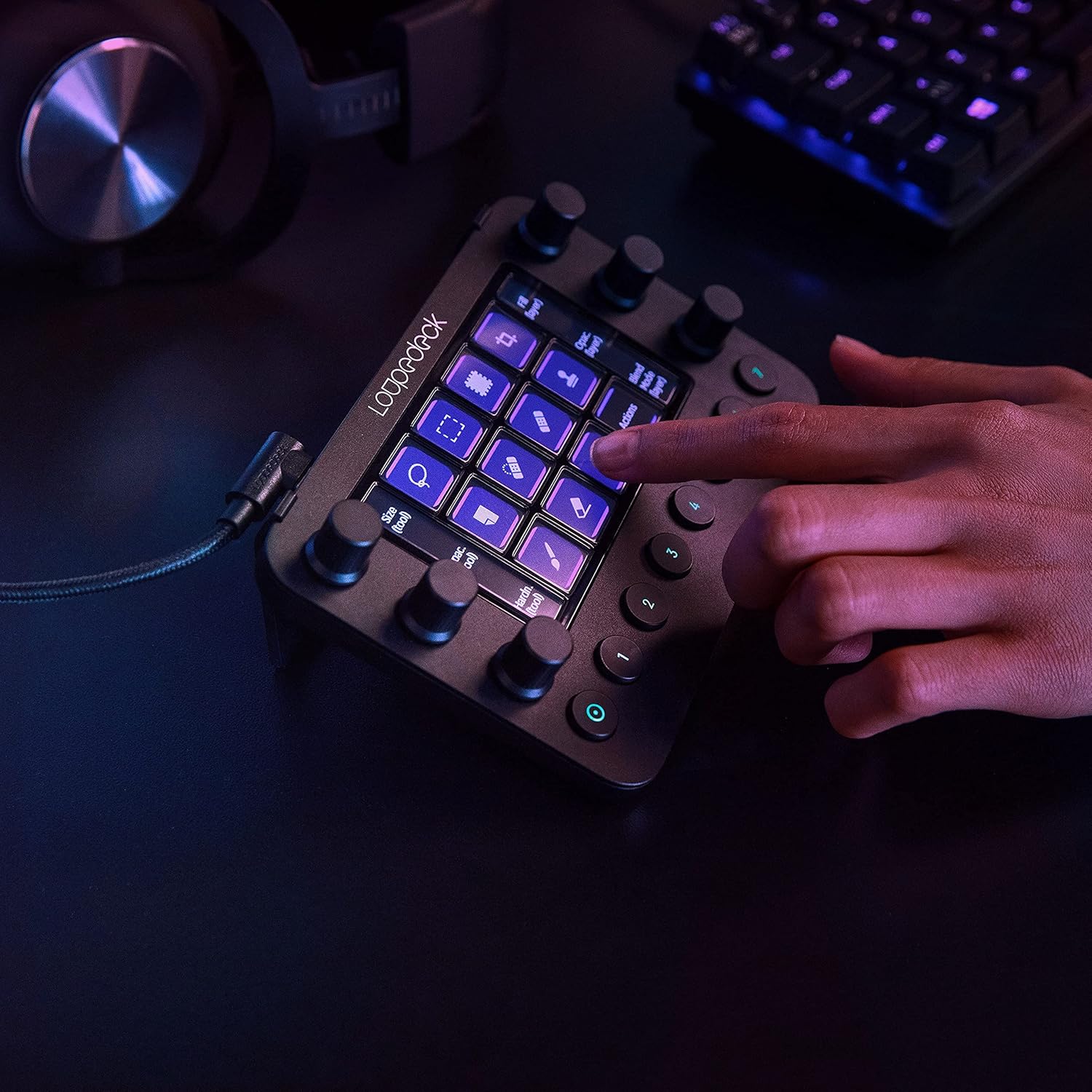
Loupedeck Live – The Custom Console for Live Streaming, Photo and Video Editing with Customizable Buttons, Dials and LED Touchscreen

4.10

지난 32시간 동안 판매됨 20

$ 315.99
$ 339.00
-7.28%

The Loupedeck Live has become an essential tool in my creative workflow in Adobe Premier Pro, Lightroom and Photoshop, revolutionizing the way I work and boosting my efficiency like never before. This versatile device deserves a resounding five-star review for its incredible functionality and seamless integration with my favorite software.First and foremost, the build quality of the Loupedeck Live is outstanding. It feels solid and well-crafted, providing a comfortable and tactile experience during use. The sleek design and intuitive layout of buttons, dials, and sliders make it a joy to interact with, whether I'm editing photos, videos, or working on other creative projects.The real magic of the Loupedeck Live lies in its customization capabilities. With the Loupedeck software, I can easily map and assign functions to each button, dial, and slider based on my specific needs and preferences. This level of personalization allows me to create a tailored setup that perfectly aligns with my workflow, saving me valuable time and effort.The integration of the Loupedeck Live with various creative applications is seamless. It supports popular software like Adobe Photoshop, Lightroom, Premiere Pro, and many others. Having instant access to commonly used tools and functions at my fingertips eliminates the need for keyboard shortcuts and mouse clicks, resulting in a more streamlined and fluid editing experience.The responsiveness of the controls on the Loupedeck Live is impressive. The buttons have a satisfying tactile feedback, and the dials and sliders provide precise adjustments, allowing for fine-tuned control over various parameters. It enhances my ability to make quick and accurate edits, leading to a more refined and polished final product.Another standout feature of the Loupedeck Live is the inclusion of customizable profiles. This allows me to create different profiles for different software or projects, further enhancing the device's versatility. Switching between profiles is a breeze, and it enables me to seamlessly transition between different creative tasks without missing a beat.Finally, the support and regular updates from the Loupedeck team are commendable. They actively listen to user feedback and continuously improve the device's performance and compatibility through firmware updates and software enhancements. It's reassuring to know that the Loupedeck Live is backed by a company dedicated to providing an exceptional user experience.In conclusion, the Loupedeck Live has become an invaluable tool in my creative arsenal. Its exceptional build quality, customization options, seamless integration with software, and responsive controls have elevated both my productivity and creativity. If you're a photographer, videographer, or any creative professional seeking to optimize your workflow, the Loupedeck Live is an absolute game-changer. It's a worthy investment that will undoubtedly enhance your editing experience.

17 현재 누군가가 웹사이트를 탐색 중입니다.

수량:
- +

예상 배송 시간: 12~26일(국제), 3~6일(미국)

구매일로부터 45일 이내에 반품이 가능합니다. 관세 및 세금은 환불되지 않습니다.

  • ASIN:

    B08F7RJYZV

  • BEST_SELLERS_RANK:

    #157,811 in Electronics (See Top 100 in Electronics) #683 in Streaming Media Players

  • BRAND_NAME:

    Loupedeck

  • COLOR_NAME:

    Black

  • CUSTOMER_REVIEWS:

    4.1 4.1 out of 5 stars (1,034) 4.1 out of 5 stars

  • DATE_FIRST_AVAILABLE:

    August 23, 2020

  • ITEM_MODEL_NUMBER:

    LOUPEDECK LIVE

  • ITEM_WEIGHT:

    8.1 ounces

  • MATERIAL:

    Aluminum

  • PRODUCT_DIMENSIONS:

    5.91 x 4.33 x 1.18 inches

  • SPECIAL_FEATURES:

    Backlit

안전한 결제를 보장하세요

제품 상세 정보
Founded in Finland in 2016, Loupedeck is now the leading brand of custom creative consoles within professional and hobbyist workstations. At Loupedeck we are on a mission to empower creatives, by designing custom consoles that transform the creative process into a more intuitive, tactile, and personal experience. We are dedicated to eliminating all barriers so you can create, edit, and stream with no limits. Loupedeck was founded to address the rising demands of creative workflows and the overwhelming complexities of software. Our custom-built consoles solve this with deep integrations, seamless controls, and intuitively designed interfaces that make achieving the perfect edit, easy. At Loupedeck Marketplace you’ll find tools specifically tailored to your console, plus over 200 downloadable profiles, plugins, icon and sound packs. Brand-new content added regularly. Explore marketplace.loupedeck.com.
고객 리뷰
4.10

(100 점수)

5
10
4
6
3
10
2
12
1
62
댓글 취소
댓글을 남겨주세요

16 논평

I have stood by my Loupedeck since I got it a little over a year ago. It works incredibly with both Mac and Windows and although I originally purchased it for streaming which I don’t really do anymore, I have found it to be a great companion for creative workflows. The dials feel incredible and having 6 of them is really nice for managing audios or color grading. This thing just has so many buttons for the price compared to the competitors and is super fast and reliable. A few things to keep in mind:1. The screen buttons don’t actually press, they’re just touchscreen. I actually prefer this as I find it’s a lot easier to actually press them. The lower buttons and the dials do properly click though.2. The stand isn’t adjustable. I ended up replacing it with one of those really cheap tent-style phone stands just to be able to adjust the angle but the stand it comes with is still sturdy enough for use.3. While the setup is easy, it does take a LONG time if you’re really looking to customize. The software is incredible and has a ton of profiles and integrations built in. However, any of these just take some time to setup fully. You can even make it run windows batch files though so the possibilities are really endless.I did end up vinyl wrapping mine as it didn’t come in white and I COVERED it in stickers just since that fits my aesthetic but the device itself looks incredible on its own. The main body is actually metal instead of plastic. I did also include a picture on my cutting mat I took for making the vinyl but it shows the size well. Overall, I love this thing!

The Loupedeck Live has become an essential tool in my creative workflow in Adobe Premier Pro, Lightroom and Photoshop, revolutionizing the way I work and boosting my efficiency like never before. This versatile device deserves a resounding five-star review for its incredible functionality and seamless integration with my favorite software.First and foremost, the build quality of the Loupedeck Live is outstanding. It feels solid and well-crafted, providing a comfortable and tactile experience during use. The sleek design and intuitive layout of buttons, dials, and sliders make it a joy to interact with, whether I'm editing photos, videos, or working on other creative projects.The real magic of the Loupedeck Live lies in its customization capabilities. With the Loupedeck software, I can easily map and assign functions to each button, dial, and slider based on my specific needs and preferences. This level of personalization allows me to create a tailored setup that perfectly aligns with my workflow, saving me valuable time and effort.The integration of the Loupedeck Live with various creative applications is seamless. It supports popular software like Adobe Photoshop, Lightroom, Premiere Pro, and many others. Having instant access to commonly used tools and functions at my fingertips eliminates the need for keyboard shortcuts and mouse clicks, resulting in a more streamlined and fluid editing experience.The responsiveness of the controls on the Loupedeck Live is impressive. The buttons have a satisfying tactile feedback, and the dials and sliders provide precise adjustments, allowing for fine-tuned control over various parameters. It enhances my ability to make quick and accurate edits, leading to a more refined and polished final product.Another standout feature of the Loupedeck Live is the inclusion of customizable profiles. This allows me to create different profiles for different software or projects, further enhancing the device's versatility. Switching between profiles is a breeze, and it enables me to seamlessly transition between different creative tasks without missing a beat.Finally, the support and regular updates from the Loupedeck team are commendable. They actively listen to user feedback and continuously improve the device's performance and compatibility through firmware updates and software enhancements. It's reassuring to know that the Loupedeck Live is backed by a company dedicated to providing an exceptional user experience.In conclusion, the Loupedeck Live has become an invaluable tool in my creative arsenal. Its exceptional build quality, customization options, seamless integration with software, and responsive controls have elevated both my productivity and creativity. If you're a photographer, videographer, or any creative professional seeking to optimize your workflow, the Loupedeck Live is an absolute game-changer. It's a worthy investment that will undoubtedly enhance your editing experience.

Loupedeck Live
2026-02-21    -Mario Fonseca Ramos

Excelente produto ótimo vendedor .

I'm probably not the typical user of a Loupedeck. I bought the Loupedeck about four months ago because it is configurable to whatever you want. It has the functionality that I could define a function or macro for each program I use for the desired buttons, dials etc. OK, I had to spent some time looking up the shortcuts and program them, but now I have all the shortcut available at my fingertips. This is such an improvement to quickly activate something in the programs i use, like start a new document or something else. It feels that some people are making an unfair comparison between doing something through your mouse or looking up the shortcut and programming it in Loupedeck. It takes a little time, but now you can work much faster.It is not clearly stated at the website, but you can program macros for every program you want, which can replicates everything you normally do in a program. You don't have to be a rocket scientist to do this, only a few clicks and you are ready to go.I’m glad I bought the Loupedeck because it makes working with a computer much easier and less intense on using your mouse all day long.

Works well, but takes some time to set it up
2026-02-25    -M. Witherington

I think this device works really well. I use it with Capture One, but also with other photo editing software like Exposure X6. For Capture One the Loupedeck Live works by mimicking the readily available keyboard shortcuts. This works pretty well in general and the Capture One custom profile is a help in setting this up. Having said that I did have to spend a good few hours setting up the device to be how I want it. I could have used the Capture One custom profile straight out of the box, I would say that it does not integrate with Capture One to it's full potential. I used the custom profile as a start point and modified the dials and buttons to suit my needs.The software looks good, but it is a little unwieldy, although with a bit of patience it is easy enough to setup. The software seems stable in operation. The device itself has a really good build quality, the dials and buttons have a nice feel to them. The touch screen also works very well in my opinion.I have started to set up other applications and over time I am sure I will get all of my most used apps integrated into the Loupedeck.Overall I would say that the the Loupedeck Live has increased the speed of editing dramatically and I don't have to touch my keyboard at all while editing. I spend less time looking at sliders and messing with the user interface and more time looking at the image and the effect the sliders are having.One minor gripe is that it needs a longer USB C cable. A one metre cable is provided, but for my setup a two metre cable would be better for my setup. It's a USB C to USB C cable so easy enough to get hold of.I suppose the take away is that if you expect to receive the Loupedeck Live and start using it with applications like Capture One out of the box then you will be disappointed. If you are willing to put some time in to set the device up as you want it then I would say that the result is surprisingly good.NOTE: Before you buy, check the Loupedeck website to see what extended software profiles are available and if one is not available for the software you are intending to use it with then the functionality that Loupedeck Live is capable of supporting is completely linked to the amount of shortcuts the intended software has. Example, Capture One has an impressive number of shortcuts available for many of the sliders and tools within it, so as you might expect each of these shortcuts can be assigned to buttons and dials with Loupedeck Live. DxO have a very limited amount of shortcuts within the software, so as you can imagine the amount of things that Loupedeck Live can be programmed to mimic will be limited.

The Loupedeck Live has become an essential tool in my creative workflow in Adobe Premier Pro, Lightroom and Photoshop, revolutionizing the way I work and boosting my efficiency like never before. This versatile device deserves a resounding five-star review for its incredible functionality and seamless integration with my favorite software.First and foremost, the build quality of the Loupedeck Live is outstanding. It feels solid and well-crafted, providing a comfortable and tactile experience during use. The sleek design and intuitive layout of buttons, dials, and sliders make it a joy to interact with, whether I'm editing photos, videos, or working on other creative projects.The real magic of the Loupedeck Live lies in its customization capabilities. With the Loupedeck software, I can easily map and assign functions to each button, dial, and slider based on my specific needs and preferences. This level of personalization allows me to create a tailored setup that perfectly aligns with my workflow, saving me valuable time and effort.The integration of the Loupedeck Live with various creative applications is seamless. It supports popular software like Adobe Photoshop, Lightroom, Premiere Pro, and many others. Having instant access to commonly used tools and functions at my fingertips eliminates the need for keyboard shortcuts and mouse clicks, resulting in a more streamlined and fluid editing experience.The responsiveness of the controls on the Loupedeck Live is impressive. The buttons have a satisfying tactile feedback, and the dials and sliders provide precise adjustments, allowing for fine-tuned control over various parameters. It enhances my ability to make quick and accurate edits, leading to a more refined and polished final product.Another standout feature of the Loupedeck Live is the inclusion of customizable profiles. This allows me to create different profiles for different software or projects, further enhancing the device's versatility. Switching between profiles is a breeze, and it enables me to seamlessly transition between different creative tasks without missing a beat.Finally, the support and regular updates from the Loupedeck team are commendable. They actively listen to user feedback and continuously improve the device's performance and compatibility through firmware updates and software enhancements. It's reassuring to know that the Loupedeck Live is backed by a company dedicated to providing an exceptional user experience.In conclusion, the Loupedeck Live has become an invaluable tool in my creative arsenal. Its exceptional build quality, customization options, seamless integration with software, and responsive controls have elevated both my productivity and creativity. If you're a photographer, videographer, or any creative professional seeking to optimize your workflow, the Loupedeck Live is an absolute game-changer. It's a worthy investment that will undoubtedly enhance your editing experience.

Loupedeck Live
2026-01-07    -Mario Fonseca Ramos

Excelente produto ótimo vendedor .

I knew this device would be a game changer for streaming and only after a few hours of playing with it I'm in love. The design is really great. It feels like a solid piece of equipment and the knobs have a nice grip and feel to them as well. You can customize the knobs and touch screen for anything you want. I have been using it a lot for background music on Spotify and having the knobs to change volume levels without tabbing out is amazing. The touch screen is extremely responsive and you can add extra pages of buttons and just swipe over the buttons to change pages. The swipe is very smooth and quick and it even works for quick swiping up or down to switch pages and change the custom knobs. The software has a lot to it so it seems a little overwhelming at first but I was able to find my way around. Could maybe be a bit more user friendly but not a huge issue. If you can figure out a stream deck you can most likely figure out this but there is so much more you can do. The software is preloaded with profiles that automatically switch based on whatever program you switch to on your pc. I usually lock the profile so it doesn't switch while I'm streaming. I have noticed a problem where the Spotify integration just seems to stop working and I can't seem to get it back without restarting the Loupedeck. This is a quick fix as the device has a restart option but something that will hopefully be fixed in future software updates. I sent a message to technical support about this. Overall this device is amazing though. Having so much integration with programs from Adobe Photoshop to OBS Studio and so many more is incredible. I can't wait to continue to improve the production quality of my stream and my workflows when I'm creating content with the Loupedeck Live.Edit regarding support from Loupedeck: Still waiting to hear back from support. The automated message said all for 1-2 days for a response but is been well over a week now. I'm still hoping for a response about the Spotify issue.Edit: Support has assured me they are aware of the issues and are currently working on a software update.

Demasiado útil
2026-01-02    -Antonio

Ha sido mas fácil realizar varias tareas en menos tiempo, aunque al inicio es un poco complicado entender el programa después de un rato le agarras la onda.

Great piece of device for my editing needs
2025-12-23    -screamice

Nice, compact and sturdy. Great addition to my editing and 3d needs, hotkeys and macros right in front of you. I love how you can swipe to the right to toggle more commands and group them per workspace. Itd be nice in the future update if they can provide a feature where you can add url links to the buttons, I couldnt figure out how. Other than that, awesome piece of equipment.

댓글을 남겨주세요:

댓글 제목
댓글 내용
배송 및 반품
우리가 당신을 보호하겠습니다

대부분 지역에서는 배송비를 한 번만 지불하시면 됩니다 (주문 및 배송 페이지를 확인해 주세요).

구매 후 14일 이내 무료 반품 가능 (단, 수명이 다한 제품, 맞춤 제작 상품, 마스크, 향수 및 에어로졸과 같이 위험하거나 인화성 물질이 포함된 일부 제품은 제외).

수입 관세 정보

복잡한 절차는 저희가 처리해 드리겠습니다. 카나리아 제도를 제외한 모든 EU 국가, 영국, 미국, 캐나다, 호주, 뉴질랜드, 푸에르토리코, 스위스, 싱가포르, 한국, 쿠웨이트, 멕시코, 카타르, 인도, 노르웨이, 사우디아라비아, 대만, 태국, UAE, 일본, 브라질, 맨섬, 산마리노, 콜롬비아, 칠레, 아르헨티나, 이집트, 레바논, 홍콩 특별행정구, 바레인, 터키로 배송되는 상품 가격에는 모든 수입 관세가 포함되어 있습니다. 표시된 가격이 최종 결제 금액입니다.

예상 배송 시간

특급 배송: 7-10일

해당 창고에서 배송되었습니다.

더 자세한 정보가 필요하신가요?
반품 정책
반품 정책

저희는 제품 품질에 자신 있습니다. 만약 구매하신 제품에 완전히 만족하지 못하신다면, 수령일로부터 30일 이내에 간편하게 반품하실 수 있도록 정책을 마련해 두었습니다.

간편한 교환 또는 환불
  • 다른 사이즈, 색상 또는 스타일의 상품으로 교환하거나 전액 환불받을 수 있습니다.
  • 반품되는 모든 상품은 착용하지 않은 상태여야 하며, 원래 포장 상태 그대로 모든 태그가 손상되지 않은 상태여야 합니다.
간단한 절차
  • 온라인으로 반품을 신청하거나 고객 서비스 팀에 문의하여 도움을 받으실 수 있습니다.
  • 물품을 제대로 포장해 주시고, 원래의 포장 목록도 함께 넣어주세요.
  • 반품하실 상품을 보내주실 때에는 저희가 제공해 드린 선불 배송 라벨을 사용해 주시기 바랍니다.
  • 환불 요청 접수 즉시 처리해 드리겠습니다.

반품과 관련하여 궁금한 점이나 우려 사항이 있으시면 언제든지 저희 전문 고객 서비스 팀에 문의해 주세요. 고객 만족은 저희의 최우선 목표입니다.

범주
차이
제품
모든 제품 지우기