
스캐너
Plustek Mobile Scanner S410 Plus - Portable Sheet-Fed Document Scanner - for Windows 7 / 8 / 10 / 11, Featuring Button-Free Scanning with Included OCR Software
4.20
지난 32시간 동안 판매됨 30
$ 99.00
$ 105.00
-6.06%
Great little scanner! Works fine with my Surface Pro 8, does exactly what I need it to do. Images are quite nice. I have mainly used it to scan and file documents but so far it works great. Comes with a cord that hooks right in to the A port on my dock that sits on my desk.
23 현재 누군가가 웹사이트를 탐색 중입니다.
수량:
-
+
예상 배송 시간: 12~26일(국제), 3~6일(미국)
구매일로부터 45일 이내에 반품이 가능합니다. 관세 및 세금은 환불되지 않습니다.
-
ASIN:
B09LD2SXWC
-
BEST_SELLERS_RANK:
#27,929 in Office Products (See Top 100 in Office Products) #30 in Document Scanners
-
CUSTOMER_REVIEWS:
4.2 4.2 out of 5 stars (143) 4.2 out of 5 stars
-
DATE_FIRST_AVAILABLE:
December 15, 2021
-
ITEM_MODEL_NUMBER:
314
-
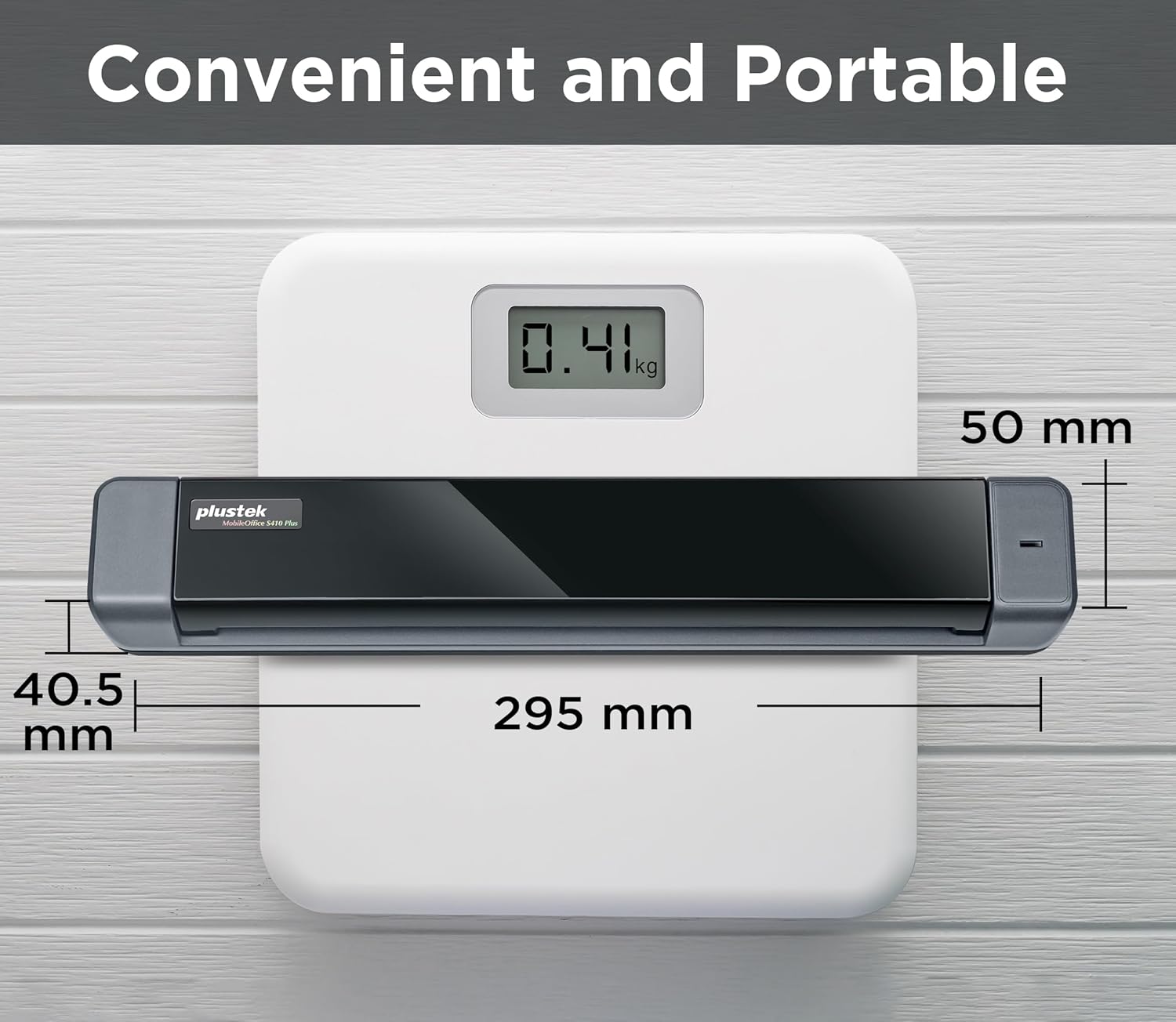
ITEM_WEIGHT:
14.4 ounces
-
MANUFACTURER:
Plustek
-
PRODUCT_DIMENSIONS:
1.6 x 11.7 x 1.9 inches
안전한 결제를 보장하세요






제품 상세 정보
Convert scanned paper document into search PDF or editable files.
Automated image crop and deskew
The included TWAIN driver ensures compatibility with thousands of software application and systems
My Laptop/PC don't have CD-ROM How can I install driver & software?
For user who's Laptop/PC don't have CD-ROM, can follow quick installation guide driver download link, or visit Plustek website download driver to install.
How can I launch DocAction software with Windows system to change scan setting
After install the driver and software, you can open DocAction by double click the icon in the taskbar, which is located on the bottom right corner.
Is scanner can auto crop image size? if I scan receipt or letter size document
The S410 Plus default enable auto deskew and crop function.You will get the complete scanned image without any black edge.
How to deal with the strips or bands on the scanned images?
If the colors of scanned images are not correct or there are strips on the images. Use bundle calibration target to calibration the scanner, you can visit Plustek website, select S410 plus to see tutorial video
Where I can find help for Plustek MobileOffice S410 plus?
If you need help with any issue or question, Visit Plustek website, click the chat windows at the bottom right corner to contact our engineer.
고객 리뷰
4.20
(100 점수)
댓글 취소
댓글을 남겨주세요

배송 및 반품
우리가 당신을 보호하겠습니다
대부분 지역에서는 배송비를 한 번만 지불하시면 됩니다 (주문 및 배송 페이지를 확인해 주세요).
구매 후 14일 이내 무료 반품 가능 (단, 수명이 다한 제품, 맞춤 제작 상품, 마스크, 향수 및 에어로졸과 같이 위험하거나 인화성 물질이 포함된 일부 제품은 제외).
수입 관세 정보
복잡한 절차는 저희가 처리해 드리겠습니다. 카나리아 제도를 제외한 모든 EU 국가, 영국, 미국, 캐나다, 호주, 뉴질랜드, 푸에르토리코, 스위스, 싱가포르, 한국, 쿠웨이트, 멕시코, 카타르, 인도, 노르웨이, 사우디아라비아, 대만, 태국, UAE, 일본, 브라질, 맨섬, 산마리노, 콜롬비아, 칠레, 아르헨티나, 이집트, 레바논, 홍콩 특별행정구, 바레인, 터키로 배송되는 상품 가격에는 모든 수입 관세가 포함되어 있습니다. 표시된 가격이 최종 결제 금액입니다.
예상 배송 시간
특급 배송: 7-10일
해당 창고에서 배송되었습니다.
반품 정책
반품 정책
저희는 제품 품질에 자신 있습니다. 만약 구매하신 제품에 완전히 만족하지 못하신다면, 수령일로부터 30일 이내에 간편하게 반품하실 수 있도록 정책을 마련해 두었습니다.
간편한 교환 또는 환불
- 다른 사이즈, 색상 또는 스타일의 상품으로 교환하거나 전액 환불받을 수 있습니다.
- 반품되는 모든 상품은 착용하지 않은 상태여야 하며, 원래 포장 상태 그대로 모든 태그가 손상되지 않은 상태여야 합니다.
간단한 절차
- 온라인으로 반품을 신청하거나 고객 서비스 팀에 문의하여 도움을 받으실 수 있습니다.
- 물품을 제대로 포장해 주시고, 원래의 포장 목록도 함께 넣어주세요.
- 반품하실 상품을 보내주실 때에는 저희가 제공해 드린 선불 배송 라벨을 사용해 주시기 바랍니다.
- 환불 요청 접수 즉시 처리해 드리겠습니다.
반품과 관련하여 궁금한 점이나 우려 사항이 있으시면 언제든지 저희 전문 고객 서비스 팀에 문의해 주세요. 고객 만족은 저희의 최우선 목표입니다.