고객 서비스

판매자들은 가입하면 더 많은 혜택을 누릴 수 있습니다.

모든 주문 무료 배송.

인쇄기

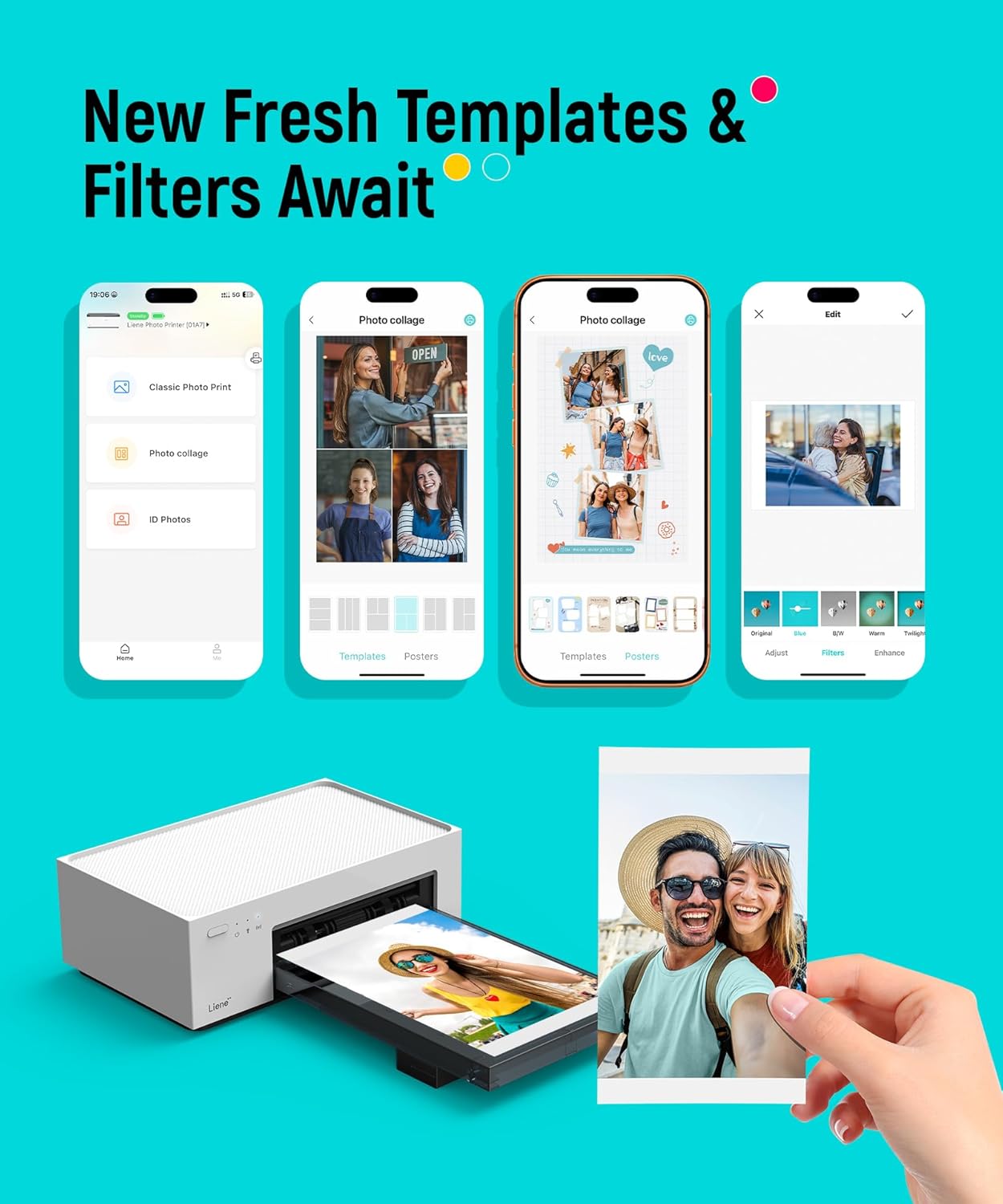
Liene M100 4x6'' Photo Printer, Phone Printer 100 Sheets & 3 Cartridges, Full-Color Photo, Portable Instant Photo Printer for iPhone Android, Thermal Dye Sublimation, Wi-Fi Picture Printer 100 Papers

4.50

지난 32시간 동안 판매됨 32

$ 159.99
$ 160.00
-0.01%

Wow! What a nifty printer to have on hand. We purchased ours and gifted one. This is one of the easiest printers to use. It’s fantastic printing from your phone.This is one of the best purchases we’ve made. So much so we gifted one to our granddaughter. Super cool for new parents. She has really enjoyed it and didn’t know anything like this existed.Highly recommend. Great photos. Quality printing. Very impressive.

16 현재 누군가가 웹사이트를 탐색 중입니다.

Style
Printer+20 Sheets Printer+100 Sheets Battery Printer+20 Sheets
수량:
- +

예상 배송 시간: 12~26일(국제), 3~6일(미국)

구매일로부터 45일 이내에 반품이 가능합니다. 관세 및 세금은 환불되지 않습니다.

  • ADDITIONAL_PRINTER_FUNCTIONS:

    Print Only

  • ASIN:

    B09XHYNHB2

  • BEST_SELLERS_RANK:

    #606 in Office Products (See Top 100 in Office Products) #1 in Desktop Photo Printers

  • COLOR_DEPTH:

    24 bpp

  • COMPATIBLE_CARTRIDGE:

    Liene proprietary cartridges

  • COMPATIBLE_DEVICES:

    Laptops, PC, Smartphones

  • CONTROL_METHOD:

    App

  • CUSTOMER_REVIEWS:

    4.5 4.5 out of 5 stars (6,233) 4.5 out of 5 stars

  • DATE_FIRST_AVAILABLE:

    July 10, 2022

  • DUAL_SIDED_PRINTING:

    No

  • DUPLEX:

    Manual

  • GLOBAL_TRADE_IDENTIFICATION_NUMBER:

    06971398601060

  • HARDWARE_INTERFACE:

    USB Type C

  • INCLUDED_COMPONENTS:

    photo printer, power adapter, paper cassette, ink cartridge, photo paper

  • INITIAL_PAGE_PRINT_TIME:

    59 seconds

  • INK_COLOR:

    Cyan, Magenta, Yellow, Black

  • ITEM_MODEL_NUMBER:

    DHP513

  • ITEM_WEIGHT:

    6.32 pounds

  • MANUFACTURER:

    Hannto Technology Co., Ltd.

  • MAX_COPY_RESOLUTION_BLACK_WHITE:

    300 x 300 DPI

  • MAX_COPY_RESOLUTION_COLOR:

    300 x 300 DPI

  • MAX_INPUT_SHEET_CAPACITY:

    20

  • MAXIMUM_BLACK_AND_WHITE_PRINT_RESOLUTION:

    300 x 300

  • MAXIMUM_COLOR_PRINT_RESOLUTION:

    300 x 300 dpi

  • MAXIMUM_MEDIA_SIZE:

    4 x 6 inch

  • MEMORY_STORAGE_CAPACITY:

    32 MB

  • MODEL_SERIES:

    DHP513

  • NUMBER_OF_TRAYS:

    1

  • OUTPUT_SHEET_CAPACITY:

    20

  • PRINT_MEDIA:

    Glossy photo paper

  • PRINTER_INK_TYPE:

    proprietary

  • PRINTER_RESOLUTION_BW_HORIZ_MAX:

    1 Inches

  • PRINTER_RESOLUTION_BW_VERT_MAX:

    1 Inches

  • PROCESSOR_COUNT:

    1

  • PRODUCT_DIMENSIONS:

    7.48 x 9.84 x 7.48 inches

  • SCANNER_TYPE:

    Photo

  • SHEET_SIZE:

    4x6 Inches

  • SPECIFIC_USES_FOR_PRODUCT:

    Home, Office

  • SUPPORTED_MEDIA_SIZES:

    4 x 6 inches

  • TOTAL_USB_PORTS:

    1

  • WARRANTY_TYPE:

    12-month warranty

  • WATTAGE:

    60 watts

안전한 결제를 보장하세요
제품 상세 정보
Swipe to See More → Previous page Every moment that we explore the insights of the future, is always dedicated to inspiration and aspiration. Hannto Technology is eager to collaborate with the open environment of this era, and contribute more happiness and love to everyone on a global scale, this is the story that LIENE was born. We expect everybody could join this brand family, grow and search a wonderful future. Load photo paper into photo cassette. Place the ink cartridge into the printer. Turn on the printer, when the power light is solid and stops flashing, the light turns orange. Use your devices to connect the printer. Is the printer easy to use from installation to use? This photo printer is easy to use in 3 steps: 1. Install the ink cartridge and photo paper. 2. Connect the power cord and turn it on. 3. Print via the app or directly from the photo album. Can I still use it If I don't have Wi-Fi at home? Yes, you can. The Liene photo printer has a built-in hotspot and also supports a USB connection. You can connect your device via the printer’s hotspot. Does the photo printer come with photo paper at the time of purchase? Need to buy additional photo paper separately? The Liene photo printer set comes with 1 ink cartridge and 20 sheets of photo paper. Our store also sells photo paper sets that include with 1 ink cartridge and 40 sheets of photo paper. And a set of 2 ink cartridges and 80 sheets. What if I don't want to use the app to print photos? You can print photos directly from your iPhone or Android phone's local photo album. Plus, you can print photos from a Mac or Windows-based laptop or desktop via Wi-Fi or USB. PixCut S1 Sticker Maker Pearl N200 Pro (Gold) Pearl N200 Pro (Purple) Bluetooth Photo Printer 2x3 Printer (50 Sheets) 4x6 Printer (100 Sheets) 4x6 Battery Printer
고객 리뷰
4.50

(100 점수)

5
7
4
2
3
4
2
8
1
79
댓글 취소
댓글을 남겨주세요

24 논평

I bought this as my primary printer is a color laser printer, and so I needed something that could handle picture and ID photo printing. I despise inkjet printers since I don't use them often enough to keep the ink from drying out and clogging the nozzle.That left a dye sublimation printer like this little Liene. It's as reliable as my laser printer even without regular use, delivers prints that are every bit as good as photo printing services, and it's relatively cheap per print if you buy the cartridges in bulk.It's also extremely easy to use, especially from a phone. Just connect to the printer Wi-Fi, open it's companion app, and you're off.I also use it for ID photo prints and not only is it great for that, but the app even helps you size and crop the photos to match the size/composition requirements.Overall this is is an amazing little printer!

Wow! What a nifty printer to have on hand. We purchased ours and gifted one. This is one of the easiest printers to use. It’s fantastic printing from your phone.This is one of the best purchases we’ve made. So much so we gifted one to our granddaughter. Super cool for new parents. She has really enjoyed it and didn’t know anything like this existed.Highly recommend. Great photos. Quality printing. Very impressive.

5.0 out of 5 stars Worth the hype.
2025-12-26    -Jamie Martin

This little photo printer works very well. We were looking for something to print small pictures quickly for our kids. And this does just that. It prints fast and well. The pics are quality.

It’s just not open
2026-02-07    -Horrible ,u sent to me broken item!!!!

Very very badNot working

Su calidad y muy buen precio
2026-01-30    -Sara Wong Be

Es excelente producto el que pego trae dos cartuchos y 80 hojas,imprime con los colores tal cual es la imagen,lo que me gustó es que su aplicación trae aunque solo dos opciones para editar tu foto.lo recomiendo.

Su calidad y muy buen precio
2026-01-10    -Sara Wong Be

Es excelente producto el que pego trae dos cartuchos y 80 hojas,imprime con los colores tal cual es la imagen,lo que me gustó es que su aplicación trae aunque solo dos opciones para editar tu foto.lo recomiendo.

2 thumbs up, a great printer
2026-01-19    -Shannon Tombs

This photo printer is a great product. The pictures are perfect!! The colours are so vibrant and crisp. The app and printer are very simple to use. I would definitely recommend this printer! Delivery was quick and product was well packaged.

[ Update July 18, 2025. The company got in touch regarding some of the observations in the review and has said they're working on software and documentation updates. I appreciate their response and for that reason I'm adding 1 star to the rating. If the software updates are good I'll definitely increase to 5 stars. Considering the excellent print quality, it's certainly worth 5 stars.]The print quality is fantastic. I've been taking and printing photographs for a long time and have never seen such excellent quality right out of the box, so to speak. The Liene completely smokes my wife's older Epson 4x6 inkjet printer (which we stopped using due to connection problems and inkjet clogging).«Liene Image quality»Given a properly exposed and correctly color-balanced original image, you'll get outstanding print quality—see the photos I've attached to the review. The reproduction of the bright red in the one picture is flawless. (Both were taken by a mobile phone.) Neither photo has gained or lost contrast. The neutral areas are very clean. Highlight detail is preserved perfectly. The prints are 99% faithful to the originals. Excellent results.«Connection»We connected a Google Pixel 7A and an iPhone 16 to the printer without difficulty right after installing the Liene apps. The connections were instant—faster than Bluetooth.Now the bad news—why I gave the printer 3 stars instead of the 5 stars it deserves (!).Part of the problem is the software itself. There are also major documentation issues. Liene has got to improve its documentation!«Internet access disabled»Apparently by design, the Liene private wifi network is not meant to connect to the internet. On both Android and iPhone, when we connect the phones to the printer their internet access is disabled even if the phones are still connected to our home wifi. I'm guessing this is how it's supposed to work when a phone connects to a private wifi network lacking internet access.When we were running the Liene app and wanted to connect from within it to Liene's own site, we first had to turn off the phone-to-printer connection.It might all be by design but it was downright confusing until we realized the private network was the problem. Liene should document this _explicitly_.«Compatibility issue: Lenovo tablet»The Google Play store informed me that the Liene app can't be installed on my Lenovo tablet, which is running the latest Android version. The software just isn't compatible with that model. Disappointing. I don't know if this applies to other Android tablets or iPads. It's another thing Liene should document explicitly. (But, why not make the app compatible with tablets in the first place?)«Unpleasant bug in the iPhone app»When I print from the Android phone, when I'm done I can return immediately to my photo gallery (within the Liene app) and find something else to print. No such luck with the iPhone.After my wife made her first print on the iPhone, the Liene app has remained stuck on that first image. We haven't been able to "clear" the photo and display her photo gallery again within the app. It seems to me we'll have to uninstall and reinstall the app on her phone. But then we might have the same problem again. Super annoying.She did find a workaround: She opens the iPhone's photo gallery, picks one or more image(s), and prints directly to the Liene. But then she can't select certain features provided by the Liene app. She's ok with it for now, but it's far from ideal. That bug needs fixing.The workaround doesn't work at all on my Android phone. When I try it, I get only an error message saying that the phone can't find the printer, even though they are already connected. It's another thing Liene needs to fix.«Annoying design flaw in the Android app»I was kind of astonished that I can print only one image at a time via the Liene app. It does not support selecting more than one image at a time. Come on, Liene—why limit the software that way? It isn't exactly a benefit to the user.Conclusion:So we figured out how to deal with these issues, and as I say the print quality is outstanding. We'll live with limitations for now considering the high quality prints. But Liene REALLY needs to work on its software issues and documentation.

5.0 out of 5 stars Great product!
2026-01-28    -Amazon Customer

Very happy with this photo printer. Pictures are very clear, color is perfect. Easy to operate. Compact storage.

5.0 out of 5 stars Love this thing!
2026-02-24    -Casi K.

I got this as a part of a "paper" anniversary gift and I'm (overall) very happy with it!Pros:- It prints pretty good quality photos- Easy to get up and running/set up- Seems to print around 10 (ish) photos before you need a new cart- Nice size- Easy to put a new cartridge in or more printer paperCons:- Does take a second before it starts printing- If scrolling for too long to find a photo, it will turn off and you have to reconnect the printer to your phone (though that could be seen as a pro as well if you forget to turn it off)- A bit annoying it connects through your wifi vs bluetooth because then you're disconnected to wifi on your phone which can slow down scrolling on google photos or when using apps to make collages- Cuts off things in a photo vs fitting the photo to the size of photo sheetOverall very happy with this printer because it's doing what I want it to do. The pictures I've attached are different in sizing and stuff because I'll sometimes screenshot photos zoomed out on my iPhone so it prevents the printer from cutting things off (just incase you're wondering how I got some of my photos to be like they are). Side note, the scribbles on the kids faces are only because those aren't my kids and I don't want to post them without permission!

댓글을 남겨주세요:

댓글 제목
댓글 내용
배송 및 반품
우리가 당신을 보호하겠습니다

대부분 지역에서는 배송비를 한 번만 지불하시면 됩니다 (주문 및 배송 페이지를 확인해 주세요).

구매 후 14일 이내 무료 반품 가능 (단, 수명이 다한 제품, 맞춤 제작 상품, 마스크, 향수 및 에어로졸과 같이 위험하거나 인화성 물질이 포함된 일부 제품은 제외).

수입 관세 정보

복잡한 절차는 저희가 처리해 드리겠습니다. 카나리아 제도를 제외한 모든 EU 국가, 영국, 미국, 캐나다, 호주, 뉴질랜드, 푸에르토리코, 스위스, 싱가포르, 한국, 쿠웨이트, 멕시코, 카타르, 인도, 노르웨이, 사우디아라비아, 대만, 태국, UAE, 일본, 브라질, 맨섬, 산마리노, 콜롬비아, 칠레, 아르헨티나, 이집트, 레바논, 홍콩 특별행정구, 바레인, 터키로 배송되는 상품 가격에는 모든 수입 관세가 포함되어 있습니다. 표시된 가격이 최종 결제 금액입니다.

예상 배송 시간

특급 배송: 7-10일

해당 창고에서 배송되었습니다.

더 자세한 정보가 필요하신가요?
반품 정책
반품 정책

저희는 제품 품질에 자신 있습니다. 만약 구매하신 제품에 완전히 만족하지 못하신다면, 수령일로부터 30일 이내에 간편하게 반품하실 수 있도록 정책을 마련해 두었습니다.

간편한 교환 또는 환불
  • 다른 사이즈, 색상 또는 스타일의 상품으로 교환하거나 전액 환불받을 수 있습니다.
  • 반품되는 모든 상품은 착용하지 않은 상태여야 하며, 원래 포장 상태 그대로 모든 태그가 손상되지 않은 상태여야 합니다.
간단한 절차
  • 온라인으로 반품을 신청하거나 고객 서비스 팀에 문의하여 도움을 받으실 수 있습니다.
  • 물품을 제대로 포장해 주시고, 원래의 포장 목록도 함께 넣어주세요.
  • 반품하실 상품을 보내주실 때에는 저희가 제공해 드린 선불 배송 라벨을 사용해 주시기 바랍니다.
  • 환불 요청 접수 즉시 처리해 드리겠습니다.

반품과 관련하여 궁금한 점이나 우려 사항이 있으시면 언제든지 저희 전문 고객 서비스 팀에 문의해 주세요. 고객 만족은 저희의 최우선 목표입니다.
범주
차이
제품
모든 제품 지우기