고객 서비스

판매자들은 가입하면 더 많은 혜택을 누릴 수 있습니다.

모든 주문 무료 배송.

인쇄기

iDPRT Portable-Printer Wireless for Travel, 300DPI Inkless-Thermal-Small-Printers for Home Use, Office, Vehicles, Mobile Bluetooth Printer Supports 8.5" x 11" US Letter, for Smartphone & PC,MY890

4.10

지난 32시간 동안 판매됨 49

$ 45.99
$ 49.00
-6.54%

The media could not be loaded. I found it hardest to connect by my laptop because of all the things you had to go into after you downloaded the stuff for it on the laptop, took forever trying to figure it out so I just had success connecting it to my phone by Bluetooth through the app you download for it on your phone and printing happened immediately, and I love all the controls on the app for the printer how you can make your ink and paper then the ink quality really good just choose the darkness and lightness of your prints carefully to turn out good.The only horrible thing about this is the SOUND, I was covering my ears when it prints... it's a really shrieky annoying screech like noise only last few seconds the whole time it's printing.I love you can sit this anywhere and print anything, it's all black and white ink but it's still nice.The directions pretty easy far as how to connect and turn the printer on and love the added thermal paper it already comes with for a start because I used all those for trat printing but it was all folded and I didn't like that really.I was testing this for papers I'm making to go with hand written gospel tracts I made.I'm printing this from Google Docs/Drive, pictures of the Lord Jesus to show His shroud for His resurrection and that it's visual proof He paid for our sin and you can see your Saviour's face.

11 현재 누군가가 웹사이트를 탐색 중입니다.

Color
Blue White White-Grey Dark Black Black
Style
MT890 MT610 pro
수량:
- +

예상 배송 시간: 12~26일(국제), 3~6일(미국)

구매일로부터 45일 이내에 반품이 가능합니다. 관세 및 세금은 환불되지 않습니다.

  • ADDITIONAL_PRINTER_FUNCTIONS:

    Print Only

  • ASIN:

    B0CXPVH459

  • BATTERIES:

    1 Lithium Polymer batteries required. (included)

  • BEST_SELLERS_RANK:

    #36,270 in Office Products (See Top 100 in Office Products) #59 in Portable Thermal Printers

  • COLOR_DEPTH:

    24 bpp

  • COMPATIBLE_CARTRIDGE:

    No Toner, inkless

  • COMPATIBLE_DEVICES:

    Laptops, PC, Smartphones, Tablets

  • CONTROL_METHOD:

    App

  • CONTROLLER_TYPE:

    Android, iOS

  • CUSTOMER_REVIEWS:

    4.1 4.1 out of 5 stars (685) 4.1 out of 5 stars

  • DATE_FIRST_AVAILABLE:

    May 8, 2024

  • DUAL_SIDED_PRINTING:

    No

  • DUPLEX:

    Automatic

  • HARDWARE_INTERFACE:

    USB Type C

  • INCLUDED_COMPONENTS:

    1 x Instruction Manual, 1 x MT890 Portable Printer, 1 x Thermal Paper Roll, 1 x USB Data Cable, APP "HerePrint"

  • INITIAL_PAGE_PRINT_TIME:

    8 Seconds

  • INK_COLOR:

    No ink

  • ITEM_MODEL_NUMBER:

    MT890

  • ITEM_WEIGHT:

    3.03 pounds

  • MANUFACTURER:

    iDPRT

  • MAX_COPY_RESOLUTION_BLACK_WHITE:

    203 dpi

  • MAX_COPY_RESOLUTION_COLOR:

    203 dpi

  • MAX_INPUT_SHEET_CAPACITY:

    100

  • MAXIMUM_BLACK_AND_WHITE_PRINT_RESOLUTION:

    203 dpi

  • MAXIMUM_COLOR_PRINT_RESOLUTION:

    203 dpi

  • MAXIMUM_MEDIA_SIZE:

    8.5 x 11 inch

  • MODEL_SERIES:

    Thermal Printer

  • NUMBER_OF_USB_2_PORTS:

    1

  • PRINT_MEDIA:

    Labels

  • PRINTER_INK_TYPE:

    no Ink

  • PROCESSOR_COUNT:

    1

  • PRODUCT_DIMENSIONS:

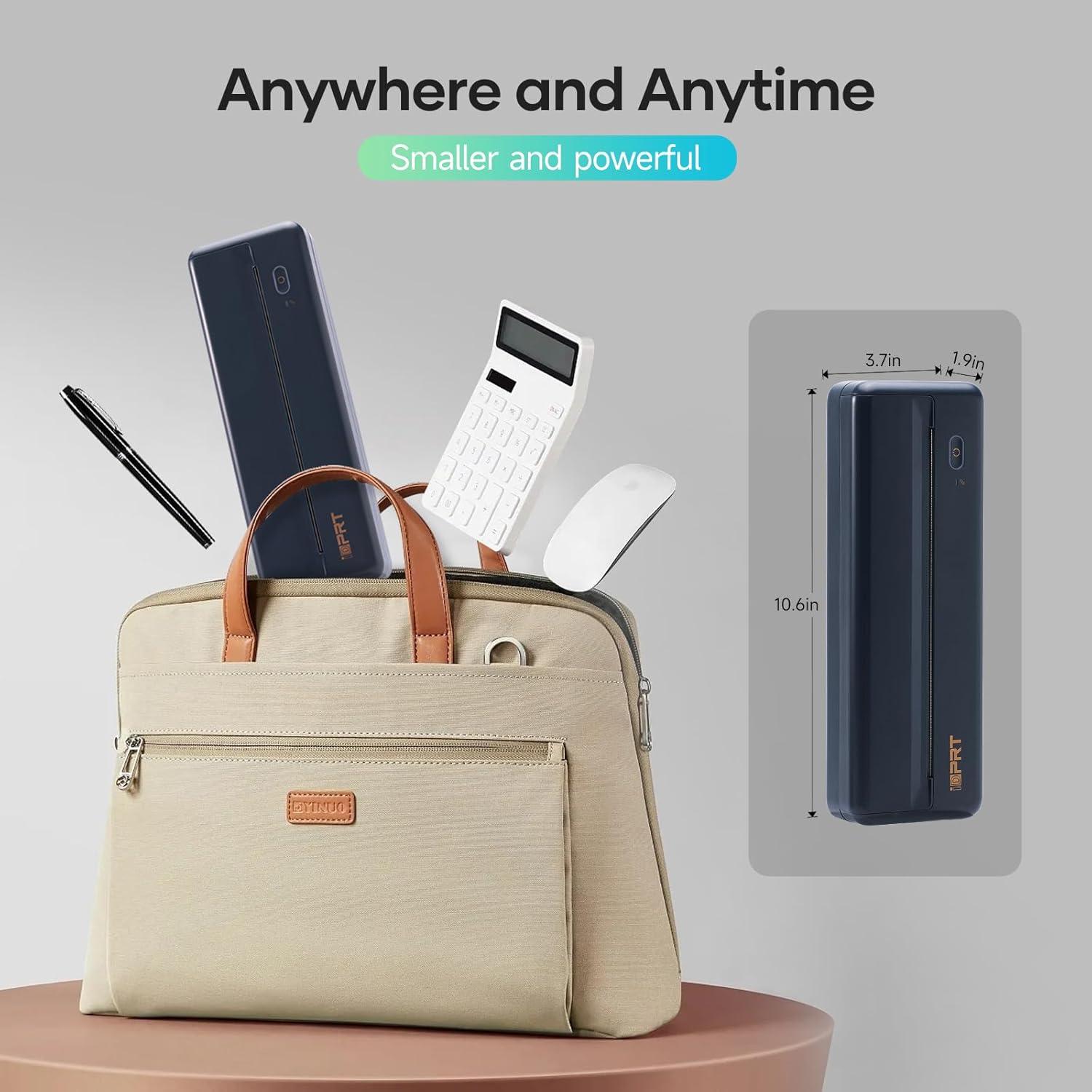
    10.6 x 3.75 x 2 inches

  • SCANNER_TYPE:

    No Scanner

  • SHEET_SIZE:

    8.5x11 inch Inches

  • SPECIFIC_USES_FOR_PRODUCT:

    Enterprise, Home, Office

  • SUPPORTED_MEDIA_SIZES:

    Letter (8.5 x 11 inches)

  • TOTAL_USB_PORTS:

    1

  • WARRANTY_TYPE:

    Extended

  • WATTAGE:

    7.4 Watt-hours

안전한 결제를 보장하세요

제품 상세 정보
Your future printer, More Creation, More Possibilities Founded in 2017, “iDPRT” to be specialized in the R&D, manufacturing and sales of the Hardware and Software solutions for the Auto Identification and Data Collection (AIDC) application, such as different types of barcode printers, label printer, card printers, PDA, RFID barcode printers, etc. iDPRT's advanced thermal printing technology reduces the cost of ink or toner, and the compact design of the printer makes it the best for individual or corporate use. Step 1: Download APP "HerePrint"; Step 2: Turn on the MT890 and make a Bluetooth connection in the APP; Step 3: Click the "+" sign to complete the device connection and select the file type to start print Step 1. Enter the URL of iDPRT driver in the browser Step 2. Enter "MT890" in the search box Step 3. Select the corresponding system to download and install the driver Step 4. Use the USB cable to connect the MT890 printer to your computer Step 5: Select and open your document, and choose iDPRT MT890 in the printer list MT890 Printer + 3 Rolls 2 Pcs MT890 Thermal Paper New Version MT610 Printer New Version MT610 Printer 2 inch Label Maker 300DPI Portable Printer 200 Sheets Letter Paper
고객 리뷰
4.10

(100 점수)

5
12
4
3
3
8
2
13
1
64
댓글 취소
댓글을 남겨주세요

22 논평

5.0 out of 5 stars Easy printer!
2026-01-16    -Melodie

This works very well as long as you have what you want printed is on your device.

1-star still implies there is something good about the item and there isnt. I have 3 phones and 3 PCs and installed drivers on all of them and then started testing. From an iphone it printed a photo badly. From a PC it printed a text document as well as my laser printer which was surprising. Very crisp and excellent. From then on, it variously printed half a page and then stopped, or printed entire sheets in solid black, or wouldnt feed paper or printed two lines and then the rest just a black page. The machine began making awful noises. This was maddening. I returned it and quickly got a replacement. On all 6 devices the new one refused to connect to bluetooth and after 1 hour of trying, I gave up. In between, I contacted the company for help but they offered no help, eventually writing to say to contact the seller but there is no seller to contact via Amazon. Since this was the best rated thermal printer I think it wont pay me to try another brand or to try another replacement. I live in my van now and cannot take along my giant laser printer so this was an excellent idea except that they do not work. I hope one day the company tests and fixes the products they sell. Something else important to know. Each time you print, you must first open the driver, go to the Image configuration tab and select how you want the printer to handle the job. The choices are completely non-sensical and there are no instructions how to set up Settings. Its trial and error. The build quality of the device is OK, its small and light and super easy to store. If it just worked I would certainly raise the stars. I regret I didnt take photos for you of the bad printing, I gave all in the return box for the seller to see. I never heard from them.

5.0 out of 5 stars My Thermal Portable Printer
2026-02-28    -Amazon Customer

The instructions to set up the printer driver and other matters dealing with the printer comes in a little pamphlet and even though I downloaded the printer driver I could not set my computer to print on this printer. Also, since the pamphlet is so little, I misplaced it and then I was at a loss. Luckily my computer teacher, Catherine, helped me install the printer driver and I was able to print. After my teacher set it up, I found the pamphlet.I din't know how to use the Bluetooth connectivity to set up the printer driver. This is where my teacher came in handy. I still don't know how she did it but she is still my teacher and I can ask her to go over the set up with me on how to do it.The value for the money is great. The color print quality is good; it is quite dark. I am glad I do not have to buy cartridges for ink. How long will this last? What is the life span of a thermal small printer? How often do they have to be maintained and what kind of maintenance do they require? I didn't know a printer could print without ink cartridges. I am amazed.

4.0 out of 5 stars Printer Overview
2026-02-15    -T Neal

This is a THERMAL printer and it works good overall utilizing the app approach the challenge is the cost of 8x11 thermal paper which isn’t cost effective.

1-star still implies there is something good about the item and there isnt. I have 3 phones and 3 PCs and installed drivers on all of them and then started testing. From an iphone it printed a photo badly. From a PC it printed a text document as well as my laser printer which was surprising. Very crisp and excellent. From then on, it variously printed half a page and then stopped, or printed entire sheets in solid black, or wouldnt feed paper or printed two lines and then the rest just a black page. The machine began making awful noises. This was maddening. I returned it and quickly got a replacement. On all 6 devices the new one refused to connect to bluetooth and after 1 hour of trying, I gave up. In between, I contacted the company for help but they offered no help, eventually writing to say to contact the seller but there is no seller to contact via Amazon. Since this was the best rated thermal printer I think it wont pay me to try another brand or to try another replacement. I live in my van now and cannot take along my giant laser printer so this was an excellent idea except that they do not work. I hope one day the company tests and fixes the products they sell. Something else important to know. Each time you print, you must first open the driver, go to the Image configuration tab and select how you want the printer to handle the job. The choices are completely non-sensical and there are no instructions how to set up Settings. Its trial and error. The build quality of the device is OK, its small and light and super easy to store. If it just worked I would certainly raise the stars. I regret I didnt take photos for you of the bad printing, I gave all in the return box for the seller to see. I never heard from them.

5.0 out of 5 stars Cool Printer!
2026-02-25    -Nessa Brown

The media could not be loaded. I found it hardest to connect by my laptop because of all the things you had to go into after you downloaded the stuff for it on the laptop, took forever trying to figure it out so I just had success connecting it to my phone by Bluetooth through the app you download for it on your phone and printing happened immediately, and I love all the controls on the app for the printer how you can make your ink and paper then the ink quality really good just choose the darkness and lightness of your prints carefully to turn out good.The only horrible thing about this is the SOUND, I was covering my ears when it prints... it's a really shrieky annoying screech like noise only last few seconds the whole time it's printing.I love you can sit this anywhere and print anything, it's all black and white ink but it's still nice.The directions pretty easy far as how to connect and turn the printer on and love the added thermal paper it already comes with for a start because I used all those for trat printing but it was all folded and I didn't like that really.I was testing this for papers I'm making to go with hand written gospel tracts I made.I'm printing this from Google Docs/Drive, pictures of the Lord Jesus to show His shroud for His resurrection and that it's visual proof He paid for our sin and you can see your Saviour's face.

5.0 out of 5 stars Easy printer!
2026-01-03    -Melodie

This works very well as long as you have what you want printed is on your device.

3.0 out of 5 stars App issues
2026-02-24    -Jesse

It is very convenient only issue I have is the app won’t let me flip items to print them differently

Good clear print.
2026-01-27    -Mrs.p.Mulheron

Very neat. Glad I ordered the pack of paper as the free paper didn't work.Good clear print and easy to use once connected to tablet.

5.0 out of 5 stars My Thermal Portable Printer
2026-02-26    -Amazon Customer

The instructions to set up the printer driver and other matters dealing with the printer comes in a little pamphlet and even though I downloaded the printer driver I could not set my computer to print on this printer. Also, since the pamphlet is so little, I misplaced it and then I was at a loss. Luckily my computer teacher, Catherine, helped me install the printer driver and I was able to print. After my teacher set it up, I found the pamphlet.I din't know how to use the Bluetooth connectivity to set up the printer driver. This is where my teacher came in handy. I still don't know how she did it but she is still my teacher and I can ask her to go over the set up with me on how to do it.The value for the money is great. The color print quality is good; it is quite dark. I am glad I do not have to buy cartridges for ink. How long will this last? What is the life span of a thermal small printer? How often do they have to be maintained and what kind of maintenance do they require? I didn't know a printer could print without ink cartridges. I am amazed.

댓글을 남겨주세요:

댓글 제목
댓글 내용
배송 및 반품
우리가 당신을 보호하겠습니다

대부분 지역에서는 배송비를 한 번만 지불하시면 됩니다 (주문 및 배송 페이지를 확인해 주세요).

구매 후 14일 이내 무료 반품 가능 (단, 수명이 다한 제품, 맞춤 제작 상품, 마스크, 향수 및 에어로졸과 같이 위험하거나 인화성 물질이 포함된 일부 제품은 제외).

수입 관세 정보

복잡한 절차는 저희가 처리해 드리겠습니다. 카나리아 제도를 제외한 모든 EU 국가, 영국, 미국, 캐나다, 호주, 뉴질랜드, 푸에르토리코, 스위스, 싱가포르, 한국, 쿠웨이트, 멕시코, 카타르, 인도, 노르웨이, 사우디아라비아, 대만, 태국, UAE, 일본, 브라질, 맨섬, 산마리노, 콜롬비아, 칠레, 아르헨티나, 이집트, 레바논, 홍콩 특별행정구, 바레인, 터키로 배송되는 상품 가격에는 모든 수입 관세가 포함되어 있습니다. 표시된 가격이 최종 결제 금액입니다.

예상 배송 시간

특급 배송: 7-10일

해당 창고에서 배송되었습니다.

더 자세한 정보가 필요하신가요?
반품 정책
반품 정책

저희는 제품 품질에 자신 있습니다. 만약 구매하신 제품에 완전히 만족하지 못하신다면, 수령일로부터 30일 이내에 간편하게 반품하실 수 있도록 정책을 마련해 두었습니다.

간편한 교환 또는 환불
  • 다른 사이즈, 색상 또는 스타일의 상품으로 교환하거나 전액 환불받을 수 있습니다.
  • 반품되는 모든 상품은 착용하지 않은 상태여야 하며, 원래 포장 상태 그대로 모든 태그가 손상되지 않은 상태여야 합니다.
간단한 절차
  • 온라인으로 반품을 신청하거나 고객 서비스 팀에 문의하여 도움을 받으실 수 있습니다.
  • 물품을 제대로 포장해 주시고, 원래의 포장 목록도 함께 넣어주세요.
  • 반품하실 상품을 보내주실 때에는 저희가 제공해 드린 선불 배송 라벨을 사용해 주시기 바랍니다.
  • 환불 요청 접수 즉시 처리해 드리겠습니다.

반품과 관련하여 궁금한 점이나 우려 사항이 있으시면 언제든지 저희 전문 고객 서비스 팀에 문의해 주세요. 고객 만족은 저희의 최우선 목표입니다.

범주
차이
제품
모든 제품 지우기